
Over the past few months, we’ve had their whole lineup scattered across the DezDoes desk, sometimes all plugged in at once because I kept swapping between them mid‑task. The featherweight EPOMAKER Click at 58 grams still surprises me with how insubstantial it feels, especially during long office days. The EPOMAKER Carbonis, with its built‑in LCD screen and chunkier frame, leans into a very different personality, almost playful, but still practical. And then the EPOMAKER NEX Pro arrived, that magnetic charging dock quietly becoming one of those conveniences you don’t realise you rely on until you go back to a mouse without it.
Now EPOMAKER is back again, this time with the EPOMAKER Carbon X Wireless Gaming Mouse, and the shift in direction is noticeable the moment you pick it up.
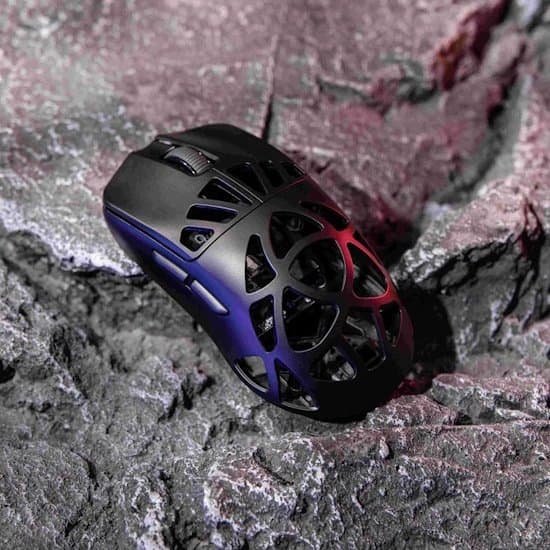
If the Carbonis was EPOMAKER showing off everything they could cram into a mouse, and the NEX Pro was their attempt at a comfortable, everyday companion, the EPOMAKER Carbon X Wireless Gaming Mouse feels like the opposite approach entirely. It’s as if they sat down and asked themselves what could be removed rather than added. The result is a mouse that feels almost startlingly lean. A real carbon fibre shell, a razor‑thin 50‑gram weight, Omron optical switches, and the flagship PAW3950 sensor, nothing more, nothing less.
There’s a kind of purity to it. I think that’s why the EPOMAKER Carbon X Wireless Gaming Mouse stands out so quickly. It doesn’t try to charm you with extras or clever tricks. It just moves. And it moves in a way that makes you notice how much unnecessary weight you’ve been dragging around with other mice.
So the question becomes: is this the mouse that finally cements EPOMAKER’s reputation among competitive FPS players and the people who obsess over performance metrics late at night? Maybe. It certainly feels like the one that could.
Let’s dive in.
Design & Hand Feel: Stealthy 50g Carbon Fibre Strength
The first moment you lift the EPOMAKER Carbon X Wireless Gaming Mouse out of its box is almost disorienting. There’s this split second where your brain expects a certain weight, something familiar, something in line with every other mouse you’ve handled, and instead you get… almost nothing. Around 50 grams isn’t just light; it’s the kind of light that makes you check whether the battery is actually inside. I caught myself doing that, which feels silly in hindsight, but the absence of weight really is that striking.
And then you squeeze it. Just a gentle press along the sides, the kind of instinctive test you do without thinking. Any worry about fragility disappears immediately. The shell doesn’t flex, doesn’t creak, doesn’t give you that hollow “please don’t break me” response some ultra‑light mice have. It’s surprisingly reassuring.
That’s the carbon fibre talking. EPOMAKER skipped the usual ABS plastic and the honeycomb cutouts that have become a shortcut for weight reduction. Those holes always end up collecting dust and, if you’re anything like me, the occasional snack crumb….mmmm…. Doritos. The EPOMAKER Carbon X Wireless Gaming Mouse avoids all of that. The carbon fibre shell feels dense in the right way, not heavy, just strong. There’s no echo when you tap it, no soft spots, nothing that hints at compromise.
Visually, it’s a very different personality compared to the Carbonis. That one had flair; purple, black, gold, a bit of attitude. The EPOMAKER Carbon X Wireless Gaming Mouse goes the opposite direction with its all‑black, woven carbon finish. It’s understated, almost quiet, but in a way that feels intentional. On the desk, it blends in rather than demands attention. I think that’s part of its charm. It looks like a tool built for work, or play, without needing to announce itself with RGB fireworks.
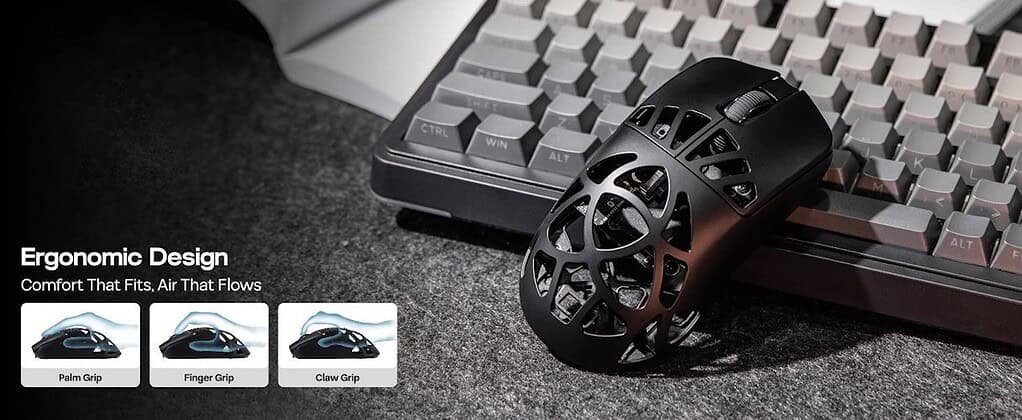
The shape follows that same philosophy. Medium-sized, clean lines, nothing exaggerated. It supports claw, fingertip, and even a relaxed palm grip without nudging you toward one in particular. I found myself switching grips depending on what I was doing, and the mouse never fought me for it. The contours guide your hand just enough to feel natural, but not so much that you’re locked into a specific posture. There’s a kind of neutrality to it, a shape that doesn’t try to be clever, just comfortable.
It’s the sort of design that doesn’t need a long adjustment period. You pick it up, you move it around, you look at the holes, and within a few minutes your hand forgets it’s new. That’s usually a good sign.
Performance: Flagship PAW3950 Meets Optical Precision
Specs at a Glance
| Feature | EPOMAKER Carbon X Specifications |
| Sensor | PixArt PAW3950 |
| Weight | ~50g Ultra-lightweight |
| Shell Material | Genuine Carbon Fibre |
| Max DPI | Up to 30,000 DPI (7 adjustable stages) |
| Polling Rate | 1000Hz default, up to 8,000Hz (8kHz) via 2.4G / Wired |
| Max Tracking Speed | 750 IPS |
| Max Acceleration | 50G |
| Switches | Omron Optical (Left & Right) |
| Lift-Off Distance (LOD) | 0.7mm / 1.0mm / 2.0mm adjustable |
| Latency | 0.35ms (Wired) / 0.4ms (2.4GHz Wireless) |
| Battery Capacity | 300mAh |
| Connectivity | Tri-Mode (2.4GHz Wireless, Bluetooth, USB-C) |
| Software | Browser-Based Web App (Chrome Engine) |
In real-world use, the PAW3950 behaves exactly the way you hope a flagship sensor will. Micro-adjustments feel almost effortless; the kind of tiny nudges you make when lining up a keyframe or selecting a single pixel in a dense interface. And when you swing the mouse hard, those fast 180-degree turns in shooters, the cursor stays locked to your hand in a way that feels strangely calming. There’s no stutter, no smoothing, no jitter. Just movement that mirrors your intention.
The Omron optical switches play into that same sense of immediacy. I think the biggest difference is how clean the clicks feel. Mechanical switches always develop quirks over time, a bit of double-clicking here, a mushy press there. Optical actuation sidesteps all of that. The latency numbers are almost absurd on paper (0.35ms wired), but what you actually notice is the consistency. Every click feels identical to the last, crisp and sharp without any wobble or pre-travel.
And then there’s the 8,000Hz polling rate. It’s one of those features that’s hard to describe without sounding dramatic, but the shift from 1,000Hz to 8,000Hz genuinely changes how motion feels. Not in a “your aim is suddenly perfect” way; more in a “why does my old mouse feel sluggish now?” way. On high-refresh monitors, the cursor glides with this strange smoothness that’s hard to unsee once you’ve experienced it. I caught myself flicking the mouse around just to watch the motion, which is probably not productive, but it does tell you something.
The EPOMAKER Carbon X Wireless Gaming Mouse doesn’t just perform well on paper. It performs in a way that feels deliberate, like EPOMAKER wanted every movement and every click to feel immediate and unfiltered. It’s fast, but more importantly, it’s consistent, and that’s usually what separates a good sensor from a great one.
Connectivity, Battery & Web-Based Customisation
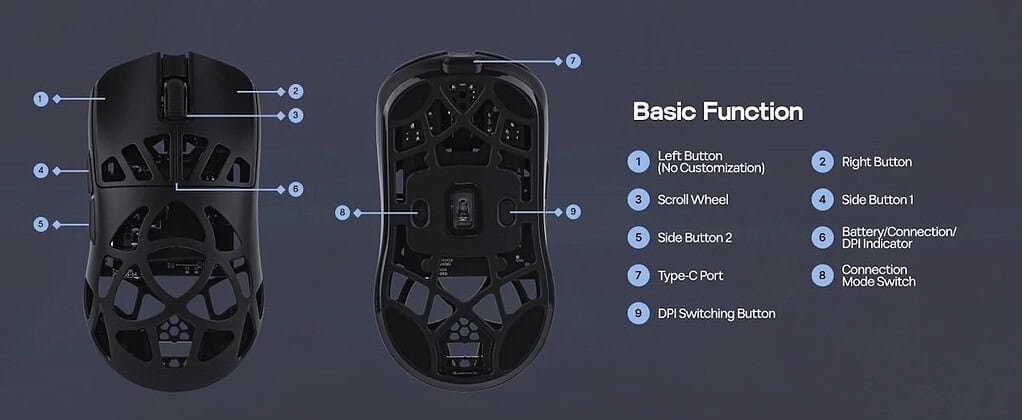
The connectivity options on the EPOMAKER Carbon X Wireless Gaming Mouse feel a bit like EPOMAKER trying to cover every possible scenario without overcomplicating anything. Tri‑mode support isn’t new in the peripheral world, but the way it’s implemented here feels unusually seamless. You get the low‑latency 2.4GHz wireless mode for gaming, the one most people will live in, and then Bluetooth 3.0/5.0 for quick pairing with laptops or tablets. I’ve used Bluetooth more than I expected, mostly when shifting between devices during the day, and it never felt like a compromise. Wired USB‑C rounds things out, doubling as your charging method and a fallback mode if you’re running hyper‑polling and forget to top up.
The battery situation is interesting. EPOMAKER clearly made the decision to prioritise weight above all else, and keeping the mouse at 50 grams meant settling on a 300mAh cell. It’s not huge, but it’s enough. If you run the EPOMAKER Carbon X Wireless Gaming Mouse at 8,000Hz all the time, you’ll be plugging in every couple of days, maybe sooner if you’re gaming heavily. Dropping down to 1,000Hz or even 500Hz during work hours stretches things out quite a bit. I’ve found myself doing exactly that, mostly because I don’t need hyper‑polling while writing or editing. Charging is quick, under an hour to full, and the braided cable is light enough that playing wired doesn’t feel like punishment.
I’ve fallen into a habit of charging during slower daytime tasks, almost like topping up a phone before heading out. It’s a small routine, but it keeps the mouse ready for the evening sessions where I actually want that 8kHz responsiveness.
No-Bloatware Web Driver
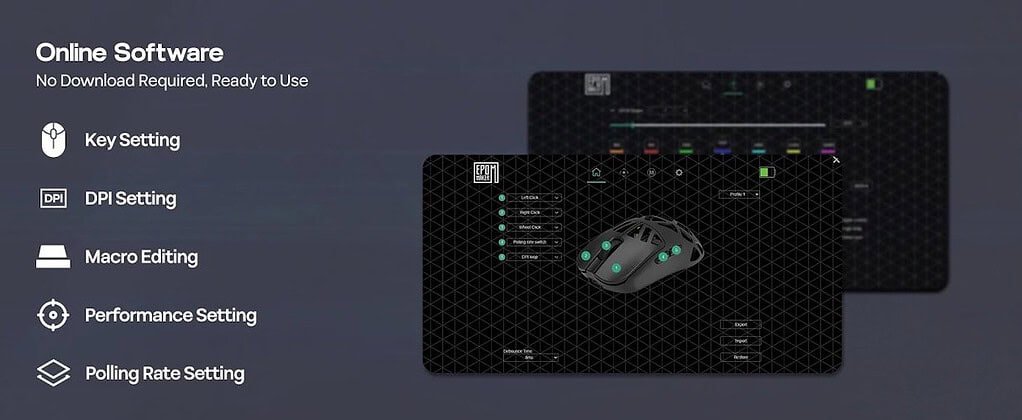
EPOMAKER’s move toward a browser‑based configuration tool feels like one of those quiet quality‑of‑life upgrades you don’t fully appreciate until you go back to a mouse that still relies on a heavy desktop app. There’s no installer, no background service lurking in your task manager, no surprise pop‑ups asking for updates. You just plug in the EPOMAKER Carbon X Wireless Gaming Mouse, open the link, and everything is ready to tweak.
The interface loads quickly, almost instantly, really, and it’s laid out in a way that doesn’t make you hunt for basic settings. It reminds me a little of older hardware utilities before they became bloated with animations and account logins. This one feels stripped back, almost intentionally simple, but not in a way that limits you. More like EPOMAKER wanted the software to disappear so the mouse could take centre stage.
You still get full control over the essentials:
- Rebinding programmable buttons and setting custom macros.
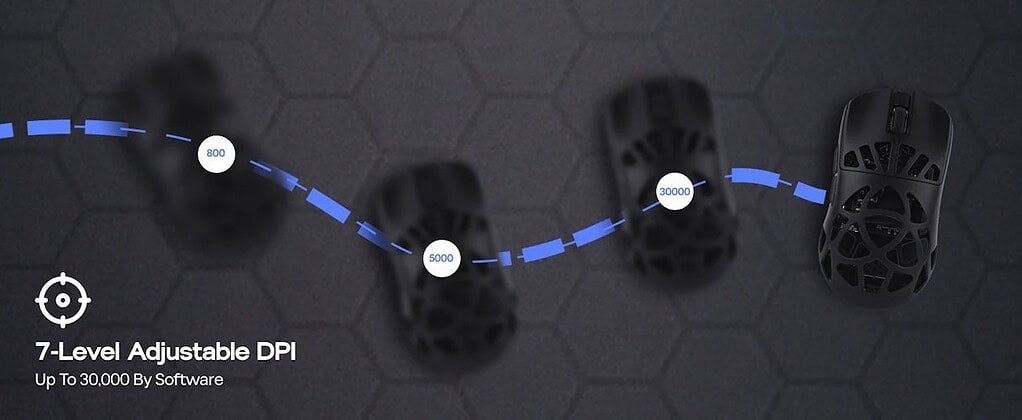
- Adjusting the 7 calibrated DPI stages (from 400 all the way to 30,000).
- Tuning Lift-Off Distance (LOD) between 0.7mm, 1mm, and 2mm.
- Changing polling rates (125Hz up to 8000Hz).
Everything applies instantly, and once you close the tab, the mouse just remembers your settings without leaving anything behind on your system. I think that’s what I like most, the sense that the software is there when you need it, and completely gone when you don’t.
Real-World Experience: Productivity & Gaming
Using the EPOMAKER Carbon X Wireless Gaming Mouse throughout a normal workday feels a little like discovering a shortcut you didn’t know you needed. The 50‑gram frame doesn’t just make the mouse feel light; it changes how your wrist behaves over long stretches of time. I noticed it most on days when I bounced between spreadsheets, photo edits, and a bit of writing. There’s less inertia to fight against, so movements stay small and controlled, and by late afternoon my wrist didn’t have that dull, tired heaviness I usually get from heavier office mice. It’s a subtle difference at first, but it adds up.
Once you shift into gaming, the personality of the mouse changes. Fast‑paced shooters feel sharper, almost more reactive, because the Carbon X doesn’t make you work to start or stop a movement. The low‑friction glide and featherweight chassis combine with those crisp Omron optical switches to create this sense of immediate control. Micro‑adjustments, the tiny corrections you make when lining up a shot, happen without that moment of hesitation you sometimes get with bulkier mice. I wouldn’t call it an advantage outright, but it does feel like the mouse gets out of your way.
For everyday desktop work, the ability to drop DPI on the fly becomes surprisingly useful. Lower sensitivities make pixel‑perfect selections in design software feel calmer and more deliberate, while bumping the DPI back up makes navigating across multiple monitors feel natural again. I found myself switching more often than I expected, almost like adjusting the volume depending on the task.
The Carbon X settles into your routine quietly, but once it does, it’s hard to go back to something heavier.
The Verdict
The EPOMAKER Carbon X Wireless Gaming Mouse feels like the point where EPOMAKER finally decided to stop experimenting and start refining. It’s easily their most focused design so far. You can almost trace the lineage: the Carbonis with its playful screen and heavier frame, the NEX Pro with its comfortable everyday feel, and then see how the Carbon X pulls only the strongest ideas forward. The carbon fibre shell, the weight reduction, the optical switches, the PAW3950 sensor… It’s as if EPOMAKER stripped away anything that didn’t directly contribute to performance and left the essentials to speak for themselves.
The price makes the whole thing even more interesting. At $67.99 USD ($99.99 AUD at time of print), the Carbon X sits in that rare space where the materials and internals feel premium, but the cost doesn’t try to compete with the big brands’ marketing budgets. Genuine carbon fibre, 8K polling, optical switches- these aren’t features you usually see at this tier. It’s hard not to glance at other mice in the same bracket and wonder why they cost more while offering less.
If you’re after a sleek, ultra‑lightweight wireless mouse that prioritises raw speed, structural rigidity, and a setup process that doesn’t involve installing yet another desktop app, the EPOMAKER Carbon X Wireless Gaming Mouse fits that niche almost perfectly. It’s the kind of peripheral that settles onto your desk quietly and then becomes something you rely on without thinking too much about it.
Pros
- Genuine carbon fibre shell delivers rock-solid rigidity at just 50g.
- Flagship PixArt PAW3950 sensor with up to 8,000Hz polling rate.
- Crisp, reliable Omron optical switches with ultra-low click latency.
- Tri-mode wireless flexibility (2.4GHz, Bluetooth, USB-C).
- Clean, web-browser-based driver software with no desktop bloatware.
Cons
- 300mAh battery requires regular charging when locked into 8K polling mode.
- Stealth black carbon finish lacks RGB if you prefer bright lighting setups.



Recent Comments