
In the world of gaming mice, everything starts to blur together after a while. Same shapes, same promises, same “ultra‑lightweight precision” marketing lines. So when the Epomaker CLICK Wireless Gaming Mouse landed on my desk, I wasn’t expecting much beyond another safe, middle‑of‑the‑road option. But first impressions were… different. In a good way.
The Epomaker CLICK has this clean, almost understated look that doesn’t scream “gamer,” which I actually appreciated. I pulled it out of the box and immediately noticed the weight… or lack of it. It’s light without feeling hollow, the kind of light where you give it a little shake just to check if something’s missing inside. Nothing was. It’s just built that way.
Pairing it was instant. No drama, no “why isn’t this connecting” moment. I clicked it on, my laptop recognised it, and that was that. I took it for a quick spin in a browser window first, just flicking between tabs, scrolling, doing the usual warm‑up dance, and it felt snappy. Almost too snappy until I settled into it. There’s a certain eagerness to the sensor, like it’s ready to sprint before you’ve even decided where you’re going.
And I’ll be honest, I didn’t expect to enjoy using it as much as I did. I’m picky with mice. I’ve used enough of them to know when something feels off within the first minute. But the Epomaker CLICK had this immediate “yeah, okay, I could use this for a while” vibe. Promising in a way that made me want to jump into a game with it and my new Epomaker HE30 just to see what it could really do.
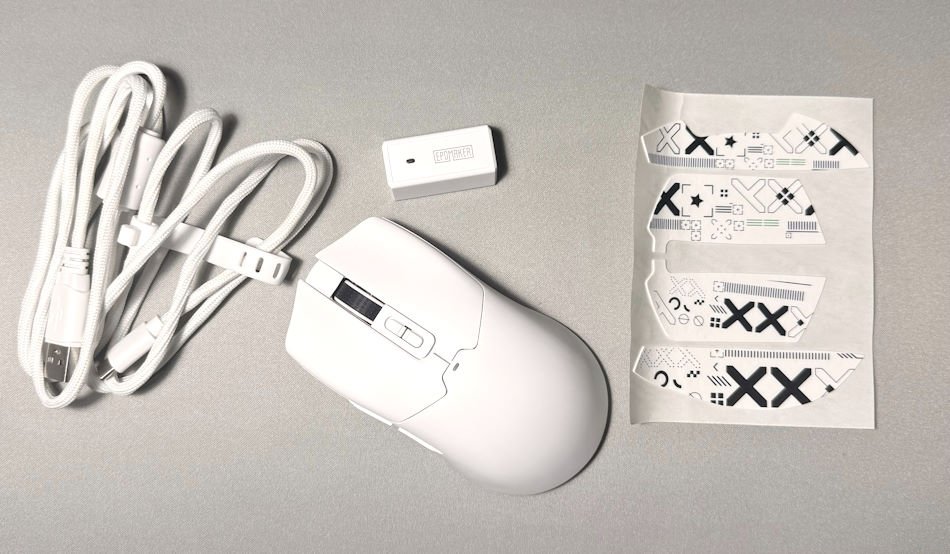
Epomaker CLICK at a glance
- Sensor: PixArt PAW3950 (Flagship Optical)
- Max DPI: 42,000
- Polling Rate: 8,000Hz (Wired/2.4G)
- Weight: 58g
- Switches: Omron D2LS (Rated for 20M clicks)
- Battery: 500mAh (Approx. 5-6 days at high polling)
- Connectivity: Tri-mode (2.4GHz, Bluetooth 5.0, USB-C)
Build & Sensor Performance
The Epomaker CLICK feels like one of those mice that quietly overdelivers. At just 58g, it’s incredibly lightweight. It’s the good kind of light, the kind where you pick it up and immediately notice how easy it is to move without ever feeling cheap or hollow. Epomaker clearly put effort into making the Epomaker CLICK feel sturdy despite its featherweight frame.
The coating deserves a mention too. Epomaker went with a grease‑resistant finish that feels smooth but not slippery, and it stays grippy even when your hands get a bit warm during longer sessions. I’ve used a few lightweight mice that start to feel glossy and gross after an hour; the Epomaker CLICK isn’t one of them.
Inside, the CLICK is running the PAW3950 sensor, which is basically the current top‑tier option for gaming mice. You get 750 IPS tracking and 50G acceleration, which translates to fast, clean, predictable movement. No jitter, no weird angle snapping, no “why did my cursor just teleport” moments. It just tracks exactly how you expect it to, even when you’re flicking across the mousepad like you’re trying to swat a fly.
One of the biggest surprises is the included 8K dongle. Most brands treat high‑polling receivers like a luxury add‑on, but Epomaker just throws it in the box. Plug it in, switch the Epomaker CLICK into high‑speed mode or “Usain Bolt” mode (as I called it), and the mouse instantly feels more responsive. It’s subtle, but once you get used to that extra smoothness, going back to a standard 1K mouse feels a bit sluggish.
For a mouse this light, this affordable, and this cleanly built, the Epomaker CLICK punches well above its weight; literally and figuratively
Button Layout & Ergonomics
The Epomaker CLICK manages something most lightweight mice don’t even attempt: a full 7‑button layout while staying at just 58g. That alone makes it a bit of a unicorn, light enough for twitch‑aiming, but with enough physical controls to handle macros, MMO abilities, or productivity shortcuts without feeling stripped back.
The primary clickers (M1 and M2) use Omron D2LS mechanical switches, which are known for their light, crisp feel and extreme spammability. In‑game, that translates to rapid semi‑auto fire or fast MOBA inputs without finger fatigue. Outside of gaming, the tactile snap makes dragging files or selecting text feel clean and deliberate. I felt it was so much easier on my wrist, too. As you get older, kids, things hurt more, and I would finish my day at 5 pm, feel like it normally did at lunchtime.
Behind the scroll wheel, the Epomaker CLICK includes dedicated DPI Up and DPI Down buttons. A rare luxury on a mouse this light, actually, I can’t remember it in any mouse I’ve used before. Instead of cycling through every preset, you can jump directly to the sensitivity you want. A small LED on top shifts colour as you change DPI: red for 800, green for 1600, blue for 2400, yellow for 3200, cyan for 5000, and purple for going plaid (Spaceballs Reference about ludicrous speed)…. or 42,000 DPI for those playing at home. It’s overkill, but fun overkill. This setup is brilliant for productivity too: drop DPI for pixel‑perfect edits, then bump it up instantly when you need to whip across multiple monitors.
The scroll wheel itself has a rubberised, textured finish with a medium‑tension click. The notches are well‑defined, which helps prevent overshooting when weapon‑switching in shooters or scrolling through long Excel documents. On the left side, the M4 and M5 buttons feature a textured ridge that makes them easy to identify by feel alone, perfect for melee binds, abilities, or quick browser navigation. I actually set one of them to “M”, as when paired with my Epomaker HE30, I couldn’t get to the map. So this was a great little workaround.
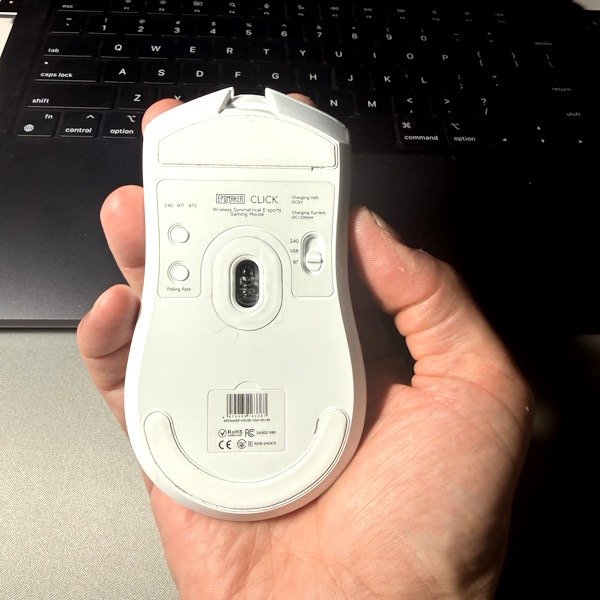
Flip the Epomaker CLICK over, and you’ll find a physical mode switch that lets you jump between 2.4GHz wireless, Bluetooth, and wired modes. It’s ideal if you want to keep the mouse paired to your gaming PC via 2.4G while also staying connected to a laptop or tablet over Bluetooth. There’s also a dedicated button for cycling polling rates (up to 8,000Hz), which doubles as a Bluetooth channel switch when you’re in wireless mode. And as much as I love technology, there is nothing like having a physical switch. As there is not second guessing, no clicking through software. It is just done, I love that.
The glide feet are surprisingly good, offering a smooth balance between speed and control, and Epomaker even includes a spare set in the box. You also get two sets of stickers for personalising the mouse. I haven’t committed to decorating mine yet, but the option is there if I ever feel bold. All of this makes the Epomaker CLICK a genuinely versatile mouse. With its 8K polling, PAW3950 sensor, and tri‑mode connectivity, it’s built for high‑stakes gaming but just as capable for productivity, letting you switch between devices and tasks with almost no friction.
Personal Thoughts
Switching from a trackpad and a basic office mouse to the Epomaker CLICK has been a mix of genuine workflow improvements and the occasional battle with muscle memory. It’s one of those transitions where you immediately notice the gains, but your hands still need time to unlearn old habits.
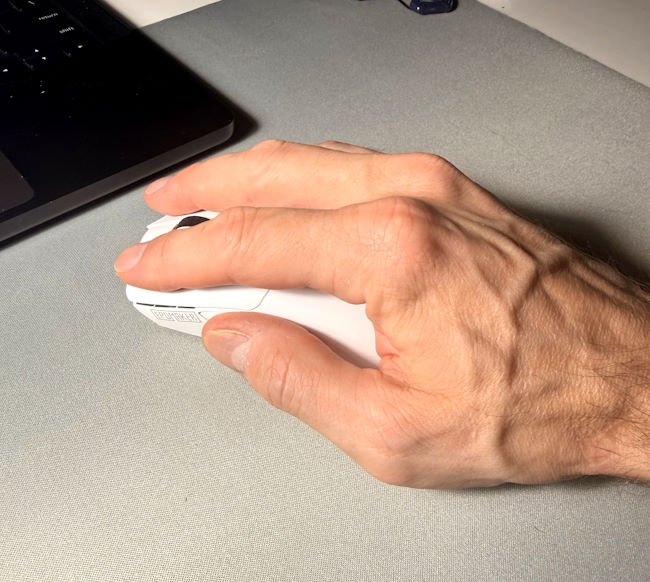
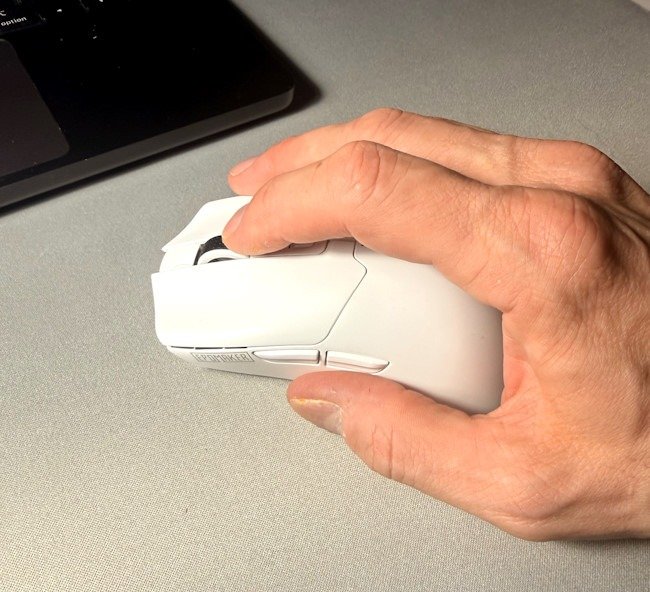
The first thing that stood out was fit. Any mouse lives or dies by how it feels in your hand, and the Epomaker CLICK feels fantastic in mine. I’ve got slightly larger‑than‑average hands, and it slots neatly into a palm grip, sitting comfortably against my hand without forcing awkward angles. The buttons are all within easy reach, including the two thumb buttons, which I found myself using more than I expected.
For gaming, I naturally switched to a fingertip grip for faster movement, and the Epomaker CLICK handled it well, or most too well. Like the mouse was ready for anything. At 58g, it’s almost too light for my taste. I’m used to heavier mice, but that featherweight design worked wonders in fast‑paced titles. In Cyberpunk 2077, I could whip around quickly and land shots with ease. In World of Warcraft, the sensitivity sometimes made me over‑rotate, but dropping the DPI a notch solved the issue.
On the productivity side, the Epomaker CLICK really shone. I tested it in Logic Pro, and the ability to pinpoint exactly where I wanted to split or edit a track was invaluable. At lower DPI settings, the precision was outstanding, making detailed work feel effortless. The fact that I could adjust DPI on the fly, up when just doing normal stuff and down instantly, to hyper focus on small details, was a genuine game‑changer.
The glide feet also impressed me. They performed smoothly on my desk pad and even worked well on a bare desk surface… ok, I mean, coffee table. Just don’t tell my wife, I shouldn’t be using computers on the coffee table. Though I suspect any hard surface would wear them down faster, I have a spare, so thanks, Epomaker. The rounded edges contribute to that fluid movement, making the mouse feel like it’s skating rather than dragging.
Maybe I just haven’t had a decent mouse in a while, but the Epomaker CLICK truly clicked for me. It’s stayed on my desk since I started testing it, and I don’t see that changing anytime soon. I’m even considering swapping out my Ugreen work mouse on my Surface Pro; the CLICK’s lighter, faster feel makes navigating oversized Excel spreadsheets far less of a chore.
In short, the Epomaker CLICK has managed to bridge both sides of my daily routine: gaming and productivity. It’s not perfect, but it’s versatile, responsive, and fun to use. And for me, that’s enough to keep it in rotation for the foreseeable future.
Final Verdict
The Epomaker CLICK doesn’t try to reinvent the wheel, but it does refine it in ways that matter. At 58g, it’s featherlight yet surprisingly sturdy, with a sensor and polling performance that punch far above its price point. The PAW3950 delivers flawless tracking, the 8K dongle adds that extra layer of responsiveness, and the seven‑button layout makes it versatile enough for both gaming and productivity.
What impressed me most wasn’t just the specs, though; it was how the Epomaker CLICK fit into my daily routine. In Cyberpunk 2077, it gave me the speed to whip around and land shots. In World of Warcraft, it handled macros and quick binds without fuss. And outside of gaming, it made navigating Logic Pro and oversized Excel sheets feel smoother and more precise than any office mouse I’ve used in years. The ability to adjust DPI on the fly turned out to be a genuine game‑changer, letting me shift from pixel‑perfect edits to multi‑monitor navigation with a couple of clicks.
It’s not flawless. The ultra-lightweight won’t suit everyone, and the glide feet will eventually wear down if you’re rough on surfaces. But Epomaker thought ahead with spares in the box, and that kind of detail sums up the CLICK well: practical, responsive, and built with real use in mind.
The Epomaker CLICK truly clicked for me. It’s stayed on my desk since testing, and I don’t see it leaving anytime soon. For a mouse that balances gaming speed with everyday usability, the Epomaker CLICK earns its spot, not by shouting innovation, but by quietly delivering where it counts.



2 Comments
[…] that tries to balance speed with space: the Epomaker HE30 One‑Handed Hall Effect Keyboard and the Epomaker CLICK Wireless Gaming Mouse. This review will focus on the Epomaker HE30 for now, though the mouse deserves its own spotlight […]
[…] few months, we’ve put two of their contrasting pointers to the test: the ultra‑lightweight, 58g EPOMAKER Click and the chunkier, premium EPOMAKER […]
Comments are closed.