
There’s something oddly satisfying about opening a premium laptop and immediately thinking, “Yep, this is where some of my money went.” The Dell XPS 16 is one of those devices… even if my money didn’t go anywhere.
After spending time with the Dell XPS 16, I found myself in a slightly awkward position. I wanted to nitpick it because that’s part of the job, but every time I sat down to write reviews, I mostly ended up admiring the screen, tapping away at the keyboard, or finding excuses to watch another YouTube video in OLED glory. It’s a tough life, I know.
The Dell XPS 16 sits at the top of Dell’s premium laptop lineup, combining premium materials, powerful Intel Core Ultra processors, and one of the nicest displays you’ll find on a Windows laptop today. It targets creators, professionals, and anyone who wants a machine that feels just as impressive as it looks.
Thankfully, it delivers.
Having recently reviewed the Dell XPS 14, I already had a pretty good idea of Dell’s vision for the modern XPS lineup. The smaller model impressed me with its design, build quality, and premium feel, but the Dell XPS 16 feels like Dell has taken that same formula and given it room to stretch its legs. Imagine your favourite burger and adding another patty and bacon. The larger display, bigger chassis, and extra workspace make an immediate difference, particularly if your day involves juggling multiple applications, endless browser tabs, and enough open windows to make your taskbar question your life choices.
What surprised me most wasn’t any single specification or benchmark result. It was how quickly the Dell XPS 16 settled into my daily routine. Instead of feeling like a review unit that would eventually be packed back into its box, it felt like a laptop I could happily use every day. And if I’m honest, I did. Wrote several and edited the last 10 reviews with it. That’s not something I find myself saying very often, especially after reviewing as many laptops as I have over the years.
Dell, you may not be getting this one back!
Design: Premium To The Point Of Showing Off
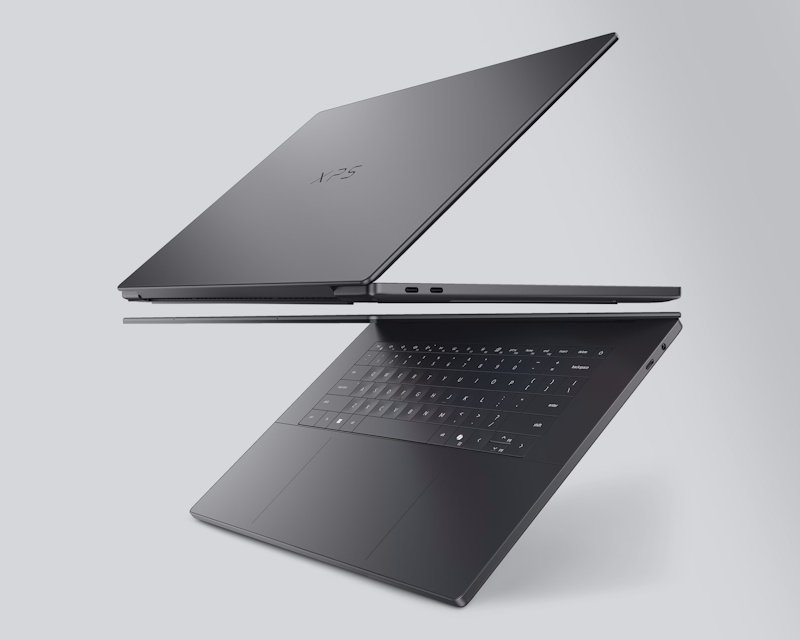
Dell has always understood industrial design, and the Dell XPS 16 continues that tradition.
The aluminium construction feels dense, solid, and reassuringly expensive. Every surface feels thoughtfully crafted, from the smooth lid to the minimalist interior. Pick it up and you immediately get that flagship feeling. There’s no creaking, no flex, and certainly none of that hollow sensation some laptops still have despite carrying premium price tags.
Despite housing a large 16-inch display, the Dell XPS 16 remains surprisingly portable. At around 1.65kg (3.6 in freedom units), it’s not what I’d call ultra-light, but it’s also far from the bulky workstation-style laptops that once dominated the premium productivity space. Carrying it between meetings, coffee shops, or the occasional “I’m definitely working” trip to the couch never felt like a burden.
The design language remains distinctly XPS. Clean lines. Sharp edges. Minimal distractions. Dell’s obsession with simplicity is on full display here, and somehow it manages to feel modern without becoming cold or sterile. The edge-to-edge keyboard and seamless glass touchpad help create an almost futuristic look. For the first few minutes, it can feel a little unusual, particularly if you’re coming from a more traditional laptop design. Then your eyes adjust, and suddenly everything else starts looking cluttered.
The slim profile is particularly impressive when you consider what’s hiding under the hood. A large 16-inch display, Intel Core Ultra processors, up to 64GB of memory depending on configuration, and a sizeable battery all fit inside a chassis that remains remarkably sleek. Dell has done a commendable job making the Dell XPS 16 feel substantial without making it feel oversized or bulky.
Sitting it beside many gaming laptops feels a bit like parking an Aston Martin next to a heavily modified off-road vehicle covered in LEDs. One attracts attention by shouting. The Dell XPS 16 just quietly looks expensive.
That’s perhaps what I appreciate most about the Dell XPS 16. It doesn’t rely on aggressive styling, oversized logos, or enough RGB lighting to guide aircraft onto a runway. It simply sits there looking effortlessly premium, fully aware that it doesn’t need gimmicks to make an impression.
And honestly, I’ve never understood those car guys and gals, who wash and polish their car weekly. But after a few weeks of use, I found myself wiping fingerprints off the lid far more often than necessary. Not because they were particularly noticeable, but because the laptop looked so good that I wanted it to stay that way.
I finally understand why these guys and gals do the same with their car!
The OLED Display Is Absolutely Gorgeous

Let’s get this out of the way early. The display is fantastic.
My review unit featured Dell’s beautiful 16-inch 3.2K OLED panel, complete with a silky-smooth 120Hz refresh rate. Colours look rich and vibrant without venturing into cartoon territory, while blacks are so deep that loading screens practically disappear into the bezel. It’s the sort of display that immediately makes everything else on your desk look slightly disappointing.
Watching movies became dangerously addictive. I’d often sit down intending to test colour accuracy, brightness, or HDR performance, only to realise I’d watched three episodes of a series and collected precisely zero useful benchmark data. For science, apparently.
The larger 16-inch canvas makes a genuine difference too. Whether I was editing photos, writing reviews, sorting through hundreds of screenshots, or simply moving windows around during a busy workday, the extra space was always welcome. It never felt cramped, and that’s something I appreciate more and more the longer I spend working from laptops.
The 16:10 aspect ratio deserves praise as well. That extra vertical space might not sound exciting on paper, but it makes a noticeable difference when you’re scrolling through documents, editing spreadsheets, or researching an article with more tabs open than you’d ever admit publicly. And let’s be honest, nobody only has five tabs open anymore… I may or may not be at 19 while writing this.
What impressed me most was how versatile the display felt. One minute I’d be reviewing product photos, the next I’d be replying to emails, followed by an entirely necessary thirty-minute detour on YouTube… What? The new Squidmar video came out; I needed to watch it. The Dell XPS 16 handled all of it beautifully. Text looks incredibly sharp, colours remain consistent, and the high refresh rate makes everything from scrolling web pages to moving windows around the desktop feel wonderfully fluid.
It’s one of those screens that quietly spoils you.
After a few weeks with the Dell XPS 16, I found myself noticing displays on other laptops and my other monitors more often, and not always in a good way. Once you get used to this level of contrast and clarity, going back to an average panel feels a bit like switching from a luxury hotel bed to the couch. Technically, both get the job done, but one is clearly having a better time.
Quite simply, the display is one of the Dell XPS 16’s standout features, and arguably one of the best reasons to buy the laptop in the first place.
Performance That Handles Pretty Much Everything
Performance is exactly what you’d expect from a premium productivity-focused powerhouse.
The Dell XPS 16 is available with Intel Core Ultra processors, generous memory configurations, and fast SSD storage, and it shows in everyday use. Applications launch quickly, multitasking feels effortless, and even heavier creative workloads like video or photo editing rarely seem to slow things down. Whether I was bouncing between Photoshop, dozens of Chrome tabs, Teams calls, Spotify, and a growing collection of review notes, the Dell XPS 16 never really skipped a beat.
That’s increasingly important because modern workloads are messy.
Nobody sits down and does one thing anymore. At least I don’t. One minute I’m editing photos, the next I’m benchmarking hardware, replying to emails, researching products, and somehow ending up with seventeen browser tabs dedicated to a topic I only needed five minutes ago. The Dell XPS 16 takes all of that in stride.
Photo editing, content creation, video conferencing, web browsing, and office work all happen without hesitation. Everything feels responsive, and more importantly, it stays responsive. There wasn’t that gradual slowdown that sometimes creeps in after you’ve been working for several hours and opened far too many applications. Perhaps the biggest compliment I can give the Dell XPS 16 is that it never feels stressed.
Some laptops constantly remind you they’re working hard. Fans spin up dramatically. Temperatures climb. The chassis begins radiating enough heat to grill a small sandwich. You find yourself wondering if you should save your work just in case the laptop decides it’s had enough for the day. The Dell XPS 16 mostly keeps its composure.
That’s not to say it’s completely silent under heavy workloads. Physics still exists, unfortunately. Push the system hard enough with video exports, rendering tasks, or other demanding applications, and you’ll hear the cooling system get to work. The difference is that it never feels out of control. Dell has done a commendable job balancing performance, thermals, and acoustics, resulting in a machine that feels refined rather than overly aggressive.
What I appreciated most was how invisible the performance became. That might sound like a strange compliment, but it’s true. Great laptops tend to disappear into the background. You’re not thinking about loading times. You’re not waiting for applications to open. You’re not planning your workflow around what the machine can handle. You simply get on with what you’re doing, and the Dell XPS 16 keeps up.
Gaming is certainly possible too, depending on the configuration. While this isn’t marketed as a gaming-first machine, lighter titles and esports games run comfortably enough, especially with the smooth 120Hz display helping everything feel fluid. More demanding modern releases will require some compromises to settings, but that’s hardly surprising given the Dell XPS 16’s focus on productivity, creativity, and professional workloads rather than chasing frame-rate records.
Could you buy a dedicated gaming laptop for less and get better gaming performance? Probably. Would that gaming laptop also look this good in a boardroom, coffee shop, client meeting, or on your desk? Probably not.
The Dell XPS 16 knows exactly what it wants to be, and performance is one of the areas where that confidence really shows. It’s fast when you need it to be, quiet when you don’t, and consistently reliable throughout the kind of real-world workloads most people actually throw at their laptop every day.
Keyboard And Touchpad
Laptop keyboards are deeply personal. Ask ten reviewers what they think about a keyboard, and you’ll probably receive twelve different answers, followed by a lengthy debate about key travel, actuation force, and why somebody’s favourite keyboard from 2017 was apparently the pinnacle of human achievement.
Personally, I found the keyboard on the Dell XPS 16 extremely comfortable during extended writing sessions, and did I give this keyboard a workout. Key travel isn’t especially deep, and some users may prefer a little more movement beneath their fingertips, but the keys feel responsive, accurate, and consistent. More importantly, they never got in the way of what I was doing.
After several days of writing articles, responding to emails, editing reviews, and generally hammering away at the keyboard for hours at a time, I stopped thinking about it altogether. That’s usually the sign of a good keyboard.
The best keyboards don’t constantly remind you they’re there. They simply become part of the workflow, allowing your fingers to keep pace with your thoughts without demanding attention. The Dell XPS 16 managed that surprisingly well.
The touchpad deserves equal praise. Dell’s seamless glass touchpad remains one of the more distinctive design choices in the XPS lineup, and it certainly takes a little getting used to. Because the boundaries aren’t immediately visible, your first instinct is often to glance down and double-check where you’re clicking. That adjustment period doesn’t last long, and for me it was like riding a bike, thanks to the Dell XPS 14.
Within a day or two, everything starts to feel completely natural. Gestures are smooth, tracking is precise, and the haptic feedback does an excellent job of mimicking the sensation of a traditional click despite the clean, uninterrupted surface. In day-to-day use, whether I was navigating between applications, editing images, scrolling through endless documents, or trying to locate the browser tab responsible for playing mystery audio somewhere in the background, the touchpad consistently felt quick and reliable.
Going back to a traditional touchpad afterwards actually felt slightly strange. Technology is weird like that. Something that initially feels futuristic quickly becomes normal, and before long you’re wondering why every laptop doesn’t work the same way. I wasn’t entirely convinced by the concept when I first saw it, but after spending a few weeks with the Dell XPS 14 and now the Dell XPS 16, I found myself appreciating just how clean and modern the whole setup feels.
It’s one of those features that’s easy to dismiss on a spec sheet but makes a lot more sense once you actually live with it.
Ports & Connectivity
Dell has fully embraced the USB-C future with the Dell XPS 16. Whether that’s exciting or mildly frustrating will probably depend on how many older accessories you still have lying around in a drawer somewhere.
Personally, I’ve reached the acceptance phase. I carry adapters. Most tech reviewers carry adapters. At this point, I suspect adapters are included in our DNA.
That said, the port selection here is undeniably premium. The three Thunderbolt 4 ports offer impressive flexibility, supporting high-speed data transfers, display output, charging, and docking solutions through a single connection. If you’re the sort of user with dual monitors, external storage, and enough peripherals to resemble a small command centre, the Dell XPS 16 won’t have any trouble keeping up.
An added bonus is Dell’s patented lock slot support across all Thunderbolt ports, allowing the laptop to be secured with a compatible Kensington lock. It’s not the flashiest feature, but your IT department will probably be more excited about it than the OLED display.
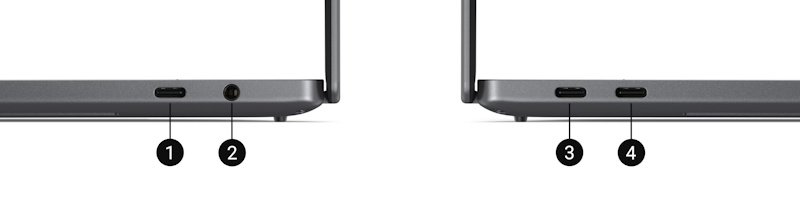
Right Side
- Thunderbolt™ 4 (USB Type-C™) with DisplayPort™ 2.1 and Power Delivery
- Universal Audio Jack
Left Side
- Thunderbolt™ 4 (USB Type-C™) with DisplayPort™ 2.1 and Power Delivery
- Thunderbolt™ 4 (USB Type-C™) with DisplayPort™ 2.1 and Power Delivery
Some users will inevitably wish for a full-sized USB-A port, HDMI output, or an SD card reader. That’s fair. Those omissions may mean carrying a dock or adapter depending on your workflow, as it seems to be becoming the norm. Still, there’s something refreshingly straightforward about the setup. Rather than trying to cram every possible connector into the chassis, Dell has focused on a smaller number of incredibly capable ports. In practice, I rarely found myself limited, and when I did, a dock solved the problem in seconds.
Of course, there was still that brief moment when I instinctively reached for a USB-A device before remembering it’s 2026 and the future has arrived whether I like it or not.
Audio And Webcam
Laptop speakers are often treated as little more than a box-ticking exercise. And you know my hatred for monitor and laptop speakers… That isn’t the case here.
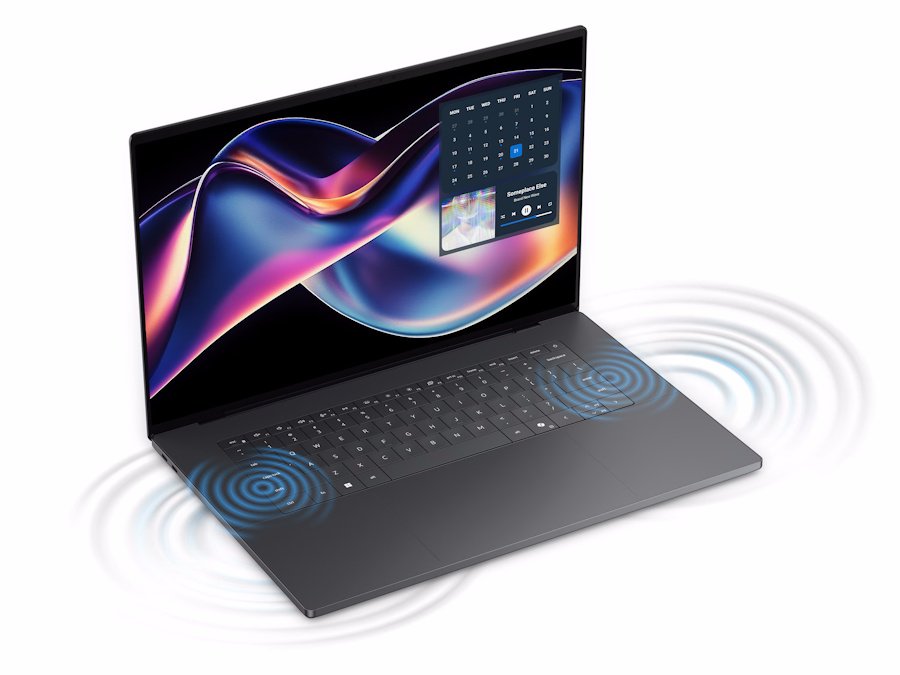
The Dell XPS 16 delivers impressive sound quality with plenty of volume and surprisingly good clarity. Music sounds rich, movies have real presence, and dialogue remains easy to follow. The quad-speaker setup does an excellent job of filling a room, creating an experience that feels bigger than you’d typically expect from a laptop this thin.
Will they replace a dedicated speaker setup? No. Did I regularly forget I was listening through laptop speakers? Actually, yes. And that is surprising.
There were more than a few occasions where I started watching a YouTube video or streaming a show and never bothered reaching for my headphones. For a laptop, that’s about as high a compliment from me. Bass is understandably limited by the laws of physics, Dam these physics, but everything else sounds remarkably full and well-balanced.
The webcam is equally strong, which is good news because video meetings aren’t going anywhere no matter how much some of us might wish otherwise. Video quality looks sharp, colours appear natural, and the image remains clean enough that I never felt the need to apologise for how I looked before joining a call. That’s not always a guarantee with laptop webcams.
Dell also includes an 8MP webcam with Windows Hello support, and it quickly became one of those features I stopped consciously noticing because it worked so reliably. Open the lid, look at the screen, and you’re in. Using facial recognition to log in still feels slightly futuristic. Typing passwords suddenly feels old-fashioned. It’s a small thing, but after a few weeks with the Dell XPS 16, going back to manually entering passwords or PINs felt unnecessarily primitive, like being asked to crank-start a car before driving to the shops.
Battery Life
Battery performance impressed me. Powerful Windows laptops often ask you to choose between performance and battery life, but the Dell XPS 16 manages a far more balanced approach than many of its competitors.
Equipped with a 70Wh battery, the Dell XPS 16 takes advantage of Intel’s latest Core Ultra platform to deliver battery life that feels genuinely dependable. During everyday productivity tasks such as web browsing, writing, streaming, photo editing, and general office work, I regularly saw around 8 to 10 hours of mixed use, depending on brightness levels and workload.
More importantly, battery anxiety never really entered the equation. I wasn’t constantly checking percentages, lowering brightness, or closing applications because I was worried about running out of power. The Dell XPS 16 felt capable of handling a full day’s work without demanding constant attention, which is exactly what you want from a premium productivity machine.
Of course, push the OLED display, render video projects, or spend a few hours gaming and you’ll drain the battery faster. That’s true of virtually every powerful laptop on the market. The good news is that the Dell XPS 16 strikes a sensible balance, delivering strong performance without behaving like it needs to live permanently attached to a wall socket.
It’s one of those features that’s easy to overlook until you use a laptop that gets it wrong. The reality is that nobody writes love letters to battery life. Nobody excitedly tells their friends about how a laptop survived a workday. What happens instead is that good battery life quietly removes one more thing to worry about. That’s exactly what the Dell XPS 16 does.
It simply gets on with the job, leaving you free to focus on your work, your entertainment, or whatever combination of productivity and procrastination happens to be filling your screen that day. The battery rarely became part of the conversation at all. It just worked.
Final Verdict
By the time I finished reviewing the Dell XPS 16, I realised something: I wasn’t really reviewing it anymore. I was just using it.
Over the course of testing, it became my daily driver for writing, editing, photo work, research, and the endless cycle of opening browser tabs faster than I could close them. The OLED display spoiled me, the performance never left me waiting around, and the keyboard proved itself during thousands upon thousands of words worth of reviews. That’s ultimately what makes the Dell XPS 16 such an easy recommendation.
It’s fast, beautifully built, packed with premium features, and manages to strike an excellent balance between productivity, portability, battery life, and everyday usability. More importantly, it feels like a laptop designed for people who spend all day in front of a screen. Not just for benchmark charts, spec sheets, or marketing slides.
There are certainly more powerful gaming laptops. There are cheaper laptops. There are even lighter laptops. There aren’t many that put the whole package together quite this well.
Looking back through my notes, I’m also noticing I made a surprising number of references to Aston Martins, physics, engines, crank-starting cars, and generally anything with wheels or mechanical parts. Normally that’s not my thing, but I recently found myself rewatching Monster Garage before writing this review, so I’m blaming Jesse James for that one.
At the end of the day, the Dell XPS 16 is one of those rare laptops that quietly gets out of your way and lets you focus on what you’re doing. Whether that’s creating content, managing workloads, binge-watching YouTube when you’re supposed to be benchmarking HDR performance, or all three at exactly the same time.
In a nutshell, the Dell XPS 16 is a premium laptop that looks fantastic, performs brilliantly, and somehow convinced me to care about polishing aluminium surfaces and discussing physics far more than any laptop review reasonably should.



Recent Comments