
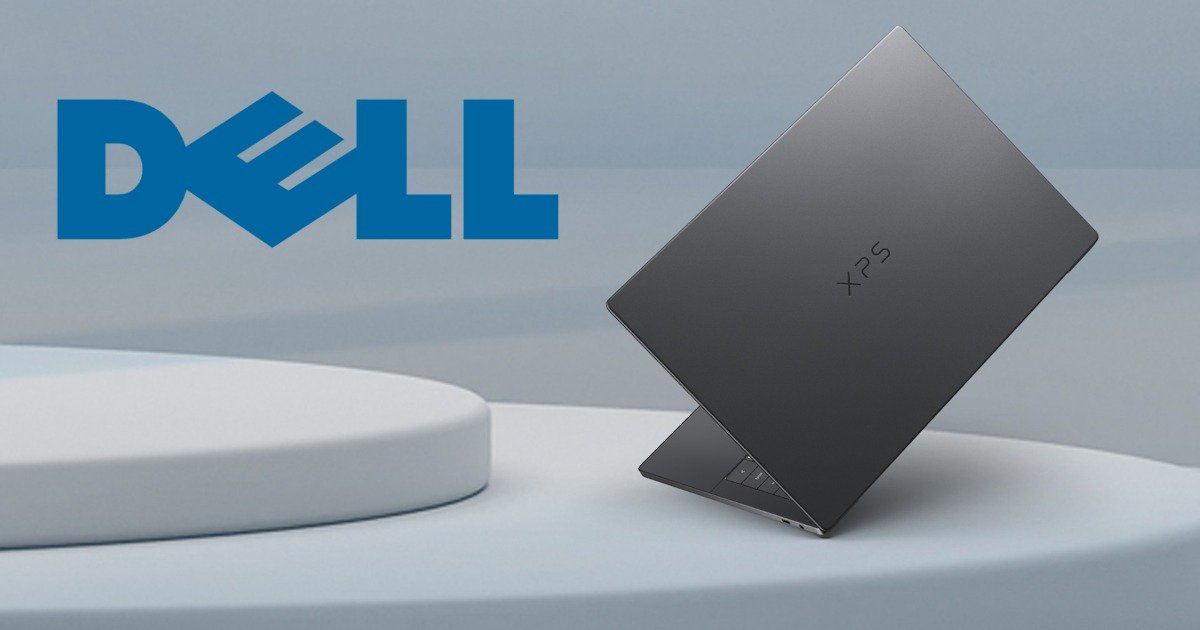
I actually sat with the Dell XPS 14 (DA14260) for a bit before writing this. Longer than usual. Not because I had to run more benchmarks or triple‑check a spec sheet, but because I was a little sad, as once it’s written, it’s going away. Which, if you’ve read my stuff on DezDoes.com before, you’ll know is usually a very good sign. Laptops that scream “LOOK AT ME” or have RGB aren’t my style. The ones that quietly settle in, make themselves useful, and then refuse to leave your desk? Those are more my style, and these tend to stick with you more.
I’ve always had a soft spot for the Dell XPS series. Dell’s been refining this look, this feel, this philosophy for years now, and the new Dell XPS 14 (DA14260) feels like the result of all that steady, slightly obsessive polish. It’s familiar in the best way. Comforting. And yet, somehow, it still feels fresh. It’s thin enough that the first time I picked it up, I did that little edge‑check with my fingers, just to make sure I wasn’t imagining things. Slim, but not fragile. Light, but without that hollow, “is there anything in here?” feeling. It has restraint. Confidence. The kind of laptop that doesn’t need to show off but has a quite confidence that only comes with legacy.
And yeah, it made me smile.
Dell XPS 14 at a Glance
- Processor: Series 3 Intel Core Ultra X7 358H (16 cores)
- Operating System: Windows 11 Home
- Graphics: Intel Arc Graphics
- Memory: 32 GB LPDDR5X
- Storage: 512 GB SSD
- Display: 14″ 2K (2560 × 1600), Non‑Touch, 16:10
- Battery: 69.5 Wh
- Ports: 3x Thunderbolt 4 (USB Type-C) with DisplayPort 2.1 and Power Delivery Kensington lock supported via USB Type-C ports and Universal audio jack
- Connectivity: Wi‑Fi 6E, Bluetooth 5.3
- Webcam: 1080p FHD + IR (Windows Hello)
- Audio: Stereo speakers, dual‑array mics
- Weight: 1.36 kg
Design and build: calm confidence
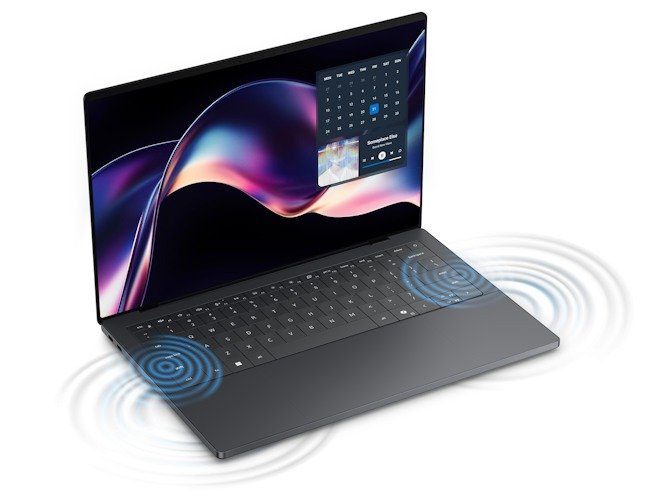
The graphite aluminium chassis of the Dell XPS 14 looks serious in that quietly accomplished way. Minimal. Almost understated to the point where, on first glance, it feels like Dell is daring you to miss it. And then you don’t. I kept glancing back at the Dell XPS 14 when it was closed, just sitting there on a desk, doing absolutely nothing. The clean lines do that. CNC‑machined aluminium tends to age well too, and the tolerances here are tight enough that everything lines up exactly how your eyes expect it to, without the tightness that cause the hinge to stick or the ports to need that extra wiggle.
The glass palm rest adds just the right amount of contrast, visually and the moment your hands land on it. It feels cool at first, and not “cool, dude,” but literally cool, which caught me off guard that first morning. It warms up quickly, though, and once it does, it settles into something that feels properly premium in a way that’s hard to pin down but very easy to enjoy.
Yes, it picks up fingerprints. Yes, I noticed. No, I didn’t spend the entire week wiping it down like a museum exhibit… though, in fairness, I probably did for the first few days. After that, it just felt lived-in. Which, honestly, suits the Dell XPS line perfectly.
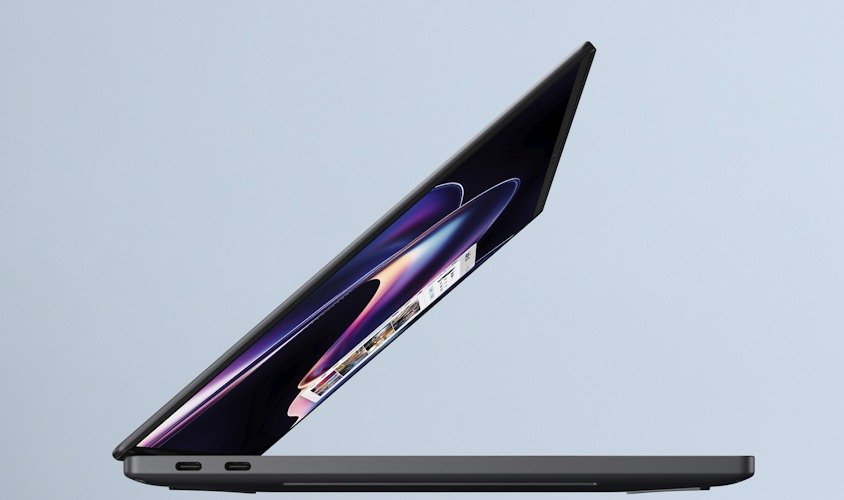
This thing is thin. Properly thin. Around 14.6mm, depending on the configuration, or, to use my current personal measurement system, roughly the thickness of 2.4 Motorola Edge 70 phones stacked together. I now use this as a unit of measurement, because it’s still the thinnest piece of tech I’ve reviewed recently. The result is a laptop where, if you grab it quickly from a bag, your brain has that half-second of “wait… where exactly is the edge?” That’s not a complaint, just a reminder that muscle memory tends to lag behind industrial design.
At roughly 1.36kg, or a hair under 3 freedom units (pounds), the Dell XPS 14 feels lighter than you expect for a 14-inch laptop. Especially when you remember it’s carrying a 70Wh battery, a quad‑speaker system, and enough aluminium and glass to survive real life without being babied. Portability is where that design really pays off. I used it on a train table once. Tight fit. Still fine. No awkward corner hanging into space, no balancing act, no gentle panic every time the carriage moved. It fits where a 13-inch laptop used to, which is one of those quiet XPS party tricks that Dell makes look easy after years of practice.
The hinge deserves another mention here, too. Press-fit, compact, and tuned so well you forget it exists, which is exactly what you want from a hinge. As for my current laptop, it’s a two-hand job that feels more like shucking an oyster than opening a laptop. So being able to count on a one-handed opening works every time, the base stays put, and the screen doesn’t wobble when you tap it or adjust your posture. Tiny detail. Absolutely blissful and intentional.
Even the colour choice feels deliberate. Graphite doesn’t shout. It doesn’t chase trends. It just exists confidently, which feels very Dell XPS. The Dell XPS 14 isn’t trying to be flashy. It’s trying to feel inevitable, like this is just what a well-made laptop should look and feel like by now.
And honestly? Dell’s earned that confidence.
Display: choose your flavour carefully
I spent most of my time with the 2.8K OLED option on the Dell XPS 14, and it didn’t take long to understand why this is the tempting one and my pick of the options. At 2880 × 1800, it’s sharp enough that individual pixels simply stop existing in your brain. Text looks crisp without appearing brittle, images pop without looking oversaturated, and anything dark just… disappears. Blacks are properly black. Not “pretty dark grey if you squint” black. The panel covers the full DCI‑P3 colour gamut, and it shows. Photos look vibrant, videos feel cinematic, and even mundane web pages somehow feel a little better behaved. I remember doing a media release for this site and thinking, “Wow, this site looks really good!” I’ve looked at it a thousand times over the years, and yet, it looked better somehow!
The brightness of the Dell XPS 14 sits around 400 nits typically, pushing higher when it needs to, and it never felt harsh or eye‑searing. I could work comfortably for long stretches without feeling visually fatigued, which I don’t always expect from OLED. Part of that comes down to Dell’s use of Eyesafe technology. Which sounded gimmicky when I first read it, but you definitely come to appreciate it after 13 hours on it.
There’s also the 2K LCD option, which swaps some visual drama for stamina. That panel runs at 1920 × 1200, still sharp at this size, with strong brightness and full sRGB coverage. It won’t have the inky blacks or contrast theatrics of OLED, but it makes a compelling case in other ways. Battery life, for one. If your priorities include long days, travel, or simply not thinking about chargers, the 2K LCD makes a lot of sense.
I think some people will genuinely be happier with the LCD option, especially if their work lives mostly in documents, spreadsheets, and browser tabs. That extra endurance adds up. I would prefer the OLED version, mainly out of ego, as I’ve never owned anything as impressive with an OLED screen.
The best part is that, regardless of which display you choose, the variable refresh rate does its thing quietly in the background. It scales from buttery-smooth when you’re scrolling or watching The Grand Tour trips. I can’t believe I missed the last 2 seasons.
Keyboard and touchpad: clean, almost too clean
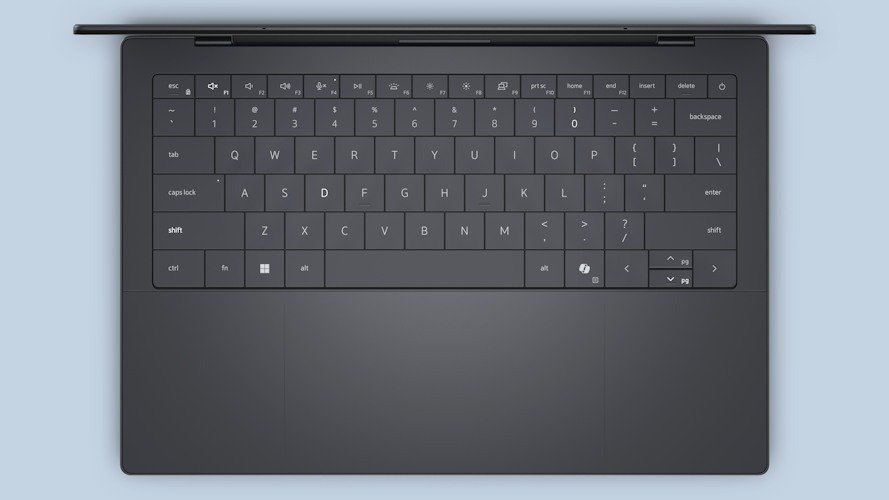
Dell XPS 14’s zero‑lattice keyboard still divides people, and I get why. It’s flat. Very flat. The spacing is tight, the look is minimalist to the point of scarcity, and at first glance, it feels more about design than comfort. I’m happy to report that the assumption doesn’t really hold up. I like this keyboard. Quite a bit, actually.
The keys have around 0.8mm of travel, which on paper sounds shallow, and it is, but it’s also remarkably consistent. Each press feels deliberate, with none of the mush or wobble that sometimes creeps into ultra‑thin laptops. Once your fingers recalibrate, it starts to make sense. That recalibration takes a little time. Maybe an hour. There’s a brief “am I fighting this?” phase, followed by a moment where everything lines up and it just… clicks. Literally and figuratively.
I ended up typing a long document on it without fatigue, which is always my personal pass/fail test. No finger ache. No irritation. No urge to plug in an external keyboard halfway through. And at some point, without really noticing when, I stopped thinking about it entirely. I didn’t miss my usual keyboard. That caught me off guard, as I have chubby fingers and the zero‑lattice keyboard shouldn’t feel this good.
The Dell XPS 14 touchpad follows the same philosophy. Large, seamless, and covered in glass, it blends almost completely into the palm rest. The only visual cue is the subtle etched outline that marks the active area, and even that only reveals itself when the light hits it just right. It looks slick. Possibly too slick. But functionally, it works.
This is a haptic touchpad using piezo feedback rather than a traditional diving mechanism, and Dell has tuned it well. Clicks feel convincing. I caught myself pressing harder than necessary during the first day out of pure habit. Old muscle memory dies slowly. Once you trust it, though, the response feels precise and reliable, with consistent feedback whether you’re clicking near the edge or dead centre.
Performance: steady, not showy
The Dell XPS 14, like the rest of the XPS, isn’t flashy, and that’s why I love these laptops. There’s no dramatic fan spin‑up moment that makes you sit back and go “oh, here we go.” No flash RBG lights that are there for now reason. Instead, it performs with confidence. Calm, steady, and a little smug about it. The Intel Core Ultra processors keep everything feeling genuinely snappy in everyday use, without ever calling attention to themselves.
Multitasking feels natural. Browser tabs pile up, dozens of them, some definitely opened “just for a second” hours ago. At one stage, I had 56 tabs open, and flipping between them to find which was playing music was annoying. Image edits happen without lag. Spreadsheets that probably should have been split into multiple files continue to grow larger and more judgmental. The Dell XPS 14 just handles it like a dream. No hesitation. No complaints. No passive‑aggressive slowdown to teach you a lesson.
It’s the kind of performance that invites you to do slightly irresponsible things. I tried stacking creative tasks that had no business overlapping. Photo edits in one window, a chunky document in another, music playing, notifications popping in and out, and a video converting quietly in the background. It didn’t flinch. I even opened a game mid‑export just to see what would happen. Nothing dramatic happened, which was kind of annoying. As I ran out of ideas before the Dell XPS 14 ran out of performance power.
Intel Arc graphics won’t replace a dedicated GPU, and Dell doesn’t try to sell them as one. That honesty helps. Casual gaming works well. Indie titles run smoothly. Mainstream games are playable at sensible settings. Creative apps behave the way you want them to behave, scrubbing through timelines, layering effects, exporting video, without turning your workflow into a series of coffee breaks and increasingly forced optimism. Which is a bit sad for this coffee addict. As I don’t have the excuse to have my 7th coffee.
 Thermally, the laptop stays impressively composed. It warms up, sure. Physics still exists, and there is no way around that. But the heat never feels alarming, and it never pools into one uncomfortable hotspot. The cooling system does its job without panic. Which brings us to… the fans, they exist. You will hear them on occasion. Usually, when you’re really pushing the system, and sometimes when you forget that you are, in fact, pushing the system. They’re polite about it. No sudden roar. No jet‑engine impressions. More of a gentle reminder that yes, work is happening right now.
AI features are present, but they stay in their lane. Noise reduction on calls works reliably, even with background chaos, which came in so handy. As I currently have revonavations happening next door. Auto‑framing keeps you centred during video calls, including those moments when you lean back in your chair and immediately regret turning your camera on. On‑device AI features run quietly, without noticeable battery drain or performance hits.
And that’s kind of the theme. I didn’t think about AI much while using the Dell XPS 14. Which could sound like criticism. I don’t think it is. The best features here are the ones you forget exist because they’re simply doing their job while you get on with whatever mildly chaotic thing you’ve decided to do next.
Battery life: genuinely freeing
This laptop lasts. Not in a marketing slide way. In a real, wandering‑through‑your‑day kind of way. With the 2.8K OLED, I was consistently getting through 10–12-hour days of mixed use without hunting for an outlet. That’s writing, browsing, music streaming, video calls, and a frankly irresponsible number of browser tabs. Brightness was set somewhere north of sensible, notifications were on, Wi‑Fi never slept, and I made zero effort to baby the battery.
Dell’s marketing numbers for OLED are higher under lab conditions, and sure, if your day is mostly controlled video playback at modest brightness, you can stretch things further. Real life trims that back. But even then, I never felt like I had to ration usage or start dimming the screen just to make it to the afternoon. The laptop simply kept going.
The 70Wh battery doesn’t sound wild on paper. In practice, it feels restless. Efficient. Like it’s constantly clawing back tiny bits of power wherever it can. Pair that with low‑power LPDDR5x memory, variable refresh rates scaling quietly in the background, and an OLED panel that’s been properly tuned rather than left to run wild, and the Dell XPS 14 starts feeling like it was designed by someone deeply committed to squeezing extra minutes out of idle time.
There’s a quiet satisfaction in closing the lid at night, glancing at the battery indicator, and realising you probably didn’t need to plug it in. I still did, of course. Anxiety habits die hard.
Ports, audio, and small gripes
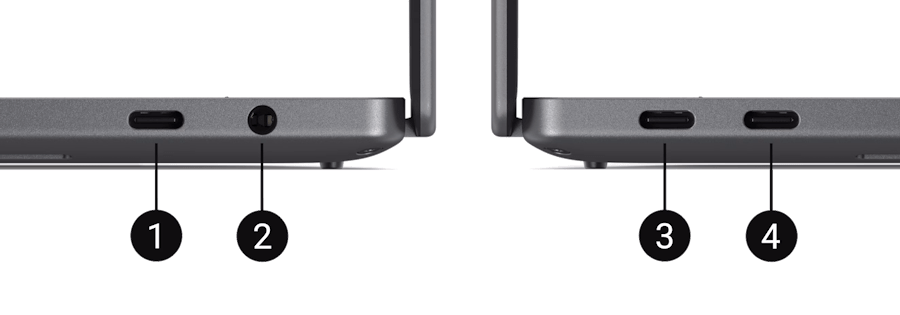
1. Thunderbolt™ 4 (USB Type-C™) with DisplayPort™ 2.1 and Power Delivery
2. Universal Audio Jack
3. Thunderbolt™ 4 (USB Type-C™) with DisplayPort™ 2.1 and Power Delivery
4. Thunderbolt™ 4 (USB Type-C™) with DisplayPort™ 2.1 and Power Delivery
Three Thunderbolt 4 ports and a headphone jack. That’s it. No USB‑A. No HDMI. No surprises if you’ve used a Dell XPS before. USB Hubs will enter your life again, whether you invited them or not. Whether that’s fine or deeply irritating depends entirely on how much patience you have left in 2026, and how many adapters you already own in a drawer somewhere “just in case”.
The speakers are better than expected, especially given that I had no idea it had them. As they are completely hidden and surprisingly full. Louder than I thought they would be, with enough clarity that voices don’t get lost once the volume creeps up. Still not “room‑filling” in any meaningful way, but far better than I expected from a laptop, and I stopped reaching for earbuds while working.
The webcam is sharp enough. 8MP sounds excessive until you actually see it in motion. Clear image, solid detail, and none of the strange colour shifts or softness that plague so many laptop cameras. Windows Hello was fast and reliable throughout, even in less‑than‑ideal lighting, which is exactly how authentication should work. No drama. Just… in.
If I’m being picky, and I usually am, the glass palm rest can feel cool at first. Literally cool. It warms up quickly, but that initial contact is noticeable every time. And the minimalist interior design means everything blends together visually. Clean, elegant, cohesive. Beautiful, yes. Occasionally a little too uniform, where keys, palm rest, and touchpad blur into one uninterrupted surface. That’s very on brand for the Dell XPS 14, for better or worse.
Final thoughts
The Dell XPS 14 feels like the result of Dell quietly refining something already brilliant. There’s no big reinvention here, no radical shift in direction. Instead, it’s a tightening of the screws. Fewer rough edges. Better balance. More confidence in the choices being made.
What stood out to me most wasn’t any single spec or feature, but how rarely the laptop pulled me out of what I was doing; I had to keep telling myself to focus. The display fades into the background in the best way. The keyboard stops being a consideration once your fingers adjust. Performance stays steady enough that you stop checking Task Manager “just in case.” Even the battery life gently rewires your habits, nudging you to care a little less about sockets and chargers.
That’s not to say it’s perfect. The minimalist design won’t be for everyone. Ports are still sparse. OLED versus LCD remains a real trade‑off, not a free upgrade. And the haptic touchpad takes a little trust before it fully clicks. But those feel like conscious decisions rather than compromises. Dell knows who this laptop is for, and it doesn’t try to be all things at once.
If you’ve followed my reviews on DezDoes.com, you’ll know I’ve always had a soft spot for the XPS line, and the Dell XPS 14 reinforces why. It’s a laptop designed for people who value things working smoothly over things shouting loudly or flashing uselessly. It rewards daily use rather than first impressions that never live up it that impression. The kind of device that becomes part of your routine without demanding attention.
I didn’t fall in love with it instantly….. no… a few hours in…. yes. And honestly, that’s exactly what I want from a laptop like this.




Recent Comments