
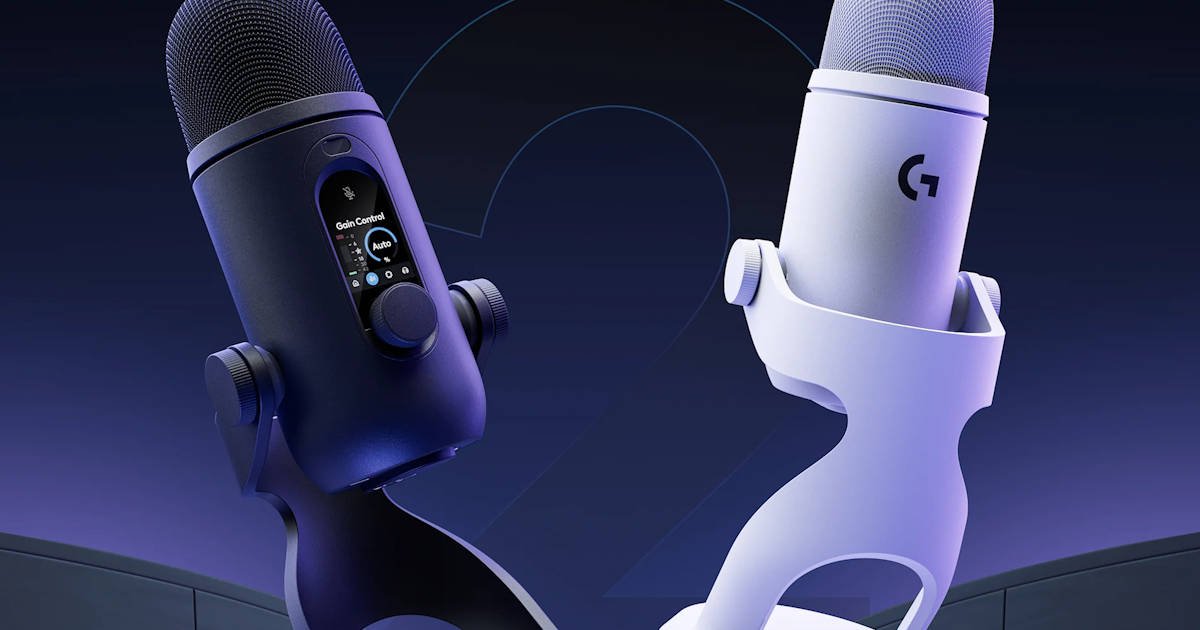
There are certain pieces of tech that immediately make your desk look more expensive than it probably is. The Logitech Yeti 2 in white is one of them.
I’ll admit, I’ve been unusually excited about this microphone. Ever since Logitech invited me to a media briefing for the Logitech Yeti 2 about a month ago, I’ve been curious to see how it would perform in the real world. Product briefings are great for learning about features and hearing the company’s pitch, but the real testing starts when you get a device on your own desk. As I’ve been disappointed in the past.
Now that I’ve spent some proper time with it, I can confidently say the wait was worth it. I pulled it out of the box, placed it next to my keyboard, and within about thirty seconds I’d convinced myself my workspace was significantly more professional. Whether my audio quality improved by that exact same amount is debatable. The microphone definitely did its part, though.
Logitech’s latest addition to the Yeti family arrives with a refreshed design, AI-powered audio processing, multiple pickup patterns, and the sort of plug-and-play simplicity that content creators, streamers, podcasters, and work-from-home professionals tend to appreciate. It also happens to look fantastic in white.
Design And Build Quality
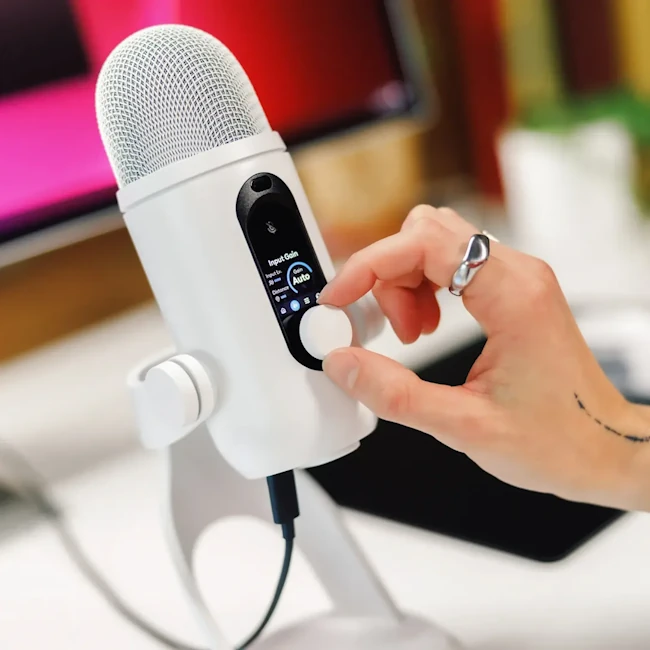
The white finish is clean, modern, and surprisingly difficult to fault. That’s not always the case with white peripherals. Plenty of companies aim for a premium look and somehow end up creating something that belongs in a medical clinic. The Logitech Yeti 2 sidesteps that entirely. It looks sleek, professional, and just a little bit fancy without trying too hard.
It feels substantial from the moment you pick it up. At nearly 1kg (or 2.2 in freedom units) with the included stand attached, there’s no mistaking this for a budget microphone. The steel and aluminium construction give it a reassuring solidity, while the weighted base keeps everything firmly in place. Once it finds a spot on your desk, it tends to stay there.
The overall silhouette remains unmistakably Yeti. Anyone familiar with previous generations will recognise it immediately. Logitech hasn’t torn up the blueprint and started over. Instead, it’s taken a design that worked and refined it. Honestly, I think that was the right call. Not every product needs to emerge from a design lab looking like it arrived from the year 2047.
What stood out during everyday use was how naturally the Logitech Yeti 2 settled into my setup. It’s undeniably a large microphone, but it never felt oversized or inconvenient. Some desktop mics constantly remind you they’re there, looming in your peripheral vision like an attention-seeking house guest. The Logitech Yeti 2 manages to feel substantial without being intrusive.
In fact, it somehow elevated the entire look of my desk. That’s saying something, considering it was sharing space with a Care Bear and a llama-shaped plant pot. Realistically, if a microphone can pull off “professional creator workspace” while sitting next to children’s collectibles and novelty décor… I mean, very very manly desk action figures; it’s doing something right.
Then there’s the display. I absolutely adore the display.
From a practical perspective, it’s bright, easy to read, and makes checking settings incredibly simple. A quick glance tells you what you need to know, which is far more convenient than tabbing into software every time you want to make an adjustment. But the real reason I kept looking at it wasn’t the information.
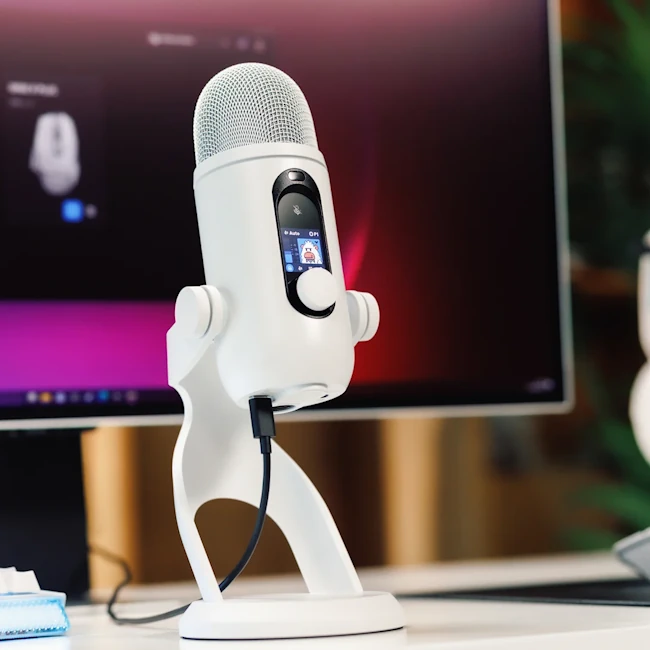
It was the tiny Yeti.
Logitech somehow decided that what this microphone really needed was a cute little animated Yeti on its display, and I fully support that decision. It has no right being as charming as it is. There were moments when I’d walk past my desk and catch myself looking at the screen purely because the little Yeti was there. Was I checking microphone settings? Sometimes. Was I checking on my tiny digital Yeti friend, whom I randomly called Herbet? Also yes.
It’s one of those small details that adds a surprising amount of personality to a product that could have easily been all business.
The controls are just as thoughtfully implemented. Everything is positioned exactly where you’d expect it to be, making quick adjustments feel natural while you’re recording. It sounds like a small thing, and perhaps it is, but when you’re halfway through a podcast, voice-over, or meeting, you don’t want to be awkwardly pawing at buttons hoping you’ve found the right one.
The Logitech Yeti 2 never gave me that problem. The controls quickly became second nature, allowing me to focus on what I was recording rather than how I was operating the microphone.
I also appreciated the smaller details that become noticeable over time. The stand offers enough adjustment to find a comfortable position, the construction feels built to survive years of use, and the finish held up remarkably well throughout testing. After weeks of recordings, photography sessions, repositioning, and the occasional burst of cable-management enthusiasm, it still looked almost brand new.
Maybe that doesn’t sound particularly exciting. Build quality rarely is. People only tend to talk about it when something creaks, wobbles, scratches, or falls apart. The Logitech Yeti 2 never gave me any of those moments. It simply sat on my desk, looked fantastic, and quietly got on with the job. Sometimes that’s exactly what you want from a premium microphone.
Setup Is Refreshingly Easy
The Logitech Yeti 2 is about as complicated to set up as making toast.
Connect the included USB cable, let your PC detect the microphone, and you’re essentially ready to go. Whether you’re using Windows or macOS, the process is refreshingly straightforward. No hunting down obscure drivers. No mysterious error messages. No spending twenty minutes wondering why your brand-new device is refusing to acknowledge your existence.
You plug it in. It works.
Honestly, that alone deserves some recognition in 2026.
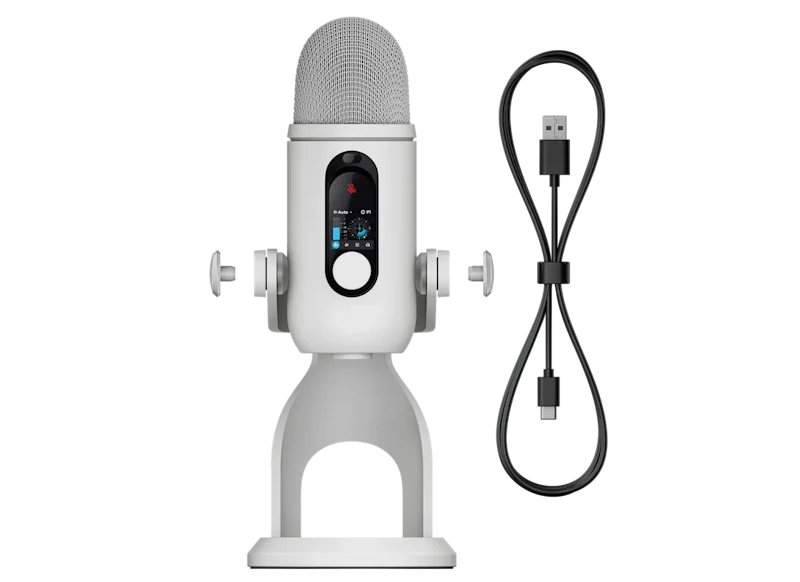
For users who enjoy tinkering with settings, Logitech’s G HUB software opens the door to deeper customisation. That’s where you’ll find things like microphone tuning, pickup pattern options, and the AI-powered noise reduction features. The good news is that you don’t need to immediately dive into any of that to get a great experience. The Logitech Yeti 2 sounds perfectly capable right out of the box.
I actually spent more time deciding where to place the microphone on my desk than I did configuring it. That rarely happens these days.
In fact, choosing a home for it became an unexpectedly serious decision. Do I place it front and centre where everyone can admire it? Slightly off to the side for maximum desk space? Directly underneath my monitor so I can keep looking at the little Yeti on the display? These are the important questions.
The microphone itself was ready to go long before I reached a conclusion.
There’s something oddly satisfying about using a product that doesn’t immediately bombard you with setup wizards and account sign-ins. The Logitech Yeti 2 feels eager to get started. Five minutes after opening the box, I was already recording test clips and making extremely important observations such as, “Do I really sound like that?” Apparently I do.
The setup process is also helped by how approachable the microphone feels. The display provides useful information without overwhelming you with technical jargon, and the physical controls make enough sense that I rarely felt the need to consult a manual. Most of the time I was simply experimenting, pressing a button here, adjusting a setting there, and figuring things out naturally.
That’s usually the sign of good product design.
I think there’s a tendency for premium creator gear to assume everyone using it is running a professional studio. The Logitech Yeti 2 takes a more welcoming approach. Whether you’re launching a podcast, jumping into work meetings, streaming games, or just trying to stop sounding like you’re speaking through a tin can during Discord or Teams calls, it makes the process feel approachable from the very beginning.
The first hour with a new piece of tech is often when frustrations start to appear. With the Logitech Yeti 2, the first hour was mostly spent recording things I didn’t need to record, admiring the tiny Yeti on the display, and looking for excuses to test “just one more feature.” That’s a far more enjoyable way to spend an afternoon.
Audio Quality
Of course, none of the aesthetics matters if the microphone sounds terrible. You can have the prettiest microphone in the world sitting on your desk. It can have premium materials, a gorgeous finish, and an adorable little Yeti on the display. If the audio sounds like you’re speaking through a drive-thru speaker from 1997, none of that matters.
Thankfully, the Logitech Yeti 2 performs exceptionally well.
The microphone uses a three-capsule condenser array with three 14mm condenser capsules, recording at up to 24-bit/48kHz quality. The result is clear, detailed audio with a pleasant warmth that helps voices sound natural rather than overly processed. There’s a nice balance here. Recordings have enough presence to sound professional without becoming harsh or artificially boosted.

During testing, I threw a little bit of everything at it. Podcast recordings, Discord calls, work meetings, voiceovers, and a few completely unnecessary attempts at becoming an attitude-era wrestling announcer. The Logitech Yeti 2 handled all of it without complaint.
What impressed me most was how forgiving it felt. In an ideal world, everyone would sit perfectly still and maintain flawless microphone placement throughout a recording session. In reality, people lean back, glance at second monitors, gesture while talking, or get distracted halfway through a sentence. I certainly wasn’t always sitting perfectly still, dam my Italian hand-talking heritage.
There may have been moments where I slowly drifted away from the microphone while talking. There may have been occasions where I turned my head because something on my desk caught my attention. There may even have been a brief moment where I was distracted by the tiny Yeti on the display. The microphone remained remarkably consistent throughout it all.
That consistency made longer recording sessions feel far more relaxed. I wasn’t constantly worrying about positioning or whether small movements would ruin a recording or distract those on the Teams call. The Logitech Yeti 2 simply let me focus on what I was saying rather than how I was sitting.
Background noise handling was also impressive. No microphone can perform miracles, but the Logitech Yeti 2 did a solid job keeping the focus on my voice rather than every sound happening around me. My mechanical keyboard still made its presence known from time to time, but thankfully it didn’t try to become the main character in every recording.
After a few weeks of testing, I reached the point where I stopped thinking about the microphone entirely and simply trusted it to do its job. Great audio gear eventually fades into the background. You hit record, start talking, and let the microphone handle the rest. The Logitech Yeti 2 got me to that point surprisingly quickly.
AI Denoiser Actually Helps
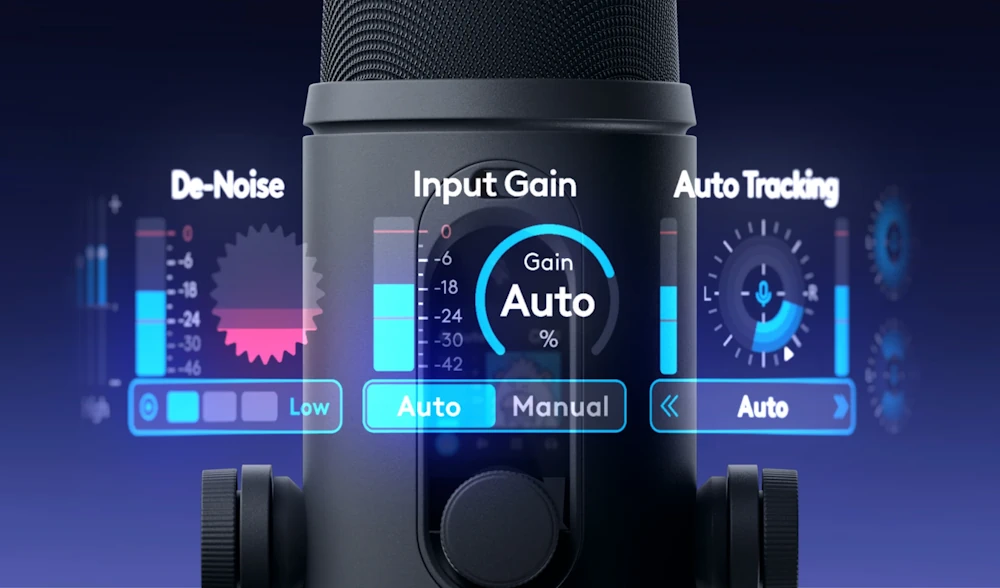
AI features often feel like they exist because somebody in marketing decided every product needs to mention AI at least six times on the packaging. The Logitech Yeti 2’s real-time AI Denoiser is one of the rare exceptions where the feature actually earns its place.
The goal is simple. Reduce unwanted background noise while keeping your voice front and centre. Thankfully, it does a pretty good job of that without requiring a degree in audio engineering to configure.
During testing, the feature helped minimise common distractions like keyboard clatter, distant fans, and the general collection of mysterious household noises that seem to appear the moment you press record. You know the ones. The neighbour starts mowing. A dog decides now is the perfect time to bark. Somebody closes a door three rooms away with the force of a medieval siege weapon. The Logitech Yeti 2 handled most of these situations surprisingly well.
What I appreciated most was how natural everything sounded afterwards. Some noise suppression systems become so aggressive that they start fighting your voice along with the background noise. The result can make you sound like you’re broadcasting from low Earth orbit or trapped inside a very small tunnel on another planet.
Thankfully, Logitech has shown a fair amount of restraint here.
My voice remained clear and natural during recordings, while the distracting sounds around me were noticeably reduced. The effect is present, but it doesn’t constantly remind you it’s working. In a strange way, that’s what makes it successful. The best audio processing often goes unnoticed.
After a while, I stopped thinking about the AI Denoiser entirely and simply enjoyed the cleaner recordings it produced. Instead of feeling like a flashy feature added for the sake of a bullet point, it feels like a genuinely useful tool that improves the overall experience.
And honestly, anything that helps reduce the sound of my enthusiast-grade mechanical keyboard from appearing in every recording deserves at least a little appreciation.
Plenty Of Recording Options
One of the Logitech Yeti 2’s strongest features is its flexibility.
The microphone supports a wide range of pickup patterns, including Automatic, Supercardioid, Hypercardioid, Cardioid, Bidirectional, Omnidirectional, Stereo, and even a Custom mode. On paper, that’s a lot of fancy audio terminology. In practice, it means the microphone can adapt to whatever you’re trying to record rather than forcing you to adapt to it.
For most people, Cardioid mode will become the default setting. It’s ideal for podcasting, voiceovers, streaming, and general content creation. Honestly, once I found myself happily recording in Cardioid mode, I could have left it there forever without any complaints.
But having options is never a bad thing.
The additional pickup patterns make the Logitech Yeti 2 far more versatile than a typical desktop microphone. Recording an interview across the table? There’s a mode for that. Capturing a group discussion? Covered. Want to experiment with ambient audio or record a room full of people? The Yeti 2 can handle that too.
I particularly like that Logitech hasn’t hidden these features behind complicated menus or made them feel intimidating. Everything is presented in a way that encourages experimentation. I found myself switching between modes simply out of curiosity to see how each one changed the recording. Admittedly, there was also a small part of my brain thinking, “I’ll probably never need this.”
And that’s exactly when a feature becomes useful.
Because six months from now there’ll be a weird recording situation you didn’t anticipate. Maybe you’re interviewing someone. Maybe you’re recording a group podcast episode. Maybe you’ve somehow become a nature documentary narrator and need ambient bird sounds. Life is unpredictable.
When that moment arrives, you’ll remember the Logitech Yeti 2 has a pickup pattern for it, switch modes, and immediately feel much smarter than you actually are.
The best part is that all these options don’t get in the way if you just want to plug the microphone in and start recording. They’re there when you need them, and quietly stay out of the way when you don’t. That’s a balance a lot of audio gear struggles to achieve, but the Logitech Yeti 2 manages it remarkably well.
Headphone Monitoring
The Logitech Yeti 2 also includes a built-in headphone output for real-time monitoring, allowing you to hear exactly what the microphone is picking up without any noticeable delay.
Now, let’s be honest. Hearing your own recorded voice is a deeply humbling experience. We all think we sound a certain way. Then we put on a pair of headphones, listen back to ourselves, and spend a few seconds wondering who that person is.
That’s not Logitech’s fault.
What is Logitech’s fault is making the experience so easy that I couldn’t avoid hearing myself. The monitoring feature works exactly as intended, providing a clear and accurate representation of your audio while recording. There’s no distracting lag or strange processing getting in the way.
It’s one of those features you don’t think much about until you need it. Then suddenly it becomes incredibly useful for checking levels, catching background noise, or making sure your microphone isn’t accidentally recording from the other side of the room because you’ve been distracted by something shiny.
The best thing I can say about the headphone monitoring is that it simply works. It’s reliable, easy to use, and quietly does its job in the background. Much like the Logitech Yeti 2 itself.
Final Verdict
After spending several weeks with the Logitech Yeti 2, I’ve come away genuinely impressed.
Going into this review, I was excited. The media briefing gave me a good look at what Logitech was aiming for, and on paper it sounded like a worthy successor to the Yeti name. What I wasn’t sure about was whether that excitement would survive weeks of actual use once the presentations, marketing slides, and launch-day enthusiasm faded away.
Thankfully, it did.
The Logitech Yeti 2 delivers where it matters most. It sounds fantastic, the AI denoising is genuinely useful, the pickup pattern options give it plenty of flexibility, and the setup process is so painless that you’ll probably spend more time deciding where to put it than getting it working.
What surprised me most, however, was how much I enjoyed using it. Good microphones often disappear into the background, and the Logitech Yeti 2 certainly does that when it’s time to record. At the same time, little touches like the integrated display and its adorable tiny Yeti somehow give the microphone more personality than most products in this category.
By the end of testing, it had become a permanent fixture on my desk. Not because I had to use it, but because I wanted to.
And yes, Herbert the tiny Yeti may have played a role in that decision.
For content creators, streamers, podcasters, remote workers, and anyone tired of sounding like they’re speaking from inside a kitchen cupboard during meetings, the Logitech Yeti 2 is an easy recommendation. It’s approachable enough for beginners, capable enough for experienced creators, and polished enough to justify its place in Logitech’s lineup.
Most importantly, it’s a microphone I continued enjoying long after the “new tech” excitement should have worn off. That’s usually the sign of a very good product.


Recent Comments