
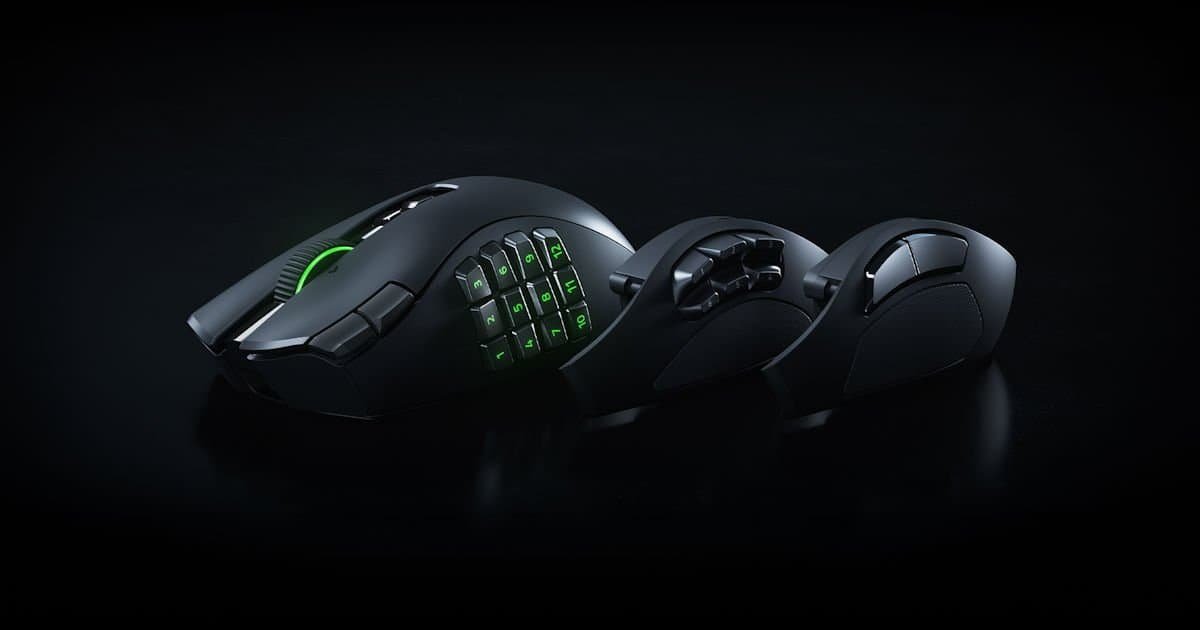
There’s a point where a gaming mouse stops being a mouse and starts becoming a small control surface that just happens to move a cursor around. The Razer Naga V3 Pro lives somewhere in that territory.
I’ve been a Naga user for years. In fact, I still use my Naga V2 because I play far too much World of Warcraft. Like, nightly WoW. The sort of nightly WoW where muscle memory becomes more important than remembering where you left your car keys. So whenever Razer announces a new Naga, I’m paying attention. Not because I need another mouse, but because the Naga line has become such a huge part of how I play MMOs that changing mice honestly feels weird.
The Razer Naga V3 Pro immediately feels familiar, but it also feels like Razer looked at the V2 and asked, “What if we added more buttons?” Then somebody else asked, “What if we added buttons to the buttons?”
And somehow that idea made it through… which I’m so glad it did!
The first thing that struck me about the Razer Naga V3 Pro is just how much functionality Razer has squeezed into a single mouse. You think you’ve found every button, then discover another one a few hours later. Between the side buttons, scroll wheel controls, DPI buttons, ring finger button and the interchangeable side plates, it almost feels like there are buttons on the buttons.
The funny thing is that it never feels completely overwhelming. Maybe slightly ridiculous. But in the best possible way.
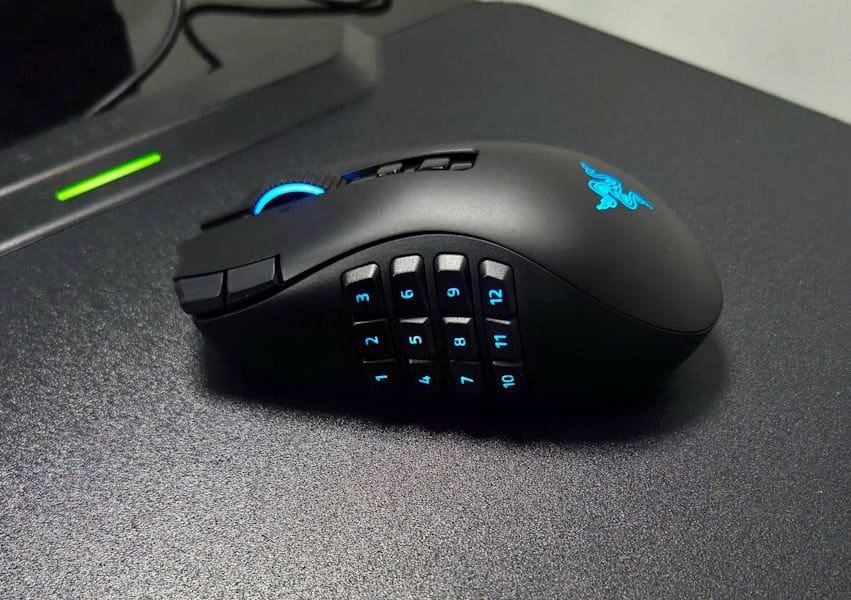
As someone who has spent an embarrassing amount of time in Silvermoon of late, the Razer Naga V3 Pro feels like it was designed by people who understand exactly how cluttered an MMO hotbar can get. The moment I attached the 12-button plate, it felt familiar. Cooldowns, interrupts, mounts, push-to-talk, macros and utility spells all found a home under my thumb within minutes.
That’s really the story of the Razer Naga V3 Pro. It takes an already great MMO mouse and pushes the concept even further. More buttons, more flexibility, more customisation. Somehow, it still feels comfortable and surprisingly natural in the hand. For long-time Naga users, it’s immediately recognisable. For MMO players, it feels a little bit like coming home.
Build Quality & Design
The Naga design has been refined over the years, and the Razer Naga V3 Pro feels like the most polished version yet. It still has that unmistakable Naga shape that MMO players will recognise instantly, but everything feels a little tighter, cleaner and more refined in the hand.
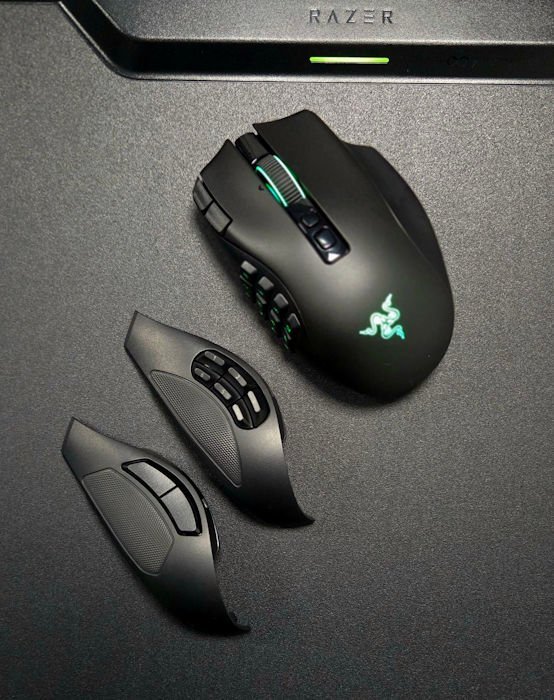
One of the biggest improvements I’ve noticed coming from the Naga V2 is the swappable side plates. The magnetic attachment feels stronger and more secure this time around. The side plates on the previous model were already good, but with the Razer Naga V3 Pro there’s a reassuring snap when they lock into place that gives you confidence they’re not going anywhere.
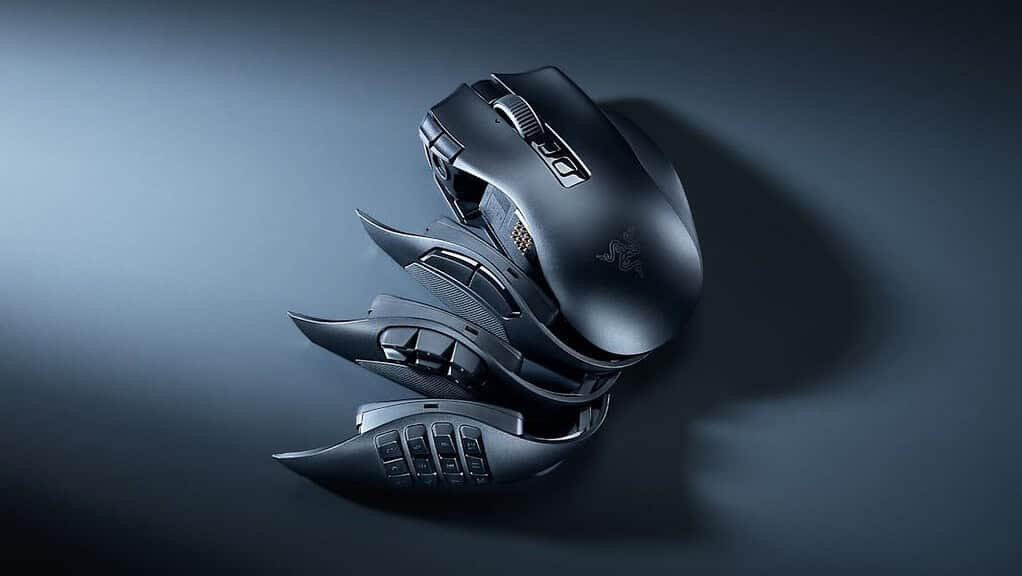
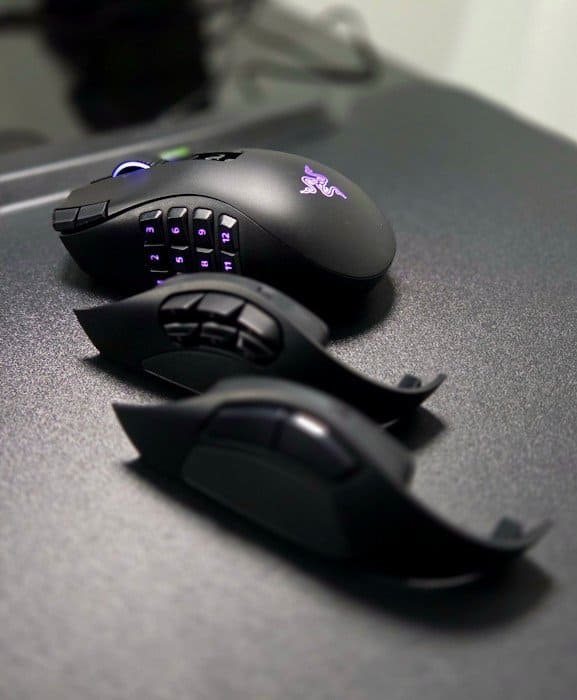
It’s a small thing, but if you’re regularly switching between the 12-button MMO plate, the 6-button layout, or the 2-button FPS setup, it makes the whole experience feel smoother and more premium. And I actually do swap between the 12-button and 2-button plates quite a bit. I call it “mulletting”. The 2-button plate is business, the 12-button plate is party mode.
The rest of the mouse carries that same premium feel. There’s very little flex in the shell, the buttons feel solid and well-supported, and the updated side-button keycaps feel more durable than previous generations. After spending years with various Naga models, the Razer Naga V3 Pro feels like Razer has paid attention to the little details that long-time users actually notice.
The Naga V2 was already an outstanding mouse in my eyes, which honestly made me wonder how much room there was left for improvement. Yet after spending time with the Razer Naga V3 Pro, it genuinely feels more refined. Nothing is dramatically different on its own, but all the small improvements add up. The stronger magnets, improved button feel, lighter weight and overall fit and finish combine to create a mouse that feels like the natural evolution of a design Razer has spent years perfecting. Sometimes it’s those subtle refinements that make the biggest difference day to day.
Buttons. So Many Buttons.
The headline feature is the sheer number of inputs available. Depending on which side plate you install, you’re looking at up to 23 programmable buttons on the Razer Naga V3 Pro, which is already absurd in the best possible way. It’s the kind of number that makes you pause, squint, and wonder whether you’re still holding a mouse or a tiny command centre disguised as one. To let that sink in, you can almost write the full alphabet without using a keyboard!
What impressed me most isn’t simply the number of buttons. It’s that Razer somehow found room for even more controls around the mouse. There are the main clicks, tilt‑wheel inputs, DPI controls, side buttons, edge buttons, a ring‑finger button, profile controls, and Hypershift functions. At some point you stop counting and just accept that the Razer Naga V3 Pro has entered a higher evolutionary state.
After a few days, I genuinely started discovering buttons I had forgotten existed. I’d be mid‑fight, reach for something, and think, Oh right, that’s a button too. It felt like the mouse was quietly revealing secrets over time, like a very enthusiastic MMO NPC.
That’s not really a criticism. It’s almost part of the appeal.
The mouse reaches a level where your brain starts assigning jobs to buttons simply because they’re available. One button became my mount. Another became Discord push‑to‑talk. One became an interrupt. Another became a healing cooldown. By the end of the week I was using binds I’d never normally bother setting up because the space was there. It’s like moving into a bigger house and suddenly owning three different types of scissors.
There are so many buttons that it almost feels like there are buttons on the buttons. You start to wonder whether the mouse is judging you for not using all of them. (“You assigned nothing to Button 17? Bold choice.”)
Yet somehow it remains surprisingly usable. The layout never collapses into chaos. The plates make sense. The spacing makes sense. The ergonomics make sense. It’s a ridiculous amount of control, but it’s structured ridiculousness, the kind that makes you laugh, then immediately bind another macro because why not, you’ve got the real estate.
Built For MMO Players First
The Razer Naga V3 Pro has always been the MMO king, and this generation feels like a direct response to long‑time players, the ones who can explain their raid rotation in excruciating detail but forget what day it is. Well, not all of us can explain their raid rotation.
The 12‑button plate remains the star of the show. As someone who spends an embarrassing amount of time in Azeroth, it just makes sense. Every cooldown, interrupt, mount, macro, and utility skill can sit comfortably under your thumb without turning your keyboard into a finger‑twisting nightmare. It’s the layout that whispers, “You don’t need to use Shift‑P for anything ever again.”
The updated double‑shot moulded keycaps (I’m not 100% sure if that is the right word) on the Razer Naga V3 Pro are also a welcome improvement. They feel durable, the legends are clearer, and the backlighting actually makes a difference during late‑night gaming sessions. And yes, those late‑night sessions absolutely happen. If you’ve ever raided past midnight, you know the exact moment when your brain goes foggy, and your fingers start operating purely on muscle memory. That’s when good keycaps matter more than sleep.
When you’re halfway through a three‑hour raid, and somebody says “stack on blue marker,” the last thing you want is to be hunting for an ability key. The tactile separation between buttons makes navigation easier than you’d expect, especially if you’ve already spent years building muscle memory with previous Naga models. It’s almost comforting, like the mouse is saying, “Don’t worry, I’ve got you. Just press 7.”
The Razer Naga V3 Pro ships with three interchangeable side plates:
- 12‑button MMO setup,
- 6‑button layout aimed at MOBAs and battle royale games, and
- Simple 2‑button configuration for FPS titles and everyday use.
All three plates are genuinely useful, but personally? I kept coming back to the 12‑button plate.
Lighter, Faster, Better
One of the biggest upgrades over the Naga V2 is the reduced weight. The Razer Naga V3 Pro feels noticeably lighter in the hand, which is impressive considering how much functionality Razer has packed into it. This is still a mouse with swappable plates, 23 possible buttons, a tilt wheel with four modes, and a sensor that could probably track a fly mid‑air, yet it somehow weighs less.
The weight reduction was actually the first thing I noticed.
The Naga V2 never felt heavy in isolation, but moving directly from a V2 into the Razer Naga V3 Pro makes the older mouse feel just a little chunky. Not bad. Just older. Like when you revisit a childhood backpack and realise it was basically a suitcase with straps.
Tracking is exceptional. Whether you’re healing, tanking, DPSing, or frantically target‑switching during PvP, or jaming away in your favourite FPS, the sensor simply disappears into the background, which is exactly what a great sensor should do. After a few minutes, you stop thinking about it because it just works. It’s the kind of sensor that quietly does its job while you panic‑spam cooldowns and pretend you meant to pull that extra pack.
The new Gen‑4 optical switches feel equally impressive. Clicks are crisp and deliberate, with enough tactility to feel satisfying without becoming fatiguing over long sessions. That matters when you’re hammering abilities for hours on end. There’s a fine line between “responsive click” and “my fingers feel like they’ve been doing CrossFit,” and the Razer Naga V3 Pro lands comfortably on the right side of that line.
A Scroll Wheel That Deserves Its Own Review
I wasn’t expecting to spend this much time talking about a scroll wheel. As, I know many don’t love the Razer scroll wheel. Yet here we are.
The Razer Naga V3 Pro comes with the HyperScroll Tilt Wheel Gen‑2, which offers four separate scrolling modes, and surprisingly, they’re all genuinely useful. Not “marketing useful,” but actually useful in the way that makes you rethink how often you rely on the scroll wheel during a raid.
Precision Tactile mode ended up becoming my favourite.
For MMO players who use the mouse wheel heavily, the tighter notches provide a level of control that feels almost absurdly precise. Scrolling through hotbars, action wheels, and inventory menus feels deliberate and accurate. It’s the kind of precision that makes you wonder why every mouse doesn’t do this. It’s almost unsettling how quickly you get used to it.
Meanwhile, Smart‑Reel automatically switches between tactile scrolling and free‑spin mode depending on how quickly you scroll. It sounds like the sort of feature you’d ignore. But believe me, you won’t.
After a few days it becomes one of those small quality‑of‑life improvements that quietly worms its way into your routine. Then you move back to another mouse and immediately miss it. You’ll flick the wheel expecting it to switch modes and it just… doesn’t. And suddenly you’re annoyed at a perfectly normal scroll wheel for not being psychic.
The Razer Naga V3 Pro doesn’t just give you a scroll wheel, it gives you a scroll wheel with personality. A scroll wheel with opinions. A scroll wheel that genuinely deserves its own section in a review.
The Battery That Wouldn’t Die (Until I Remembered HyperFlux Exists)
Ok, and here comes the part of the review where I was happily typing away and then had to stop myself, because I was about to write: “In a week, I’ve not charged this thing. The battery on the Razer Naga V3 Pro is unstoppable. It’s still full…”
For a far longer than a moment, I genuinely believed it. I’d been focused so much on the Razer Naga V3 Pro that I completely forgot about it.
Then, and this is the stoopid part, I remembered that Razer also supplied me with the HyperFlux V2 Wireless Charging System mouse pad… and the realisation only hit me while writing this section.
So yes, technically the battery is unstoppable, but only because it’s been quietly topped up the entire time.
The Razer Naga V3 Pro already has excellent battery life on its own (up to 155 hours on HyperSpeed), which is more than enough for marathon MMO sessions, late‑night raids, and the occasional “I’ll just do one more dungeon” lie we all tell ourselves. But pairing it with the HyperFlux V2 Wireless Charging System it takes things to a completely different level. Charging basically stops being a concept. You use the mouse, and it charges while you use it. That’s the whole workflow.
There’s no cable on the desk. No charging dock. No “oh no, I forgot to plug it in overnight.” Just seamless, continuous power.
HyperFlux V2 Wireless Charging System doesn’t just keep the mouse alive, it makes the idea of battery management feel outdated. You stop checking battery levels. You stop thinking about charging. You stop caring about percentages entirely. The mouse becomes this quietly immortal little creature that never seems to run out of energy.
After a few days, your brain stops tracking battery levels entirely. You sit down and play. Then play some more. Then accidentally realise it’s 1 am and you’ve got work in the morning.
And the funniest part? You don’t even notice the HyperFlux V2 Wireless Charging System doing anything. It’s just there, silently keeping the Razer Naga V3 Pro or any Razer mouse compatible with it topped up like a wireless life‑support system. It’s the kind of convenience that sneaks up on you, or in my case completely remember it exists, and once you’ve lived with it, going back to a normal wireless mouse feels weirdly primitive.
A Little More About HyperFlux V2 Wireless Charging System
Since this isn’t getting its own review, it deserves a proper spotlight, because it’s doing far more than just keeping the mouse alive.
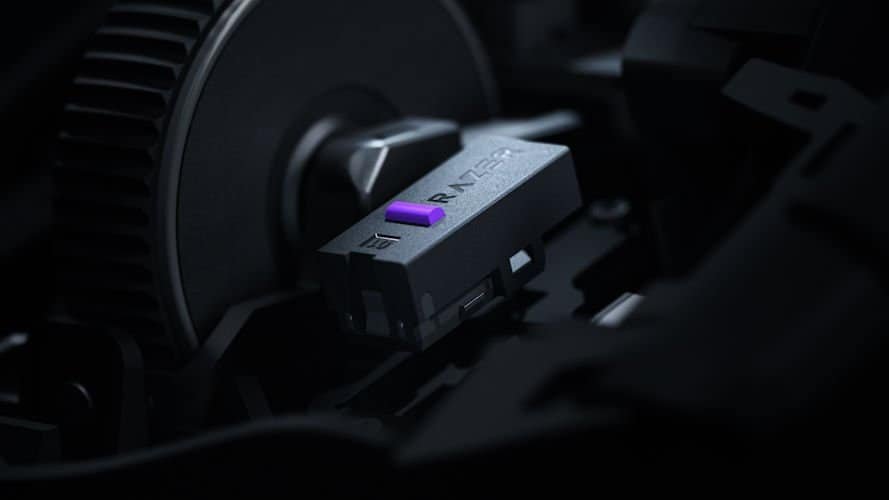
HyperFlux V2 Wireless Charging System is Razer’s continuous wireless charging system, and it replaces both your charging dock and your wireless dongle. You swap the puck in the mouse for the HyperFlux puck, place it on the mat, and the whole setup just… works. The mat becomes the power source and the wireless receiver, so your desk instantly loses two pieces of clutter.
It’s a surprisingly elegant system. There’s no “charging animation,” no “dock handshake,” no “place it exactly here or it won’t charge.” The moment the Razer Naga V3 Pro touches the mat, it’s powered. Lift it off, it keeps running. Put it back down, it tops up again. It feels less like charging and more like the mouse is siphoning ambient energy from the universe.
You also get two surface options, a hard micro‑textured surface for fast flicks, which I received, and a cloth surface for more controlled, pixel‑precise swipes. The hard pad is snappy and fast; the cloth pad claims to be steady and predictable, or so the specs tell me. You pick the one that suits your playstyle, and the charging works identically on both.
There’s even a small LED indicator at the top of the mat that shows your battery level at a glance. Mine basically stayed green forever, which is both impressive and slightly unsettling, like the mouse was quietly immortal and didn’t feel the need to tell me. If you want to preserve battery health, as that was a fear of mine, you can set the mat to stop charging at 50–80%, and it’ll obey that limit automatically.
The mat also supports HyperSpeed Multi‑Device, meaning it can act as the wireless receiver for your mouse and your keyboard. One cable into your PC, two devices connected, zero dongles. It’s a tiny quality‑of‑life improvement that becomes very noticeable once you realise you haven’t had to unplug or shuffle dongles around in weeks.
Final Verdict
The Razer Naga V3 Pro is one of those rare upgrades that doesn’t just refine a familiar formula; it expands it in the best way possible. It takes everything the Naga line has always done well for MMO players and pushes it further without ever tipping into chaos. More buttons, better switches, smarter scroll modes, lighter weight, stronger magnets, cleaner design… It’s the kind of iteration that feels like Razer finally reached the version of the Naga they’ve been chasing for years.
If you’re an MMO player, this mouse is an easy recommendation. It’s built for you. It understands you. It knows exactly how many cooldowns you’re juggling and how many keybinds you’ve run out of. The 12‑button plate feels like home, the double‑shot keycaps feel like an overdue upgrade, and the ergonomics feel like slipping into something familiar but better.
But here’s the thing I didn’t expect: even if you aren’t an MMO player, the Razer Naga V3 Pro still has something for you. After finishing most of this review, I ended up mapping several shortcuts for video editing, timeline scrubbing, ripple delete, cut, zoom, tool switching, and suddenly I became so, so lazy. Why use two hands when I can just use one? It’s ridiculous how quickly the extra buttons become part of your workflow, even outside gaming. The mouse goes from “MMO powerhouse” to “tiny productivity cheat code” without missing a beat.
Pair it with HyperFlux V2 and the whole setup becomes even more absurd. A mouse that never dies, a mat that replaces your dongle, and a desk with fewer cables than ever. It’s the kind of convenience that sneaks up on you and quietly rewires your expectations.
In the end, the Razer Naga V3 Pro feels like the natural evolution of a mouse that’s already iconic. It’s familiar, but better. Packed with features, but still usable. Ridiculous in concept, but brilliant in practice. Whether you’re raiding, editing, grinding, or just living your best lazy one‑handed life, this mouse adapts to whatever you throw at it.


Recent Comments