
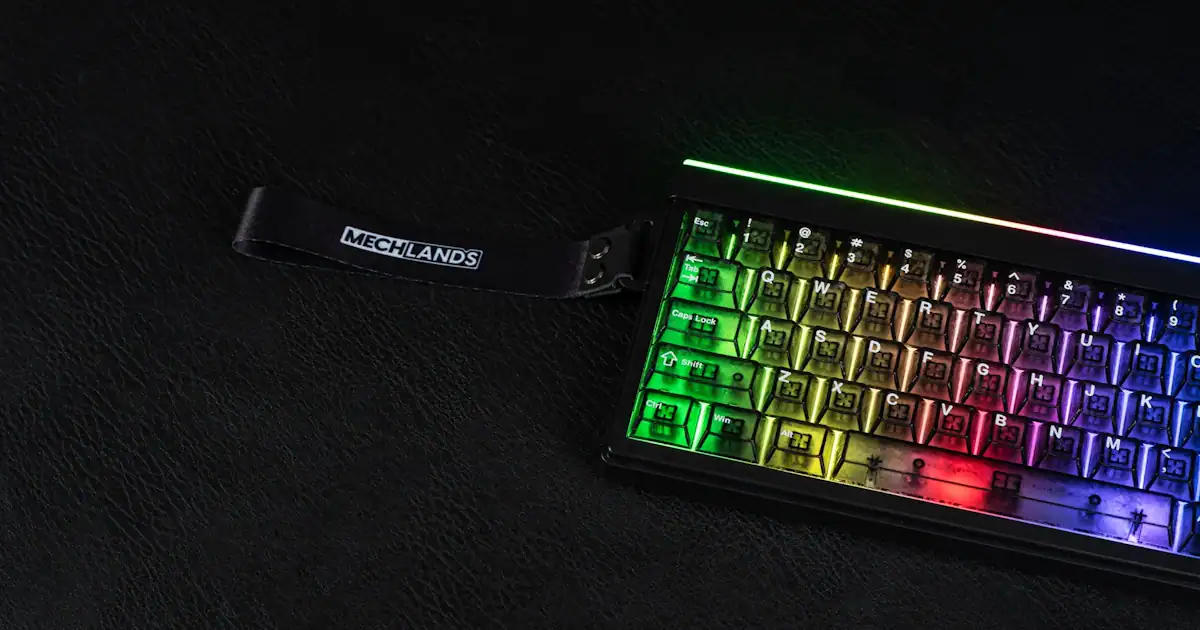
The MechLands Halo68 doesn’t try to overwhelm you with size or unnecessary extras. It’s a compact 65% wireless keyboard that feels like it was designed for people who want their desk to breathe a little, and on my tiny desk, I appreciate the little extra room. Gamers, professionals, or anyone who spends long hours typing will probably notice the difference straight away: the footprint is small, the noise is almost nonexistent, and the portability is surprisingly practical.
I found myself appreciating how it balances those things. On one hand, you’ve got feature‑rich connectivity that covers pretty much every scenario: Bluetooth for casual use, 2.4GHz for gaming, and USB‑C when you just want the reliability of a cable. On the other hand, there’s the aesthetic side; the MechLands Halo68 has this glow that makes it feel more like part of your setup than just another tool. It’s not flashy in a distracting way, but it does catch your eye when the lights hit.
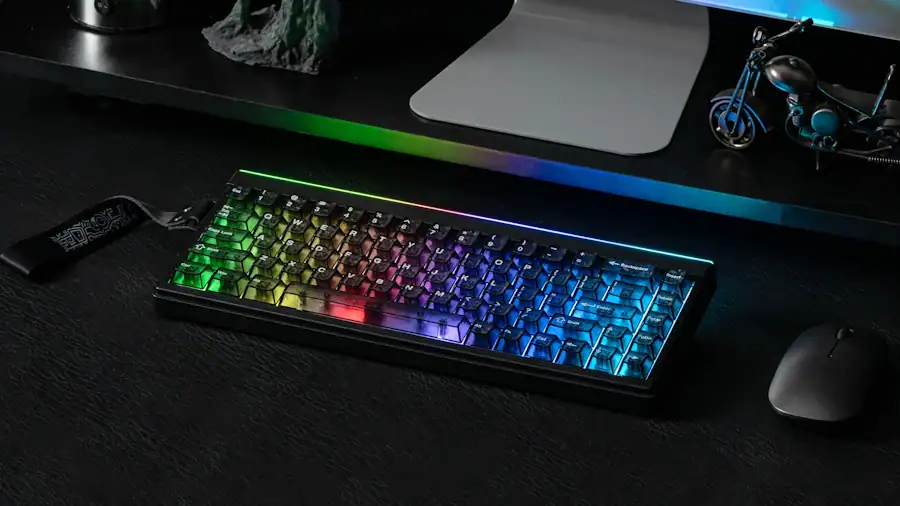
The idea here is clear: maximum desk clearance without stripping away the essentials. And while that sounds like marketing speak, in practice it’s actually true. I had more space for my mouse, more freedom to move things around, and less clutter overall… well, if you ask my wife, there is still too much clutter, but it’s helping. It’s the kind of keyboard that doesn’t demand attention but quietly improves the way you work or play.
Understanding the Membrane Build
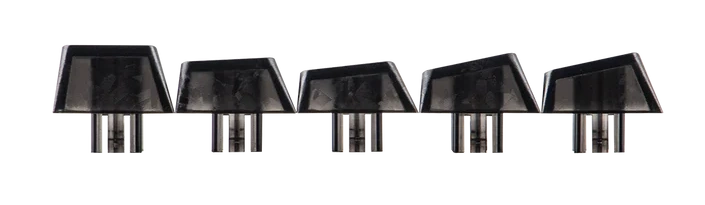
The MechLands Halo68 is a bit of a curveball. You’d expect a brand like MechLands, known for enthusiast mechanical gear, to stick with switches and springs. Instead, they’ve gone with a silicone membrane design. It’s not a downgrade exactly, but it does change the way you think about the keyboard.
Here’s how it works in practice. Instead of each key having its own little mechanical system: stem, spring, contact leaf. The MechLands Halo68 uses a single sheet of silicone domes laid over the circuit board. Press a key, the dome collapses, and the circuit registers the input. It’s simple, efficient, and very quiet.
The typing feel is soft, cushioned, almost pillowy. Mechanical fans might miss the sharp bump or thock, but after a few hours I noticed my fingers felt less strained. There’s something to be said for that. It’s not exciting, but it’s comfortable.
Acoustically, the MechLands Halo68 is almost silent. No clack, no thock, just a muted press that barely registers in a room. I tested it late at night with someone sleeping nearby, and they didn’t notice a thing. For streamers or students in shared spaces, that’s a real advantage.
Of course, the trade‑off is modding. Mechanical boards invite tinkering; swapping switches, lubing stems, experimenting with plates. The MechLands Halo68 doesn’t. The membrane sheet is fixed, so what you buy is what you get. That might frustrate hobbyists (Looking at you, Editor Dez), but for anyone who just wants a keyboard that works out of the box, it’s refreshingly straightforward.
Design & Build Quality
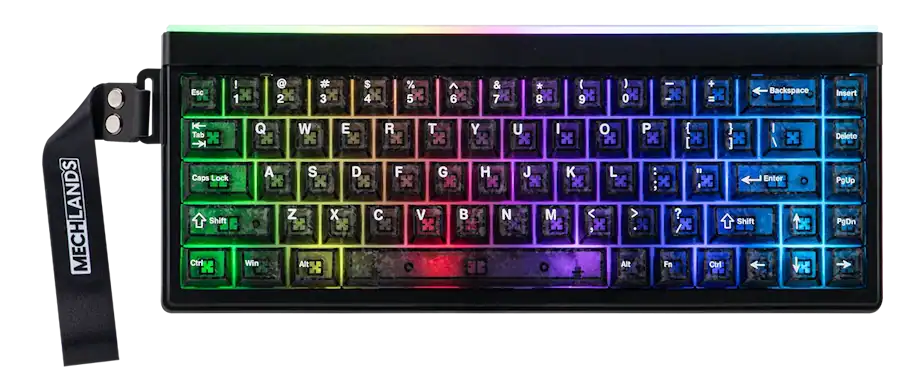
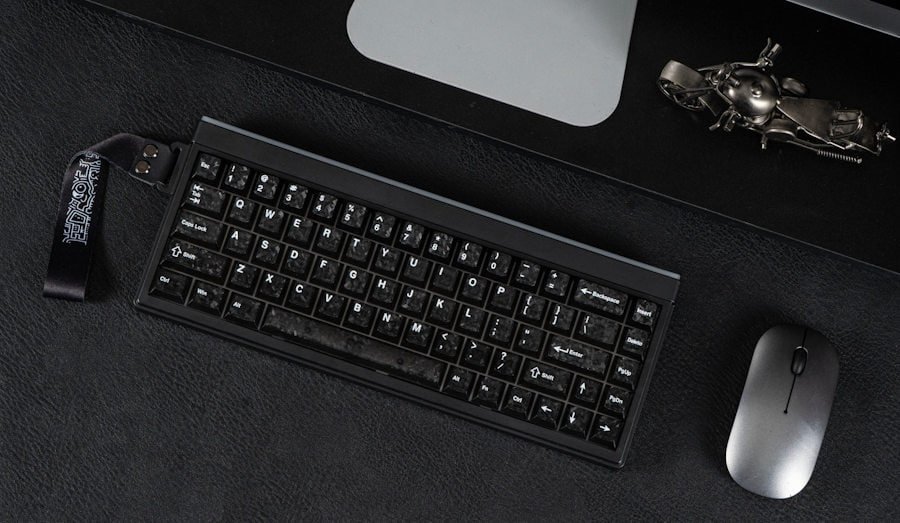
The MechLands Halo68 makes a strong first impression. The RGB lighting isn’t just backlit keys; there’s a whole light box effect that spills across the desk in a way that feels deliberate. It’s the kind of glow you notice when you walk back into the room, even if the keyboard isn’t the focus. The carbon‑fiber styled keycaps add a bit of personality too. They’re not premium in the strictest sense, but they do give the board a distinctive look.
The side strap is an unusual touch. At first I wasn’t sure if I’d ever use it, but after carrying the MechLands Halo68 between rooms a few times, I realised it’s actually practical. It feels like the designers were thinking about portability beyond just weight.
Speaking of weight, the chassis is very light. That’s good if you’re tossing it into a backpack, but it does mean the board flexes a little under pressure. I pressed down across the deck and felt it give slightly. Some people might find that cushioning pleasant; others might see it as a lack of rigidity. Personally, I didn’t mind it for casual typing, though I wouldn’t call it reassuring.
Durability is where the trade‑off becomes clearer. The plastic holds up fine for everyday use, but I wouldn’t want to drop it on a hard floor. It feels like the kind of keyboard that benefits from a sleeve or case if you’re travelling often. Not fragile exactly, but not built to take knocks either.
The design feels intentional but lightweight. It’s portable, visually striking, and comfortable enough for daily use. Just don’t expect the solid, anchored feel of aluminium or heavy polycarbonate boards. The MechLands Halo68 is more about mobility and style than brute strength.
Software & Customisation
Configuring the MechLands Halo68 feels a little old‑school. Instead of opening a browser and instantly remapping keys like you can with VIA or QMK boards, you’re downloading a Windows driver, installing it, and then working through a desktop interface. It’s straightforward enough, but I did catch myself thinking about how much easier web‑based configurators have become.
The driver itself does the basics: remapping, macros, lighting adjustments. It saves layouts directly to the keyboard’s onboard memory, which is handy because once you’ve set things up, you don’t have to keep the software running in the background unless you’re using more dynamic features. That said, I noticed that certain lighting profiles only stayed active if the program was still open. It’s not a deal‑breaker, but it does feel slightly dated compared to boards that write everything straight to firmware.
Cross‑platform support is where the MechLands Halo68 shows its limits. On Windows, everything works as expected. On macOS, you can connect via Bluetooth or 2.4GHz and type normally, but deeper customisation isn’t really accessible. I tried pairing it with a MacBook, and while the typing experience was fine, I couldn’t adjust macros or remap keys without going back to a Windows machine. That’s something to keep in mind if you’re not primarily a Windows user.
The upside is that once you’ve gone through the setup, the keyboard remembers your layouts. I tested switching between devices: a desktop, a laptop, even a tablet, and the MechLands Halo68 carried its saved profile without issue. It’s reliable in that sense, even if the process of getting there isn’t as seamless as modern web‑based tools.
Typing Experience & Acoustic Profile
Typing on the MechLands Halo68 feels different from what most people expect when they hear the word “gaming keyboard.” The silicone membrane structure gives every press a soft, cushioned landing. It’s quiet enough that you almost forget the sound of typing is there at all. I tried it late at night with the TV on in the background, and the keystrokes blended into the room so seamlessly that I barely noticed them myself.
The silence really stands out. Mechanical boards tend to have their own personalities, or their own racket, as my wife likes to call it. The sharp click of blues, the muted thock of linears, even the occasional rattle from stabilisers if you’re unlucky. The MechLands Halo68 doesn’t bring any of that. Instead, it leans into a soft, creamy profile that makes typing feel private. No echo, no resonance, just a gentle press and release.
In terms of response, it’s gentle. If you’re coming from heavy linear switches or crisp tactiles, the MechLands Halo68 might feel almost too forgiving at first. I caught myself pressing harder than necessary, expecting a firmer bottom‑out that never came. After a while, though, I realised the lighter touch reduced fatigue. My fingers didn’t ache after long sessions, which is something I’ve noticed with stiffer mechanical boards.
It’s not perfect. The lack of tactile snap means you don’t get that satisfying rhythm some people chase. I sometimes miss the sense of momentum that comes with mechanical switches, where each press feels like part of a larger cadence. Here, the typing experience is calmer, slower, maybe even more deliberate. That could be a strength or a weakness depending on your habits.
MechLands Halo68 ’s acoustic profile is almost invisible, and that’s the point. It’s designed for environments where noise is unwelcome, whether that’s a shared office, a dorm room, or a streaming setup where microphones pick up everything. It doesn’t demand attention, but it does make typing feel softer, quieter, and a little more relaxed.
Connectivity & Features
The MechLands Halo68 doesn’t hold back when it comes to connectivity. Tri‑mode wireless is the headline here: Bluetooth 5.0 for everyday pairing, 2.4GHz for gaming sessions where latency matters, and USB‑C when you want the reassurance of a wired link, or you forget to charge it… again. Switching between them is quick, almost casual; I swapped from my laptop to a tablet mid‑typing without breaking rhythm. That kind of flexibility is easy to take for granted until you’ve used a keyboard that makes device switching feel clunky.
Latency is impressively low on the 2.4GHz connection. The 1000Hz polling rate translates to a 1ms response, which is about as fast as you’d reasonably need for gaming. I tested it in a few fast‑paced titles and never felt like the keyboard was lagging behind. Bluetooth, of course, isn’t quite as sharp, but for browsing or writing it’s perfectly fine.
Battery life is a mixed bag. The 2000mAh cell can stretch to 200 hours if you disable lighting, which sounds great on paper. With RGB active, though, you’re looking at closer to 10 hours. I found myself recharging more often than expected because I liked the glow too much to turn it off. It’s a trade‑off: ambience versus endurance.
The layout is compact but practical. The 68‑key ANSI design keeps arrow keys and navigation shortcuts, which makes it feel less restrictive than some smaller boards. I didn’t have to relearn muscle memory for everyday shortcuts, and the extra mouse space was noticeable.
Ideal Target Market: Who Is the Halo68 For?
The MechLands Halo68 sits in a strange little corner of the keyboard world. It’s not trying to compete with heavy aluminium builds or hot‑swappable mechanical boards, but it isn’t a throwaway budget keyboard either. It’s somewhere in between, and that makes its audience a bit more specific.
Late‑night gamers and streamers are probably the clearest fit. The near‑silent keystrokes mean you can play without worrying about microphone bleed or waking someone in the next room. I tested it during a voice call, and nobody noticed I was typing. That kind of discretion is rare in gaming peripherals.
Students and hybrid workers will also find it appealing. The compact 65% layout saves bag space, and the strap makes it easy to carry around. I took it to a café once, and it felt light enough that I didn’t think twice about packing it. For anyone moving between home, campus, and shared workspaces, that portability matters more than you realise.
Then there are setup enthusiasts who want something visually striking without spending much. The RGB lighting and side glow box give the MechLands Halo68 a premium look, even though the price sits comfortably under fifty dollars. It’s the kind of board that makes a desk feel more alive without draining your wallet.
Of course, not everyone will be satisfied. Mechanical purists who crave tactile bumps, hot‑swaps, or the acoustic “thock” will find the MechLands Halo68 too soft, too fixed. And if you’re someone who prefers a heavy, rigid chassis that anchors itself to the desk, the lightweight plastic will feel flimsy.
So who is it really for? People who value silence, portability, and style over raw mechanical performance. It’s a keyboard that fits into everyday life quietly, almost invisibly, but still manages to look good while doing it.
Pros & Cons
Pros
- The compact footprint and built‑in hand strap make the MechLands Halo68 genuinely portable. It’s easy to carry, easy to set down, and doesn’t clutter the desk.
- The silicone membrane delivers extremely quiet keystrokes, which is perfect for noise‑sensitive spaces like dorms, offices, or late‑night gaming setups.
- Tri‑mode connectivity — 2.4GHz, Bluetooth, and USB‑C — feels versatile and reliable, with low latency that holds up well in fast‑paced use.
- Vibrant RGB lighting and the ambient side glow box add personality to a setup without feeling overdone.
Cons
- The lightweight plastic housing flexes under pressure, which some users may find distracting or less reassuring than heavier builds.
- Durability is limited; the chassis feels vulnerable to drops or hard impacts, so travel requires a bit of care.
- The fixed membrane structure lacks the crisp, hot‑swappable tactile feedback that mechanical switch purists expect.
- Battery life drops quickly with full RGB enabled, averaging around ten hours before needing a recharge.
Final Thoughts
The MechLands Halo68 is a curious mix of practicality and compromise. It’s light, portable, and impressively quiet, which makes it easy to recommend for students, late‑night gamers, or anyone who values silence over mechanical flair. The tri‑mode connectivity is genuinely versatile, and the RGB lighting adds a bit of personality without feeling excessive.
At the same time, the lightweight plastic build and fixed membrane design mean it won’t satisfy mechanical purists or those who want a heavy, rigid board that feels anchored to the desk. Battery life with RGB on is shorter than I’d like, and the software feels dated compared to modern web‑based configurators.
Still, I think the MechLands Halo68 succeeds at what it sets out to do. It’s affordable, portable, and quiet, three qualities that don’t often come together in one package. If you’re looking for a keyboard that slips easily into everyday life and doesn’t demand constant attention, the MechLands Halo68 might be exactly the kind of understated companion you need.


Recent Comments