
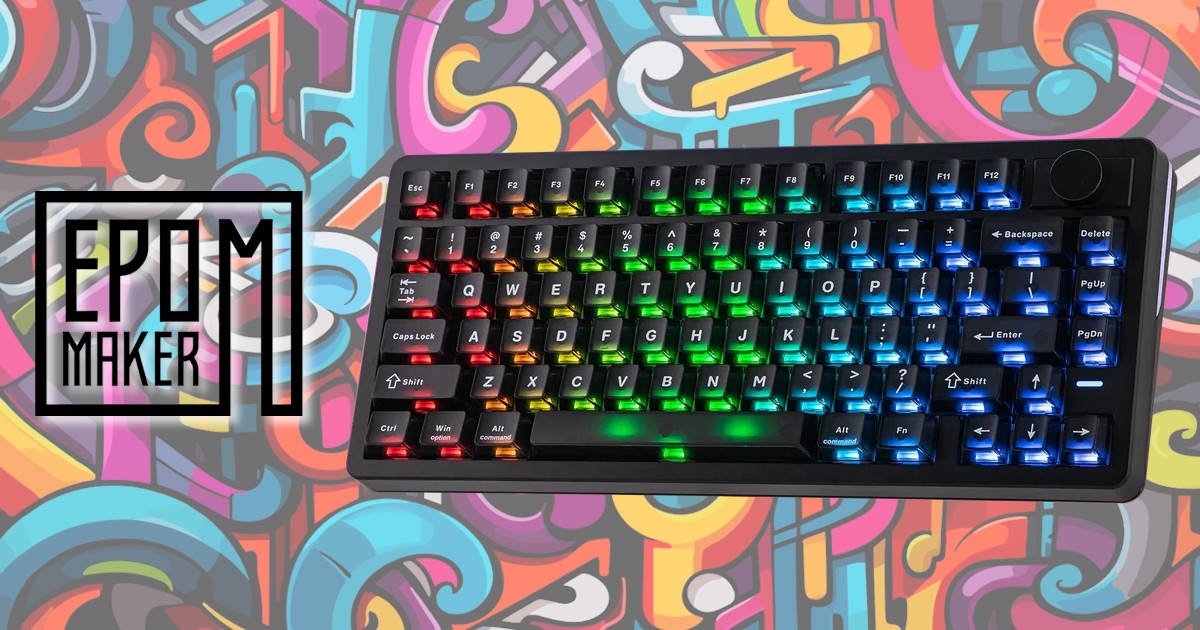
Magnetic mechanical keyboards have taken the gaming world by storm, but they often attract a familiar criticism: they’re fast and feature-packed, yet can feel overly focused on competitive gaming at the expense of everyday usability. EPOMAKER looks to challenge that perception with the EPOMAKER HE75 V2. Priced aggressively at $89.99 USD (around $138 AUD), this compact 75% keyboard combines modern Hall Effect technology with a feature set aimed at both gamers and everyday users.
The 75% layout has also been a great fit for my day-to-day workflow. I’ve always preferred smaller keyboards, especially when I’m writing or editing. Everything feels a little more focused, and there’s noticeably more room on the desk. Sure, I occasionally miss having a numpad when I’m buried in spreadsheets, but those moments are becoming increasingly rare. For most tasks, the EPOMAKER HE75 V2 includes everything I need, and throughout my time with it, I never felt like I was sacrificing functionality for a smaller footprint.
Design & Layout: The Workflow Sweet Spot
The EPOMAKER HE75 V2 makes a strong first impression. Straight out of the box, it feels reassuringly solid, with none of the creaking or flex that can sometimes plague keyboards in this price range. It has a substantial feel without becoming unnecessarily heavy, striking a nice balance between portability and durability.
EPOMAKER has opted for a 75% layout, and for me, it’s one of the most practical form factors available. It retains a dedicated Function row and essential navigation keys while freeing up valuable desk space. Whether you’re triggering macros in a game, navigating documents, or bouncing between spreadsheets, everything remains within easy reach. The multifunction knob is a thoughtful addition too, and can be swapped out for Insert and Print Screen keys if that better suits your workflow.
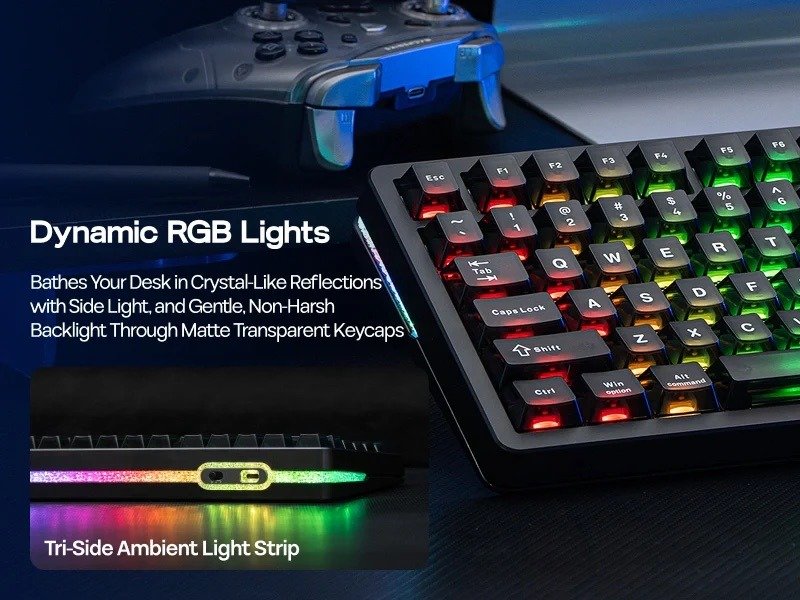
Visually, the EPOMAKER HE75 V2 manages to stand out without looking overdesigned. The frosted transparent polycarbonate keycaps give the keyboard a distinctive appearance while diffusing the RGB lighting into a soft, even glow. They also do a surprisingly good job of hiding fingerprints, something anyone with darker keycaps can appreciate. Running around the chassis is a tri-side ambient light strip that adds a subtle layer of illumination, creating a clean, modern look that feels more refined than flashy. The overall result is a keyboard that feels equally at home on a gaming desk, in a home office, or sitting beside a laptop in a creative workspace.
Tactile Touch & Subtle Acoustics
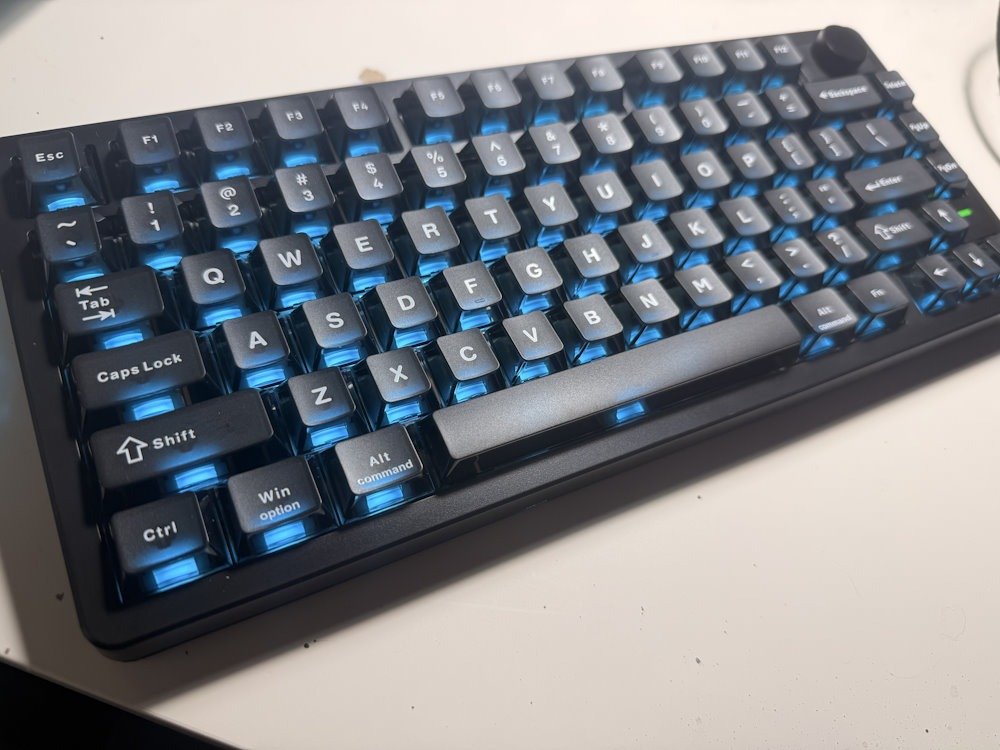
Where the EPOMAKER HE75 V2 truly excels is in its physical refinement. The transparent keycaps feature a finger-hugging curve, paired with a gorgeous, slightly matte finish that feels fantastic under the fingertips. They offer excellent grip while doing an impressive job of resisting grease and fingerprints, helping the keyboard maintain its clean appearance even after extended use.
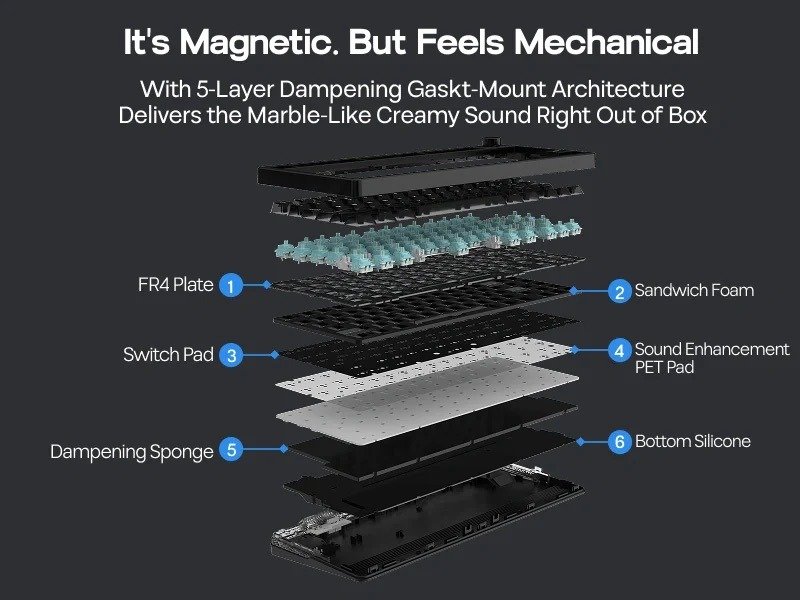
Acoustically, EPOMAKER has also struck an excellent balance. Thanks to its premium 5-layer gasket-mounted structure and factory-lubed switches, the keyboard delivers a subtle and satisfying mechanical sound profile. Each keystroke provides the crisp feedback enthusiasts enjoy, without ever becoming jarring, overly loud, or metallic.
What impressed me most is how controlled the overall sound feels. There’s enough character to remind you that you’re using a mechanical keyboard, but it never dominates the room. Whether you’re working in a shared office, writing late into the evening, or squeezing in a gaming session after everyone else has gone to bed, the EPOMAKER HE75 V2 remains pleasant to use and easy to live with.
A Dream for Cross-Platform Creators
For those who regularly bounce between platforms, the EPOMAKER HE75 V2 is incredibly accommodating. The keycaps feature dual legends out of the box, clearly displaying WIN / Option and ALT / Command shortcuts. Paired with a robust web-based driver that works seamlessly across both Windows and macOS, remapping keys, creating macros, and adjusting layers is refreshingly straightforward. Better still, there’s no need to install additional software, making the whole experience feel far more streamlined.
In the top-right corner sits a tactile control knob, which is perfect for quick volume adjustments during gaming, work, or media playback. Its real value, however, comes from its customisability. If you spend time in creative applications, the knob can be assigned to a variety of functions, such as scrubbing through video timelines, zooming in and out of projects, or adjusting brush sizes in Photoshop and similar applications.
For users who prefer additional shortcuts over a rotary control, the modular design offers another clever option. The knob can be removed entirely and replaced with two additional programmable macro keys, allowing you to tailor the keyboard to suit your workflow rather than forcing your workflow to adapt to the keyboard.
Performance: The Magic of Magnetic Switches
Underneath the clear caps lie the EPOMAKER Creamy Jade Hall Effect switches. Unlike traditional mechanical switches, which rely on physical metal contacts to register a keystroke, Hall Effect switches use magnets and sensors to measure key travel with remarkable precision.
For typing enthusiasts, these switches are a genuine treat. They offer a smooth, consistent keypress with a unique pressure curve that helps reduce finger fatigue during long writing sessions. After spending hours working on reviews, emails, and general day-to-day tasks, I found them exceptionally comfortable to use.
For gamers, however, this magnetic technology unlocks a whole new level of customisation and performance:
- Dual 8K Polling & 128KHz Scan Rate: Delivers near-zero latency input registration, with response times as low as 0.1ms in both wired and 2.4GHz wireless modes.
- 0.005mm Rapid Trigger Adjustability: Actuation can be adjusted anywhere from a deeper, typo-resistant 3.3mm for productivity tasks down to an incredibly sensitive 0.1mm for competitive gaming.
- Advanced Gaming Features: Built-in support for SOCD (Simultaneous Opposing Cardinal Directions) allows for faster, cleaner directional inputs in FPS titles, while Dynamic Keystrokes (DKS) enable multiple actions to be assigned to a single key based on how far it is pressed.
What I appreciate most is that these features don’t feel overwhelming. You can spend hours tweaking every millimetre of actuation and creating complex macros, or simply plug the keyboard in and enjoy the benefits of a fast, responsive switch. The flexibility is there if you want it, but it never feels mandatory.
Connectivity & Endurance
Cutting the cord is painless thanks to the EPOMAKER HE75 V2’s triple-mode connectivity, with support for Bluetooth 5.0, 2.4GHz wireless, and wired USB-C operation. It can be paired with up to three devices via Bluetooth, making it easy to switch between a desktop, laptop, tablet, or any combination that suits your setup. During testing, moving between devices was quick and straightforward, which is particularly useful if your work and gaming setups live on different machines.
Powering everything is a sizeable 8,000mAh battery, and the endurance on offer is impressive. Even with the RGB lighting enabled, the keyboard comfortably pushes beyond 20 hours of continuous use. In day-to-day use, that translates to spending more time working, gaming, or creating, and far less time reaching for a charging cable.
Perhaps the biggest compliment I can give the battery life is that I rarely found myself thinking about it. The EPOMAKER HE75 V2 simply continued doing its job in the background, which is exactly what you want from a wireless keyboard.
The Verdict: A Versatile Powerhouse
The EPOMAKER HE75 V2 successfully bridges the gap between high-performance gaming hardware and everyday productivity. By combining a solid build, thoughtful cross-platform compatibility, a versatile modular knob, and a surprisingly refined typing experience, it avoids being pigeonholed as a keyboard built solely for gamers.
What impressed me most throughout the review period was how adaptable it felt. During the day, it was equally comfortable handling spreadsheets, emails, and long writing sessions. In the evening, a quick switch of profiles unlocked all the performance-focused features that make Hall Effect keyboards so appealing to competitive players. That flexibility gives the EPOMAKER HE75 V2 a broader appeal than many gaming-focused boards in this category.
The Hall Effect switches deliver the responsiveness and customisation enthusiasts are looking for, while the well-tuned acoustics and comfortable keycaps make it a keyboard you’ll genuinely enjoy using for hours at a time. Add in excellent battery life, multiple connectivity options, and a software experience that works seamlessly across Windows and macOS, and the overall package becomes very difficult to fault at this price point.
At just under $90 USD, the EPOMAKER HE75 V2 consistently feels like you’re getting more keyboard than the price tag suggests. There are certainly more expensive Hall Effect keyboards on the market with additional premium features, but EPOMAKER has done an excellent job identifying the features that matter most and delivering them in a well-rounded package.
Whether you’re chasing faster reaction times in competitive games, looking for a highly customisable typing experience, or simply want a compact keyboard that can comfortably handle both work and play, the EPOMAKER HE75 V2 is an easy recommendation. After several weeks of daily use, it has firmly earned its place on my desk, and that’s probably the strongest endorsement I can give it.
The Hall Effect, Effect…
Traditional mechanical switches have relied on the same basic design for decades: when you press a key, a plastic stem pushes two metal leaves together, completing an electrical circuit to register a keystroke.
Hall Effect (HE) magnetic switches throw out physical contacts entirely, relying instead on the physics of magnetism.
How Hall Effect Switches Work
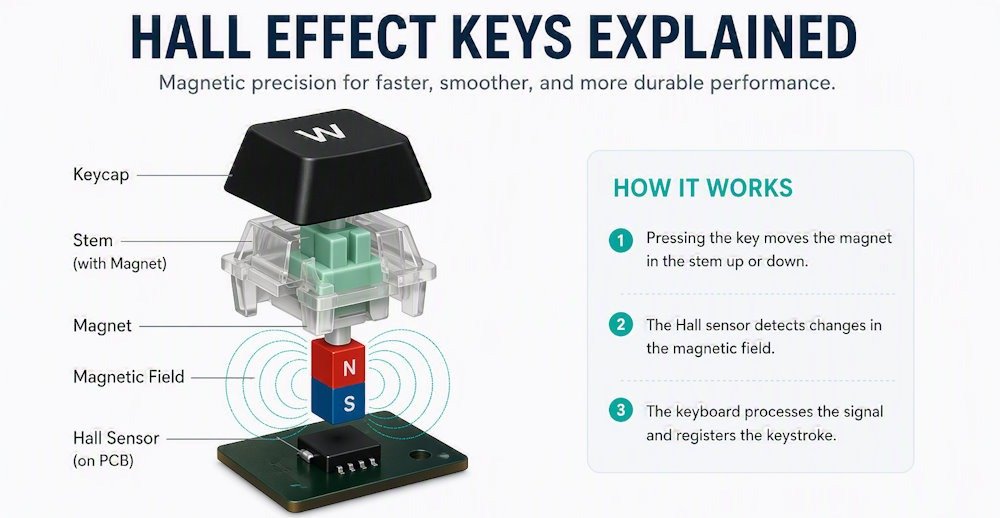
The technology is based on the Hall Effect, a physics principle discovered by Edwin Hall in 1879. Inside every HE switch, there is a small permanent magnet embedded in the moving stem, and a tiny sensor (a Hall sensor) soldered directly onto the keyboard’s printed circuit board (PCB) underneath.
Here is what happens when you press a key:
- The Descent: As you push the key down, the magnet moves closer to the sensor on the PCB.
- The Measurement: The sensor continuously measures the strength of the magnetic field. As the magnet nears, the voltage output changes.
- The Registration: Because the keyboard’s microprocessor constantly tracks this shifting voltage, it knows exactly how far down the key has traveled at any given millisecond.
Instead of an on/off switch, a Hall Effect switch functions more like an accelerator pedal on a car.
Specific Advantages for Gaming
For competitive gaming, particularly fast-paced first-person shooters or rhythm games, magnetic switches offer huge performance leaps that traditional switches physically cannot match.
- Adjustable Actuation Points: With traditional switches, the point where a key registers (actuation) is physically fixed, usually around 2.0mm. With HE switches, you can use software to change this dynamically. You can set a hyper-sensitive actuation point of 0.1mm for instantaneous inputs, or push it down to 3.5mm to prevent accidental presses.
- Rapid Trigger (RT): In a standard switch, after you press a key, you must let it rise past a fixed “reset point” before you can press it again. Rapid Trigger resets the key the exact micro-moment it begins moving upward, even by 0.1mm. This allows for incredibly fast, repeated inputs and flawless “counter-strafing” in games like Valorant or Counter-Strike 2, where stopping instantly dictates your shooting accuracy.
- Dynamic Keystrokes (DKS): Because the keyboard knows the exact depth of the press, you can bind multiple actions to a single key. For example, pressing a key down 1mm could make your character walk, while pressing it down to 3.5mm triggers a full sprint.
Specific Advantages for Typing
While gaming gets the most marketing attention, the unique characteristics of magnetic switches offer a stellar experience for writers, coders, and heavy typists.
- Ultra-Smooth Pressure Curve: Because there are no metal leaves rubbing against the stem inside the switch housing, there is no inherent friction or scratchiness. The travel is completely linear and smooth, creating a unique, fluid pressure that reduces finger strain over long writing sessions.
- Tailored Actuation for Typing: If you have a heavy hand and find yourself making frequent typos on light gaming switches, you can globally adjust your keyboard’s actuation point to be deeper (e.g., 2.5mm to 3.0mm). This ensures a key is only registered when you intentionally press it down.
- Exceptional Durability: Traditional switches eventually fail when the metal contacts corrode, bend, or lose elasticity (usually rated for 50 to 100 million presses). Hall Effect switches have no degrading contacts, often boasting a lifespan of 100 to 150 million presses. If a switch does break, the PCB itself remains untouched, making repairs as simple as popping in a fresh plastic housing.





Recent Comments