
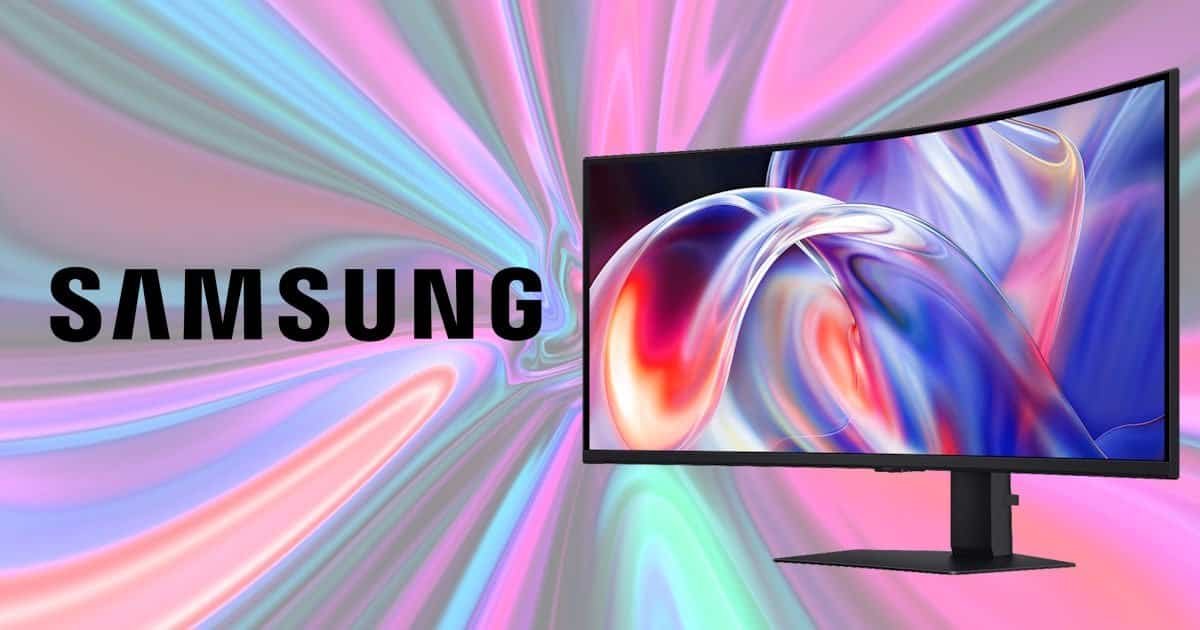
There was a time when I thought a dual‑monitor setup was the answer to every productivity problem. Need more space? Add another screen. Need even more space? Add a third… ok, for me this hasn’t happened yet.
It felt logical back then. Almost inevitable. But ultrawide displays started creeping into the mainstream, and slowly my opinion shifted. Not completely; there are still moments where multiple displays make perfect sense, but after spending time with Samsung ViewFinity S8 S85TH 40″ 5K2K WUHD Monitor, I found myself wondering why I’d ever go back.
This thing is enormous.
Not intimidatingly enormous, although the box certainly tries to convince you otherwise. It’s more that once you sit down in front of it and start working, everything suddenly feels like it has room to breathe. Documents, spreadsheets, editing timelines, browser windows, Teams chats, the twenty tabs you promised yourself you’d close weeks ago, they all fit without jostling for space. And somehow it never feels cramped.
There was a funny moment when I first unboxed the Samsung ViewFinity S8 S85TH 40″ 5K2K WUHD Monitor. I glanced over at my TV, my perfectly normal living‑room TV, and realised this monitor is only two inches smaller. Two inches. I just stood there for a second trying to decide whether that meant I needed a bigger TV or whether my idea of what counts as a “normal monitor” had quietly drifted into absurd territory. I still haven’t settled on an answer. Maybe both are true. Maybe neither. It’s one of those thoughts you laugh at and then immediately forget until someone asks how big the screen is, which happened twice during a work meeting while sharing my screen.
But once it’s on the desk, the size stops being a novelty and starts becoming… useful. Natural, even. The space stretches out in front of you, and before long you’re arranging windows in ways you didn’t realise you’d been wanting to. It’s a strange kind of comfort, like discovering your desk had been holding its breath this whole time and finally exhaled.
A Workspace That Keeps Going
The headline feature is obviously the display itself… 40 inches of display!
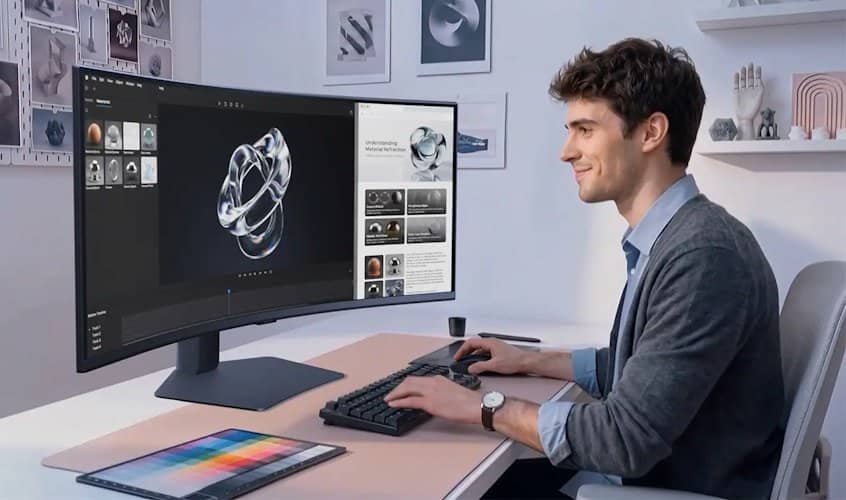
The Samsung ViewFinity S8 S85TH 40″ 5K2K WUHD Monitor arrives with a 40‑inch curved panel running at 5120 × 2160 in a 21:9 aspect ratio, and that’s… well, that’s a lot of pixels stretched across a lot of screen. The 1000R curve pulls everything into view surprisingly well, especially once you start arranging multiple applications side by side. It’s almost like the screen leans in a little, trying to help.
The first few minutes felt slightly overwhelming. I remember sitting there thinking, this might be too much, which is weird to say, as I have dual 27-inch curved monitors. Then my brain adjusted. It’s funny how quickly that happens. By the end of the day I was treating three applications side by side as completely normal, almost casual. Going back to a standard 27‑inch monitor afterwards felt strangely restrictive. Not terrible. Just… smaller than I remembered, like someone had quietly shrunk it overnight.
For productivity, the Samsung ViewFinity S8 S85TH 40″ 5K2K WUHD Monitor makes a very strong argument for itself.
Video editors gain extra timeline space. Not just a little extra either, but miles of it. Developers can comfortably keep code, documentation and output windows visible at the same time. Spreadsheet users may never find the edge of the screen, and honestly, that alone is worth its weight in gold. Given how much time I’ve spent buried in spreadsheets lately, it quickly became one of my favourite things about the monitor.
And when I say “never”, I mean almost never. I did try once, dragging a spreadsheet as far as it would go, and somewhere along the way I realised I wasn’t actually working anymore. I was just testing the limits out of pure curiosity.
There’s also an unexpected sense of freedom that comes with having this much screen real estate. You stop thinking about window management and start focusing on what you’re actually trying to get done. It’s subtle, but it genuinely changes the rhythm of your workday. I didn’t expect that, and I don’t think most people would.
I also found myself feeling more focused. Instead of spreading applications across multiple displays, I tended to maximise whatever I was working on and just get stuck into it. The usual distractions seemed to disappear. There wasn’t a second screen with YouTube or random tabs competing for my attention, yet I still could if I wanted to. It’s about having options, and there are so many options with a screen this massive! And not having a bezel sitting directly in front of me was a surprisingly nice bonus. It all combined to create a cleaner, more immersive workspace that helped me stay on task… or doesn’t. The choice is mine!
And the workspace just keeps going. It stretches out in front of you in a way that feels generous rather than excessive. Maybe that’s the real trick here: the size isn’t just big for the sake of being, it’s usable. It gives you room without demanding attention, which is harder to pull off than it sounds.
Image Quality That Prioritises Work
Samsung uses a Vertical Alignment or VA panel rather than OLED, and I think that’s the right decision for this particular monitor. The Samsung ViewFinity S8 S85TH 40″ 5K2K WUHD Monitor isn’t chasing cinematic perfection or deep‑black drama. It’s built for clarity, consistency and long hours of actual work, which is a very different priority.
The colours look excellent, helped along by Samsung’s wide colour gamut coverage, around 98% DCI‑P3 and full sRGB, if you like numbers. Text appears sharp thanks to the 5120 × 2160 resolution stretched across 40 inches, which gives you a pixel density that feels comfortably crisp without drifting into the hyper‑dense territory of smaller 4K screens. Contrast is strong for a VA panel, often hovering around the 3000:1 range, which is more than enough for office tasks, content creation and general daily use.
HDR10+ support adds a bit of extra depth when viewing compatible content. It’s not trying to compete with OLED’s pixel‑level lighting control, and honestly, it doesn’t need to. This isn’t the sort of display people buy exclusively for HDR movies. It’s more like a quiet bonus, something you notice occasionally when a highlight pops a little more than expected.
It’s a workhorse first… Fortunately, it’s a very good‑looking workhorse.
Photos appeared vibrant without drifting into that overly saturated, artificially boosted territory some panels fall into. Documents stayed easy to read for long periods, which is something I appreciate more than I probably should. Even after several hours of writing, editing and jumping between dozens of windows, I never felt like I was fighting the display. That’s a subtle thing, but it matters. A productivity monitor shouldn’t demand attention. It should just sit there and help.
One technical detail I didn’t expect to appreciate as much as I did was the uniformity. Large panels sometimes struggle with brightness consistency across the screen, especially at the edges, but this one stayed impressively even. No distracting dim patches. No odd colour shifts. Just a clean, stable canvas.
That’s probably one of the highest compliments I can give a screen like this.
The best ones eventually disappear from your conscious thought. You stop analysing the colours or the sharpness or the contrast. You just work. And every now and then, you catch yourself thinking, this looks really nice, almost as an afterthought. I had that moment a few times, usually while editing photos or videos, and each time it reminded me that the panel was doing its job without trying to impress me.
There’s something oddly comforting about that. A monitor that doesn’t shout for attention tends to make the day feel smoother. Maybe that’s why the Samsung ViewFinity S8 S85TH 40″ 5K2K WUHD Monitor feels so well‑suited to long work sessions. It’s visually strong without being dramatic, and that balance is harder to achieve than it sounds.
144Hz Makes More Difference Than I Expected
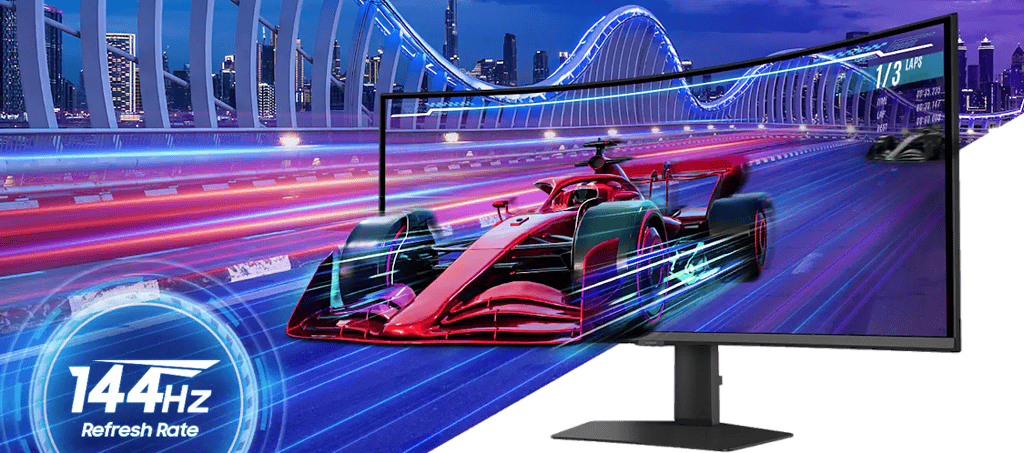
I wasn’t expecting refresh rate to be one of my favourite features. Honestly, when I first set up the Samsung ViewFinity S8 S85TH 40″ 5K2K WUHD Monitor, I thought the size and resolution would steal the spotlight and the refresh rate to be good but not amazing. Refresh rate felt like one of those specs you appreciate in passing and then forget about.
Yet here we are.
The Samsung ViewFinity S8 S85TH 40″ 5K2K WUHD Monitor supports up to 144Hz, and it immediately makes everyday interactions feel smoother. Scrolling through websites, moving windows around the desktop, navigating large spreadsheets… cheekily playing WOW on your lunch break, all of it feels more fluid than it does on traditional 60Hz office monitors or my current 75Hz ones. It’s not dramatic at first. More like a quiet improvement you notice in the corner of your mind.
It’s subtle at the beginning. After a few days, it becomes very noticeable, by not being noticeable at all. You switch back to 75Hz and wonder why everything suddenly feels slightly sluggish, as if your computer aged five years overnight. I had that moment when I moved back to my older monitor for a day, and I caught myself blinking at the screen like something was wrong. Nothing was wrong. I’d just become used to the extra smoothness.
Technically speaking, the jump from 75Hz to 144Hz reduces perceived motion blur and improves input latency, even in simple desktop tasks. It’s not just for gaming, although gamers would absolutely notice the difference. Window animations feel cleaner. Cursor movement feels more precise. Even dragging files across the screen has a kind of softness to it that’s hard to describe until you experience it.
I’m not claiming this monitor is a gaming display masquerading as a productivity screen. It isn’t. Samsung clearly designed it for professional users. The pixel response times aren’t tuned for esports, and the VA panel isn’t chasing OLED‑level motion clarity. Still, the extra refresh rate adds a layer of responsiveness that improves the experience far more than I initially expected.
It’s one of those features you don’t think you need until you have it. And once you do, it quietly becomes part of your workflow, almost like your eyes relax a little because everything moves the way you expect it to.
Thunderbolt 5 Is The Star Of The Connectivity Story
This monitor might have the most useful collection of ports I’ve seen on a productivity display recently. The Samsung ViewFinity S8 S85TH 40″ 5K2K WUHD Monitor doesn’t just throw ports at you for the sake of a spec sheet; the layout actually feels intentional, almost like someone sat down and thought about how a desk behaves on a busy workday.
Thunderbolt 5 support is the headline here. It allows for high‑speed data transfers, display connectivity and charging through a single cable. Up to 140W power delivery means many laptops can be powered directly from the monitor without needing a separate charger sitting on the desk. That’s genuinely convenient. It’s the kind of convenience you don’t appreciate until you realise your charger hasn’t moved in three days because you haven’t needed it.
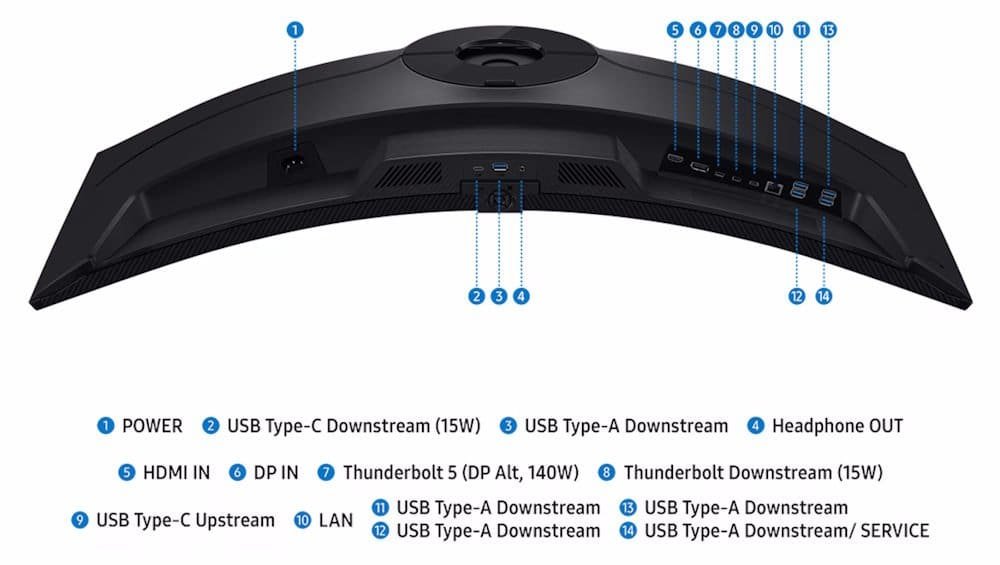
Thunderbolt 5 also brings some technical perks that don’t always get mentioned. The bandwidth jump, up to 80Gbps bi‑directional, with 120Gbps available for display‑heavy workloads, means you can run high‑resolution output, fast external storage and network traffic without the usual bottlenecks. It’s overkill for some people, sure, but it’s nice knowing the ceiling is high enough that you’re unlikely to hit it.
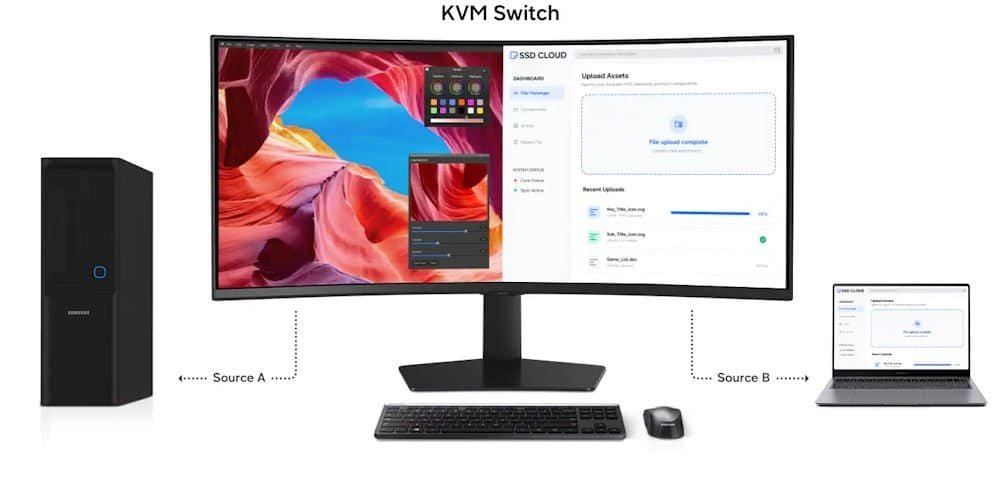
There’s also a built‑in KVM switch, Ethernet connectivity, multiple USB ports and support for Picture‑in‑Picture and Picture‑by‑Picture modes. The KVM alone saves a surprising amount of desk space. Ethernet on the monitor feels oddly old‑school at first, but once you plug in and realise your laptop no longer needs a dongle, it starts to make sense. And the USB ports, well, they’re just USB ports, but they’re placed in a way that doesn’t make you contort your wrist to reach them.
I know connectivity discussions aren’t particularly exciting.
Nobody opens a review hoping to read hundreds of words about USB ports (348 words, if anyone is counting).
But when everything is plugged into one central hub and works exactly as expected every day, you begin to appreciate how much thought has gone into the design. There’s a quiet satisfaction in knowing that your keyboard, mouse, webcam, SSD, laptop and network are all running through a single display without complaint. It’s tidy. It’s predictable. It’s the kind of thing that makes your desk feel calmer, even if you don’t consciously notice it.
And maybe that’s the real charm of the Samsung ViewFinity S8 S85TH 40″ 5K2K WUHD Monitor: the connectivity doesn’t try to impress you. It just works, and it keeps working, which is more valuable than any flashy spec sheet line.
Surprisingly Good For Content Creation
Samsung’s ViewFinity range has always targeted creative professionals, and the Samsung ViewFinity S8 S85TH 40″ 5K2K WUHD Monitor continues that approach without making a big show of it. It doesn’t try to dazzle you with gimmicks. It just quietly gives you the tools you need and lets the work speak for itself.
The combination of high resolution and expansive screen space works wonderfully for photo editing, video editing and design work. Having enough width to keep tool panels visible while maintaining a large preview window feels luxurious. Not the flashy kind of luxurious, more like the kind that makes your workflow feel calmer, smoother, less cramped. You stop shuffling windows around and start focusing on the actual creative part, which is surprisingly rare for a monitor.
Perhaps that’s the best word for the experience. Luxurious.
Not because it’s extravagant, but because it removes friction. You spend less time rearranging windows and more time actually working. That becomes addictive very quickly. It’s the sort of thing you don’t notice until you go back to a smaller screen and suddenly feel like you’re trying to paint through a letterbox.
Technically, the Samsung ViewFinity S8 S85TH 40″ 5K2K WUHD Monitor holds up well too. The 5K2K resolution gives you a dense enough pixel grid to make fine details stand out without introducing the scaling quirks you sometimes get on ultra‑high‑resolution panels. Colour accuracy is strong, around 98% DCI‑P3 and full sRGB, which is more than enough for photo work, web design, and general content creation. It’s not pretending to be a reference‑grade mastering display, but it’s consistent, and consistency is often more valuable day‑to‑day.
The VA panel’s contrast helps when grading footage or adjusting shadows in photos. Blacks aren’t OLED‑deep, but they’re clean and stable, and the uniformity across the 40‑inch panel is better than I expected. No distracting brightness dips at the edges. No weird colour shifts. Just a big, steady canvas.
And there’s something about having this much horizontal space that changes how you work. Video timelines stretch out comfortably. Layer stacks in Photoshop stop feeling cramped. Even simple tasks like comparing two images side by side feel more natural. It’s almost like the monitor encourages you to take your time, which is a strange thing to say about a piece of hardware, but that’s how it felt.
The Samsung ViewFinity S8 S85TH 40″ 5K2K WUHD Monitor doesn’t try to reinvent content creation. It just gives you room, clarity and stability… and sometimes that’s exactly what you need.
A Few Things Worth Considering
No monitor is perfect.
The Samsung ViewFinity S8 S85TH 40″ 5K2K WUHD Monitor uses a VA panel, and while it delivers strong contrast, it doesn’t achieve the deep blacks or pixel‑level lighting control you’d get from an OLED display. Users who are specifically shopping for cinematic content, the kind of people who watch HDR movies with the lights off and analyse shadow detail, may prefer an OLED alternative. It’s not a flaw, just a characteristic of the technology.
HDR performance is decent, though it isn’t attempting to compete with premium HDR‑focused displays. The peak brightness sits in a comfortable range for productivity and light creative work, but it won’t deliver the dramatic highlight punch you’d see on a high‑end mini‑LED or OLED panel. It’s more of a “nice to have” than a headline feature.
The size also deserves consideration.
Forty inches sounds exciting on paper, yet it’s a genuinely large monitor. A physically imposing one, even. Make sure your desk has the depth to accommodate it comfortably. On a shallow desk, the display can feel overwhelming until you adjust your seating position. I had a moment where I leaned back in my chair and thought, maybe I should’ve measured first. It worked out fine, but it’s something worth thinking about.
And yes, you’ll probably spend the first few days dragging windows around simply because you can.
I certainly did. There’s something oddly satisfying about stretching a spreadsheet across what feels like half a wall or lining up three apps side by side just to see how they look. It’s not productive, but it’s fun, and I think everyone goes through that phase.
Technically, the size also means you’ll want to consider viewing distance. Sitting too close can make the edges feel slightly farther away than the centre — not dramatically, but enough that you might adjust your posture a few times before settling into a comfortable rhythm. The 1000R curve helps, though. It pulls the edges inward just enough to keep everything within your natural field of view.
Final Verdict
The Samsung ViewFinity S8 S85TH 40″ 5K2K WUHD Monitor is one of those products that slowly wins you over.
Not because it does one spectacular thing that immediately blows you away, although the sheer size certainly gets your attention. Instead, it’s the combination of everything working together. The massive 5K2K workspace, the crisp image quality, the smooth 144Hz refresh rate, the Thunderbolt 5 connectivity, the KVM switch, the charging capabilities, the seemingly endless room for windows and applications. Individually, those features are impressive. Together, they create something that genuinely improves the experience of sitting down at your desk every day.
What surprised me most was how quickly it became normal.
At first, a 40-inch monitor feels excessive. Ridiculous, even. You spend a few days opening far too many windows, stretching spreadsheets across the screen simply because you can, and finding increasingly creative ways to justify having this much desktop real estate. Then something strange happens. Your brain adapts. The screen stops feeling enormous and starts feeling right. Going back to a smaller monitor afterwards is what feels unusual.
That, I think, is the highest compliment I can give it.
The Samsung ViewFinity S8 S85TH 40″ 5K2K WUHD Monitor doesn’t feel like a luxury gadget trying to show off. It feels like a tool designed by people who understand how modern work actually happens. Multiple applications open at once. Endless browser tabs. Video timelines. Spreadsheets filled with far more columns than any spreadsheet should ever contain. Teams meetings. Creative projects. The inevitable distractions. This monitor gives all of that room to exist comfortably.
Is it perfect? No. OLED enthusiasts will still prefer OLED. HDR fans will find brighter displays elsewhere. And you’ll definitely want to make sure your desk is big enough before the delivery truck arrives.
But for productivity, content creation and general day-to-day work, the Samsung ViewFinity S8 S85TH 40″ 5K2K WUHD Monitor makes an incredibly strong case for itself. I started this review wondering whether a single ultrawide screen could genuinely replace a traditional multi-monitor setup. I finished it wondering why I was still using one.


Recent Comments