
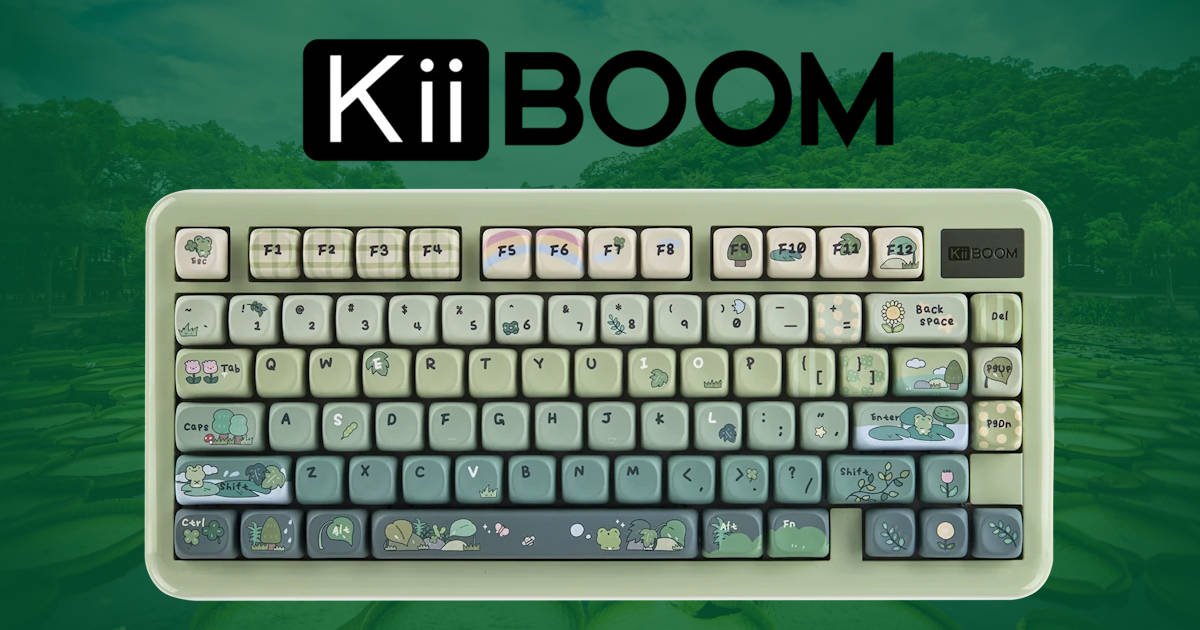
When it comes to custom mechanical keyboards, finding the right blend of eye-catching design, acoustic feedback, and rock-solid build quality can often feel like a balancing act. The KiiBOOM Phantom 81 Lite in its striking Green colourway aims to hit that sweet spot cleanly, delivering a feature-packed 75% gasket-mounted board that brings personality back to the desktop.
Whether you’re looking to brighten up a home setup or searching for a genuine conversation starter in an open-plan office, this board packs a lot of charm and performance into a compact footprint. At a glance, it’s difficult to ignore. The vibrant green chassis and playful nature-inspired accents immediately stand out amongst the sea of black and grey peripherals that tend to dominate most desks.
After spending some time with the KiiBOOM Phantom 81 Lite, it becomes clear that appearances are only part of the story. Underneath the colourful exterior is a surprisingly well-rounded keyboard that targets both enthusiasts and everyday users alike. It offers the kind of features normally associated with far more expensive custom boards, while keeping the experience approachable for anyone making the jump from a conventional gaming or office keyboard. For those wanting a mechanical keyboard with a little more character without sacrificing comfort, sound, or functionality, the KiiBOOM Phantom 81 Lite makes a very strong first impression.
Why the 75% Layout? Best Use Cases for This Form Factor
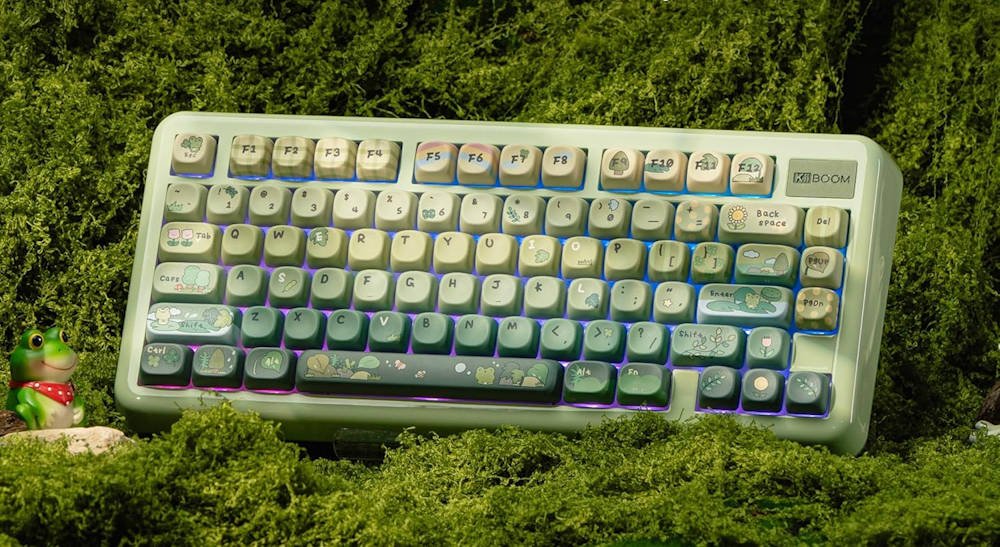
For many mechanical keyboard enthusiasts and daily typists, the 75% layout represents the “Goldilocks zone” of keyboard form factors. Striking a middle ground between full-sized boards and ultra-compact 60% layouts, a 75% board retains roughly 75% of a standard keyboard’s keys while reducing its total physical footprint by nearly 25-30%.
A big part of its popularity comes from how little compromise is actually involved. Many compact keyboards ask users to sacrifice dedicated function keys, navigation controls, or frequently used shortcuts in exchange for a smaller footprint. The KiiBOOM Phantom 81 Lite avoids those trade-offs almost entirely. You still get a dedicated F1 to F12 row, accessible arrow keys, and a useful cluster of navigation controls, all arranged in a way that feels familiar from the moment you start using it.
After spending years switching between full-sized boards, tenkeyless models, and increasingly compact layouts, I’ve found that 75% keyboards often require the least adjustment. Everything is where you expect it to be. Muscle memory remains largely intact, yet the keyboard occupies noticeably less desk space than a traditional full-sized board.
The most significant omission is the numpad, although many users will rarely miss it. Unless your day revolves around spreadsheets, accounting software, or constant numerical data entry, the extra room it creates often proves more valuable than the keys themselves. That reclaimed space allows your mouse to sit closer to your typing position, which can feel surprisingly comfortable during long gaming sessions or extended workdays.
The layout also suits a wide range of users. Gamers benefit from the additional mouse movement space, particularly in shooters where large, sweeping movements are common. Developers, writers, editors, and content creators retain easy access to function keys and navigation commands without dedicating half the desk to a keyboard. Even for hybrid workers moving between home and office setups, the KiiBOOM Phantom 81 Lite strikes a practical balance between portability and daily usability.
What I particularly appreciate about the layout is how adaptable it feels. One minute you’re answering emails, editing documents, or bouncing between browser tabs. The next you’re launching games, managing Discord, or settling in for a late-night gaming session- well, anything after 8 pm is late-night for me now. The KiiBOOM Phantom 81 Lite handles both scenarios comfortably, and that versatility is a large part of why the 75% form factor continues to be one of the most popular layouts in the mechanical keyboard space.
Unboxing & Packaging Presentation
First impressions matter, and KiiBOOM clearly understands that. From the moment I opened the box, the KiiBOOM Phantom 81 Lite felt like a product that had been carefully thought through rather than simply packed and shipped. The keyboard arrives securely protected within soft foam padding, with every accessory neatly organised inside its own dedicated compartment. It’s a small detail, but a good unboxing experience immediately creates confidence that the company has paid attention to the rest of the product as well.
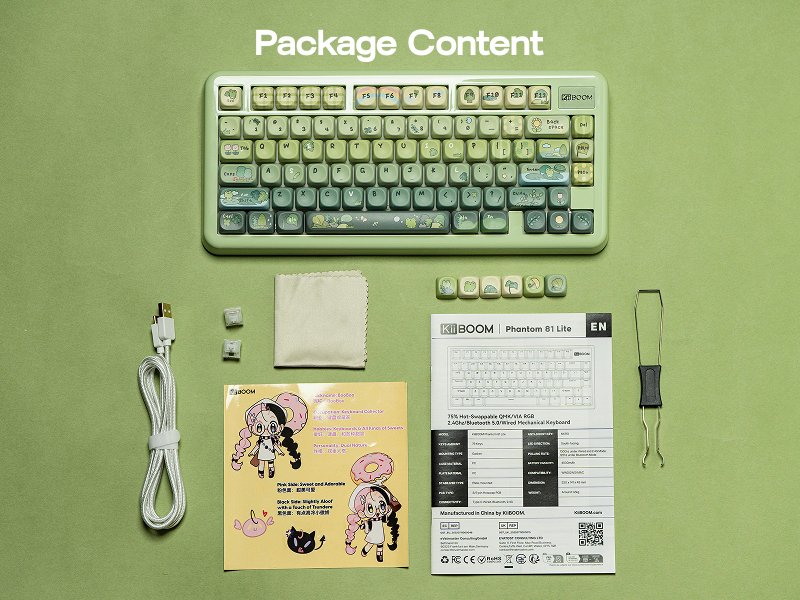
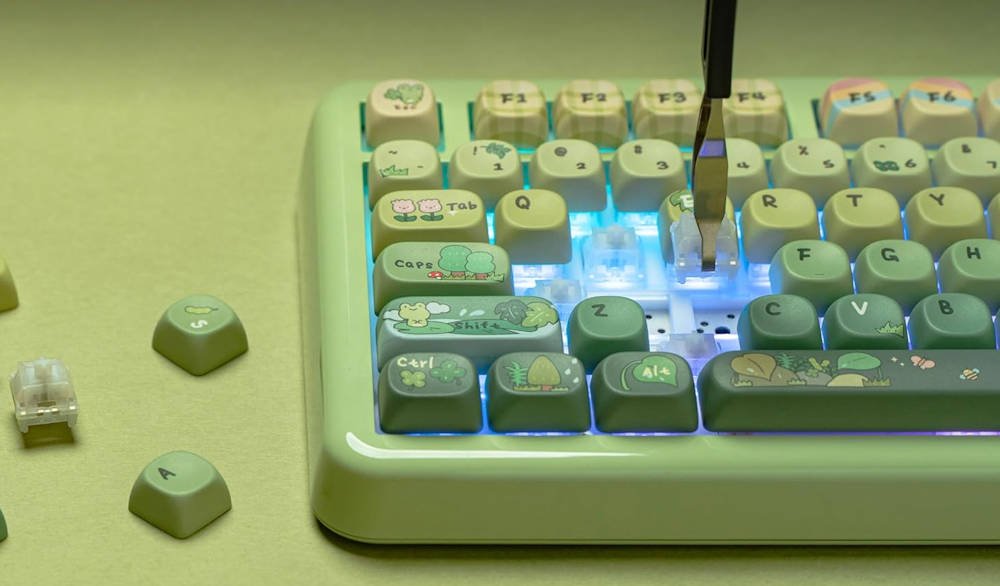
Inside the box, KiiBOOM includes everything needed to get started straight away. Alongside the keyboard itself is a sturdy branded USB-C cable for charging and wired connectivity, a combined keycap and switch puller for future customisation (which I think I have like 30 of these now), a microfiber cleaning cloth, and a handful of spare KiiBOOM switches. It’s a practical collection of accessories that feels genuinely useful rather than filler added simply to bulk out the package contents.
One of the more charming inclusions is the collection of novelty extras. KiiBOOM bundles additional decorative keycaps along with stickers featuring its mascot, Boo Boo, helping reinforce the playful personality that defines the KiiBOOM Phantom 81 Lite. Enthusiasts who enjoy personalising their keyboards will likely appreciate these small additions, while casual users may simply enjoy the extra touch of character.
What stood out to me most was how complete the package feels. There was no immediate sense that I needed to order accessories separately or start hunting for tools before making changes to the board. Whether your plan is to leave the keyboard exactly as it arrives or begin swapping keycaps and switches on day one, everything required is already in the box waiting for you.
It’s not an extravagant unboxing experience, but it doesn’t need to be. The presentation is clean, organised, and welcoming, setting a positive tone before the KiiBOOM Phantom 81 Lite even touches your desk.
Aesthetics & Desk Presence: Fun, Quirky, and Vibrant
The primary selling point of this particular version of the KiiBOOM Phantom 81 Lite is undoubtedly its visual personality. Finished in a rich, vibrant green colourway, it immediately stands apart from the endless stream of black, white, and grey keyboards that dominate both gaming setups and office desks. Even before plugging it in, it’s the kind of board that naturally draws your attention.
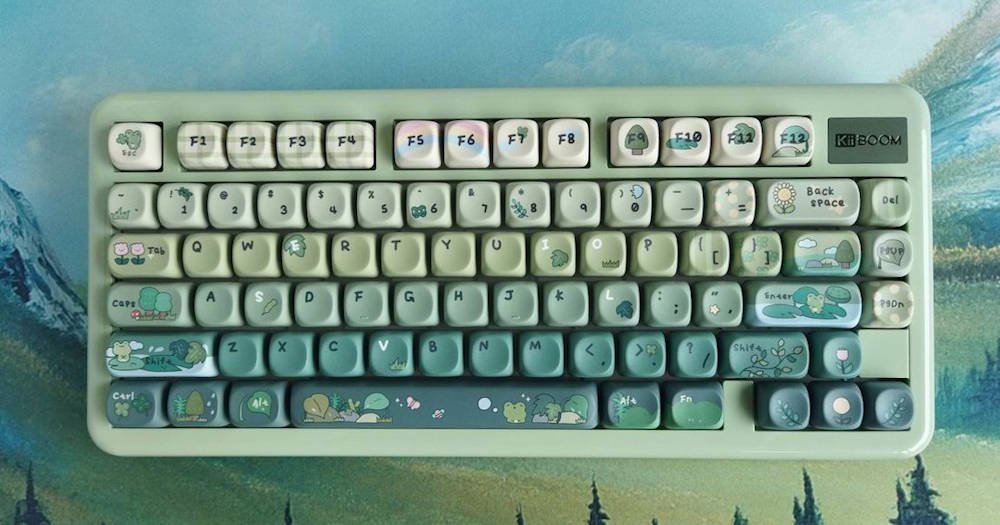
The nature-inspired theme has been carried through thoughtfully across the entire design. Frog, plant, leaf, and umbrella-themed keycaps are scattered throughout the layout, adding small pops of character without making the board feel cluttered or overly busy. It’s playful, certainly, but not childish. There’s a surprising amount of restraint in the overall design, which helps the KiiBOOM Phantom 81 Lite feel unique while still remaining practical enough for everyday use.
What I particularly liked is that the themed keycaps don’t feel like an afterthought. On some novelty keyboards, decorative keys can look as though they’ve simply been added to an existing design. Here, everything feels cohesive. The shades of green, the legends, and the novelty accents all work together to create a keyboard with a distinct identity. It’s clear KiiBOOM had a specific vision for this board and committed to it.
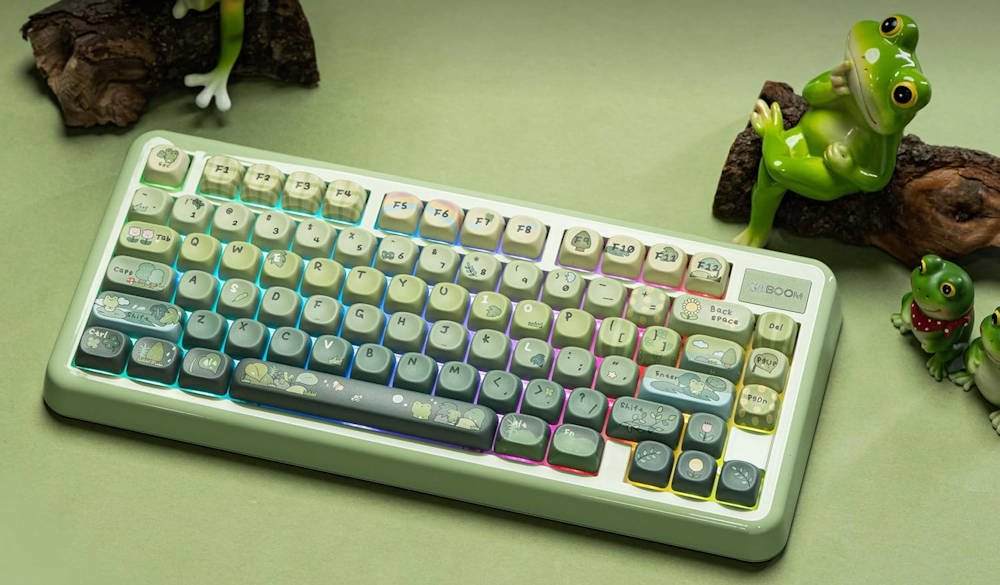
After a while, I found myself appreciating how refreshing it was to use something that didn’t take itself too seriously. Many enthusiast keyboards focus heavily on minimalist aesthetics and muted colour palettes, or just old-faithful black. There’s absolutely nothing wrong with that approach, but it does mean a lot of setups end up looking remarkably similar. The KiiBOOM Phantom 81 Lite goes in a completely different direction, embracing colour and personality without sacrificing its premium feel.
It’s also the sort of keyboard that tends to generate comments from other people. Sitting on an office desk or shared workspace, the board naturally attracts attention. More than once, I found colleagues stopping to ask about the frog-themed keys or the unusual colour scheme. Even my daughters have asked several times what I’m doing with it after I review it. Few peripherals genuinely stand out these days, but the KiiBOOM Phantom 81 Lite manages to do exactly that.
Ultimately, the design won’t be for everyone, and that’s perfectly fine. Keyboard aesthetics are deeply personal. For those who want something a little different from the usual sea of monochrome peripherals, however, the KiiBOOM Phantom 81 Lite delivers a fun, vibrant desktop presence that’s difficult to ignore and genuinely enjoyable to use every day.
Build Quality, Weight & Desktop Stability
Despite utilising a high-grade ABS plastic construction with a protective UV coating, the KiiBOOM Phantom 81 Lite never feels cheap or hollow. In hand, the keyboard has a reassuring density that immediately gives the impression of a well-built product. Weighing approximately 935 grams, or roughly 2.06 in freedom units, it strikes a sweet spot between portability and substance.
That weight proved to be one of the more pleasant surprises during testing. Some lightweight keyboards can feel a little insubstantial, almost toy-like, while heavier custom boards can sometimes cross into the territory where moving them around becomes a chore. The KiiBOOM Phantom 81 Lite lands comfortably between those extremes. It feels solid on the desk and confidence-inspiring in use, yet it remains practical enough to toss into a backpack if you’re moving between home and the office.
The overall construction feels tight and well assembled, too. There are no concerning creaks, flex points, or rattles when handling the board. Pick it up, twist it gently, and everything remains impressively rigid. It’s the sort of structural integrity that helps reinforce the feeling that this keyboard was designed to be used daily rather than simply displayed on a shelf.
Flip the board over, and you’ll find dual-stage adjustable feet paired with generously sized rubber grip pads. While adjustable feet have become fairly standard, not all implementations are created equal. Here, the feet feel sturdy and lock into position with confidence, while the rubber pads provide excellent traction across a variety of surfaces. During my time using the KiiBOOM Phantom 81 Lite, it remained planted whether it was sitting on a desk mat, a wooden desktop, or a laminate work surface.
That stability becomes especially noticeable during longer typing sessions and gaming marathons. Even when rapidly moving between keys or getting a little enthusiastic in the middle of a competitive match, the keyboard stays exactly where you put it. It’s one of those things you rarely think about until a keyboard gets it wrong, and thankfully that’s not the case here.
From an ergonomic perspective, the KiiBOOM Phantom 81 Lite does sit slightly taller at the front edge than some lower-profile mechanical keyboards. I found it comfortable enough to start typing on immediately, but after several hours of work, particularly on writing-heavy days, a wrist rest definitely helped create a more natural wrist position. It’s not a requirement, but it’s an accessory I’d personally pair with the board if it were going to be my full-time daily driver.
Taken as a whole, the build quality leaves a strong impression. Between the substantial 935g weight, sturdy construction, reliable desktop grip, and thoughtful design touches, the KiiBOOM Phantom 81 Lite feels every bit like a premium enthusiast keyboard despite its approachable pricing.
Sound Profile & Typing Acoustics: The Sweet “Thock”
For many mechanical keyboard enthusiasts, sound is every bit as important as feel. I’ll admit that a year ago I was the person saying, “Yep, that’s clicky,” and leaving it at that. Somewhere along the way, though, I started paying attention to the finer details, and now I find myself chasing that perfect thock just as much as the typing feel itself.
This is one area where the KiiBOOM Phantom 81 Lite performs surprisingly well. Budget-oriented keyboards often suffer from hollow acoustics, metallic pinging, or an unpleasant case resonance that becomes difficult to ignore once you notice it. Thankfully, KiiBOOM has put considerable effort into tuning the sound profile here.
Beneath the keycaps sits a fairly comprehensive collection of sound-dampening materials, including latex sandwich foam, IXPE switch pads, a PE film layer, PCB foam, and a silicone bottom cushion. On paper, that’s a lot of acoustic treatment for a keyboard in this class. More importantly, it translates into a noticeably more refined typing experience in practice.
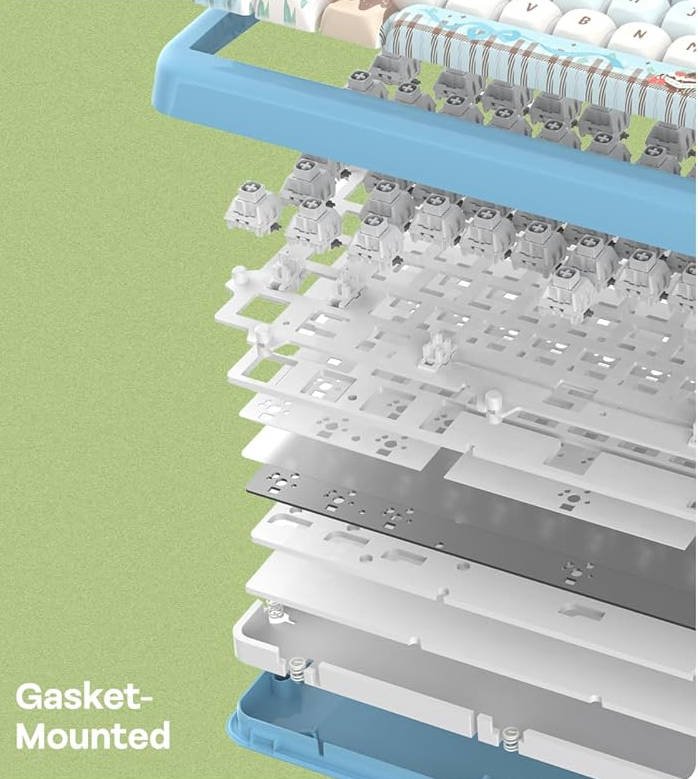
From the first few keystrokes, the KiiBOOM Phantom 81 Lite delivers the kind of deeper, fuller sound signature that many enthusiasts actively seek out. The board leans heavily into “thock” territory, producing warm and rounded keypresses that sound soft and controlled rather than sharp or hollow. There’s a pleasant depth to each keystroke without becoming overly muted or lifeless.
The included KiiBOOM Mochi linear switches play a significant role in shaping that acoustic character. Factory pre-lubed out of the box, they glide smoothly through each press with very little friction. The bottom-out feels cushioned and consistent, making long typing sessions particularly enjoyable. There’s a fluidity to the typing experience that immediately stood out after a few hours of use.
Just as importantly, the larger keys are well-behaved. Keys such as Spacebar, Enter, Backspace, and Shift can often be the weak point on prebuilt mechanical keyboards, producing unwanted rattles or inconsistent sounds. Here, the factory-lubricated stabilisers perform admirably. During testing, I encountered very little rattle, and the larger keys felt remarkably consistent with the rest of the board.
What impressed me most was how office-friendly the sound profile remains despite its enthusiast-focused tuning. The KiiBOOM Phantom 81 Lite is certainly audible, but it never becomes disruptive. The sound carries a satisfying presence without demanding attention from everyone in the room. Whether I was writing articles, responding to emails, or gaming late into the evening, the acoustic profile remained pleasant throughout.
It’s not the loud, attention-seeking mechanical keyboard experience that some people associate with enthusiast boards. Instead, the KiiBOOM Phantom 81 Lite produces a controlled, mature sound signature that feels deliberately tuned. For a stock keyboard straight out of the box, that’s an impressive achievement.
Keycaps & Layout Functionality
The green version of the KiiBOOM Phantom 81 Lite comes equipped with Cherry-profile PBT keycaps, and they’re a great match for the overall personality of the keyboard. PBT remains the preferred material for many enthusiasts thanks to its durability and resistance to wear, and that’s especially important on a keyboard built around such a vibrant colour scheme.
Even after extended use, PBT keycaps tend to resist the glossy shine that often develops on ABS alternatives. That means the rich green tones and matte texture should hold up far better over time, helping the keyboard maintain its distinctive appearance long after the initial unboxing excitement has worn off.
The keycaps themselves feel comfortable under the fingertips. Their gently sculpted Cherry profile creates a natural typing angle that encourages your fingers to settle into position without much thought. After spending several days typing articles, emails, and general day-to-day work on the KiiBOOM Phantom 81 Lite, the layout quickly became second nature.
The 75% form factor continues to be one of the keyboard’s strongest assets. With 79 keys available, you retain the dedicated function row and important navigation controls while freeing up a substantial amount of desk space compared to a full-sized keyboard. It strikes a balance that simply works for a wide range of users.
For gaming, that extra space gives your mouse room to breathe. For productivity workloads, you still have quick access to function shortcuts and navigation commands. The KiiBOOM Phantom 81 Lite manages to feel compact without ever feeling restrictive, which is exactly what many people hope for when moving to a smaller keyboard.
Features & Software Flexibility
The KiiBOOM Phantom 81 Lite isn’t simply a keyboard that focuses on looks and acoustics. Underneath its playful exterior sits a healthy collection of features that make it surprisingly adaptable to different workflows and setups.
One of the standout inclusions is tri-mode connectivity. Users can switch between Bluetooth 5.0, 2.4GHz wireless, and traditional USB-C wired operation depending on their needs. Throughout testing, moving between devices was straightforward, and the ability to quickly alternate between desktop, laptop, and mobile devices adds a level of convenience that’s easy to appreciate once you start using it regularly.
KiiBOOM has also done a nice job with the receiver storage. The included 2.4GHz dongle docks neatly into a magnetic storage compartment on the rear of the keyboard, reducing the chances of it disappearing into the mystery void where USB receivers seem to inevitably end up.
Wireless performance is backed by a sizable 4000mAh battery, providing enough capacity to comfortably support day-to-day use without constantly reaching for a charging cable. Battery life will naturally vary depending on RGB brightness and connection mode, but during general use the keyboard never left me worrying about its charge level.
Power users will likely appreciate the inclusion of full QMK and VIA compatibility. Rather than relying on proprietary software, the KiiBOOM Phantom 81 Lite supports widely respected open-source platforms that allow users to remap keys, create macros, adjust layers, and customise functionality directly through a browser-based interface. For enthusiasts who enjoy fine-tuning every aspect of their setup, this is a significant advantage.
The hot-swappable PCB further reinforces the keyboard’s enthusiast credentials. Thanks to the inclusion of 5-pin hot-swap sockets, future switch upgrades are refreshingly simple. If you decide to experiment with different switch types down the line, you can remove and replace them without touching a soldering iron. Even newcomers to the hobby can confidently customise the typing experience with minimal effort.
Taken together, these features help make the KiiBOOM Phantom 81 Lite feel like a keyboard that can evolve alongside its owner. Whether you’re content leaving it exactly as it arrives or plan on spending weekends experimenting with switches, macros, and custom layouts, the platform provides plenty of flexibility right from the start.
Technical Specifications Summary
After spending time with the KiiBOOM Phantom 81 Lite, what stands out most is how successfully it balances personality with practicality. It’s easy to be drawn in by the vibrant green colour scheme and charming frog-themed accents, but beneath that playful exterior is a genuinely capable mechanical keyboard that delivers where it matters. The typing experience is smooth and satisfying, the acoustics are impressively refined straight out of the box, and the overall build quality feels far more premium than the ABS construction might initially suggest.
What I appreciate most is that the KiiBOOM Phantom 81 Lite doesn’t feel as though it was designed solely for enthusiasts or solely for newcomers. It comfortably sits between those two worlds. Someone upgrading from a traditional gaming or office keyboard will find it approachable and feature-rich, while keyboard hobbyists still get desirable features such as hot-swappable switches, QMK/VIA support, gasket mounting, and a well-tuned sound profile.
The 75% layout continues to be one of the keyboard’s biggest strengths. It offers an excellent balance between functionality and space efficiency, making the KiiBOOM Phantom 81 Lite equally at home in a gaming setup, creative workspace, or hybrid work environment. Add in the tri-mode connectivity, solid battery life, quality PBT keycaps, and surprisingly polished typing acoustics, and there’s very little that feels compromised.
The slightly taller front height may have some users reaching for a wrist rest during longer sessions, and the bold green aesthetic won’t suit every desk setup. Those are ultimately minor considerations for what is otherwise a remarkably well-rounded package.
At the end of the day, the KiiBOOM Phantom 81 Lite is a keyboard that manages to be fun without sacrificing substance. It looks different, sounds great, feels solid, and offers enough flexibility to grow with you over time. If you’re searching for a mechanical keyboard that breaks away from the usual sea of monochrome designs while still delivering a premium everyday experience, the KiiBOOM Phantom 81 Lite is an easy recommendation and one of the more memorable keyboards I’ve used this year.


Recent Comments