
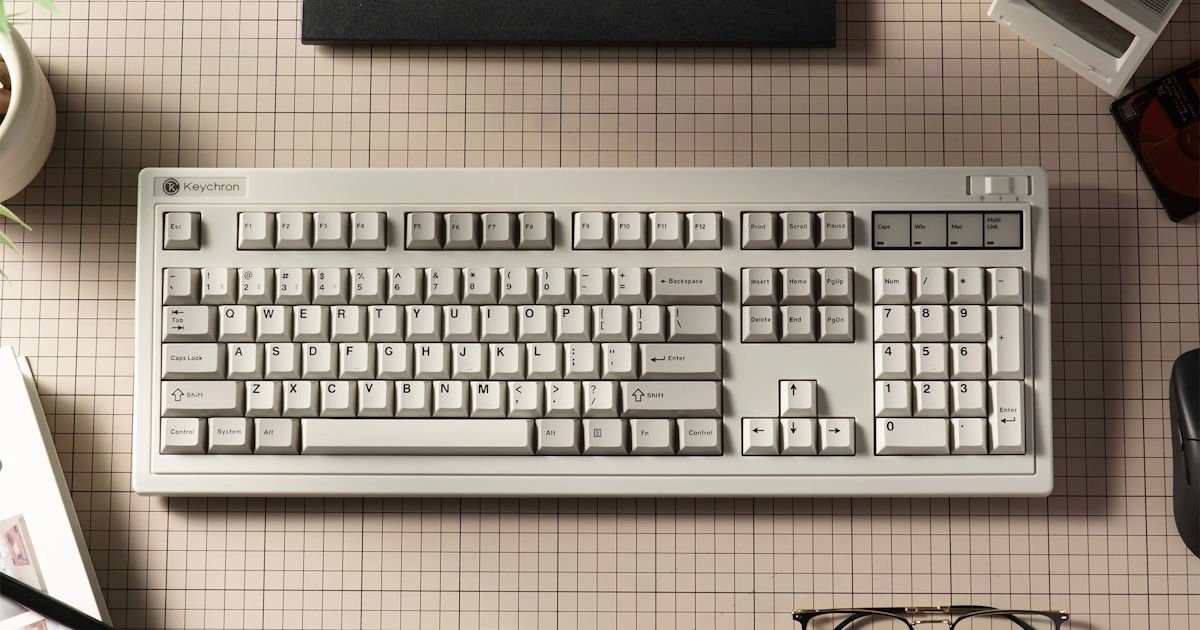
There’s a bit of a trend at the moment. Small boards everywhere. 75% layouts, tighter footprints, desks that look… almost a little too clean, if I’m being honest. I get the appeal, I really do. But after a while, it starts to feel like something’s missing. Or maybe I’ve just gotten used to having everything within reach.
That’s where the Keychron R6 QMK Wireless Mechanical Keyboard quietly pushes back.
This is a full-size, 100% layout keyboard, and it doesn’t pretend to be anything else. It shows up, takes up space, and kind of owns it. There’s something oddly comforting about the way it looks, too. A bit retro, a bit chunky in the right places. It reminds me of those older keyboards from the ‘80s that felt like they could outlive everything else on your desk. You know the kind.
And yes, it has a numpad. A proper one. I didn’t think I missed it as much as I apparently do.
I’ve been using the Keychron R6 as my main board for a few weeks now, and adjusting back to a full-size layout took… a day, maybe two. Then it just felt normal again, like slipping into an old routine you didn’t realise you’d dropped. It does eat into desk space; there’s no way around that. My mouse definitely had to negotiate for territory. But in return, you get this sense of completeness. Every key is there, no shortcuts, no layers you have to remember mid-flow.
Typing on it feels, I don’t know, reassuring. The keys have this precise, consistent response that makes long stretches of typing feel easier than they probably should. Gaming’s solid too, no surprises there, it just works. The numpad ended up being more useful than I expected as well. Quick entries, shortcuts in editing software, even the occasional bit of spreadsheet work that made me feel much more organised than I actually am.
What I keep coming back to, though, is how it balances things. It leans into that old-school presence, the weight, the layout, the overall vibe. But underneath, it’s very much a modern keyboard.
In the Box
Keychron is known for generous packaging, and the Keychron R6 is no exception. Inside, you’ll find:
- The Keychron R6 Keyboard.
- A braided USB-C to USB-C cable (with Type-A adapter).
- A set of accent keycaps (including those bright yellows).
- A set of Mac-compatible keycaps
- A combined keycap and switch puller.
- A screwdriver and extra gaskets/feet for those who like to mod their boards.
Design: A Blast from the Past
The Keychron R6 leans straight into that retro aesthetic. No hesitation. Beige and grey, the sort of colour combination that probably shouldn’t work anymore, but somehow still does. It feels familiar the second you see it. Not in a subtle way either, it’s immediate.
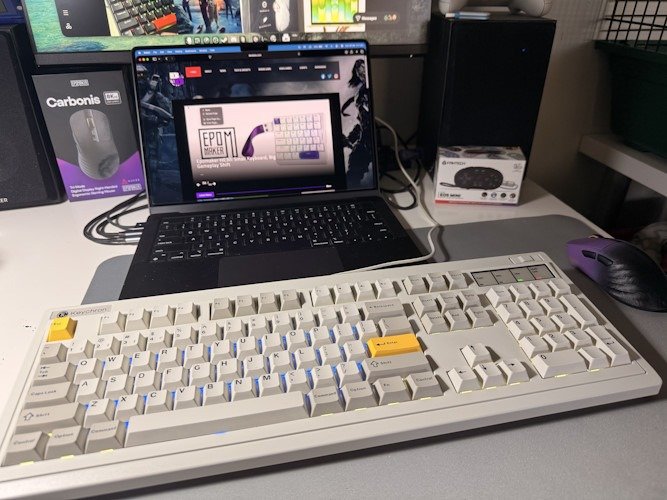
It’s also… solid. Properly solid. This thing doesn’t budge once it’s on your desk. There are two-stage adjustable feet if you’re particular about your typing angle, which I always think I am until I set it once and never touch it again. Still, it’s nice to have the option. It makes it feel considered.
Using it actually dragged me back to my first PC. Well, technically, the family PC, but I absolutely claimed it as my own. A massive IBM 386 that took over the desk like it paid rent. I can still picture it pretty clearly. The constant hum, the slightly uneven whirr of the drives, that sharp mechanical clack from the keys that felt louder than it probably was. We even put little felt pads under the CRT monitor, so it wouldn’t destroy the desk. Which, in hindsight, feels optimistic.
Booting that thing up was an event. Not fast. Not quiet. Just a slow wake-up process, green text creeping onto a black screen like it needed a moment to collect itself. It didn’t feel like using a device. It felt more like… convincing it to cooperate. And when it did, it opened up this weird, exciting little world.
The Keychron R6 taps into that feeling. Not exactly nostalgic in a forced way, just enough to remind you where all this started.
The Keychron R6 brings that old-school energy through in a few key ways:
- Layout: A full 100% layout with 108 keys, including a proper numpad. Not a cramped version, not hidden behind a function layer. It’s just there, as it should be. If you spend any time in spreadsheets, or even pretend to, it’s hard to go back once you’ve had it.
- Aesthetics: The base look is classic, almost plain at first glance. Then you realise Keychron throws in extra keycaps, including some bright yellow accents that feel slightly out of place in the best way. You can keep it clean, or add a bit of personality. I swapped a few in… then swapped them back… then changed my mind again.
- Build: It’s big. There’s no soft way to say that. But it feels intentional. The weight gives it this sense of permanence, as it belongs on the desk rather than sitting on it. It reminds me a bit of old hi-fi gear, where the bulk was part of the experience.
There’s something reassuring about it. Maybe that’s the nostalgia talking. Or maybe it’s just nice using something that doesn’t feel like it’s trying to disappear.
Connectivity & Modern Features
Underneath all that retro charm, the Keychron R6 is… surprisingly modern. More than I expected, actually. It’s the kind of keyboard that looks like it belongs plugged into something beige and humming quietly in a corner, and then you realise it’s juggling three different connection modes without breaking a sweat.
It’s a bit of a strange contrast at first in a good way.
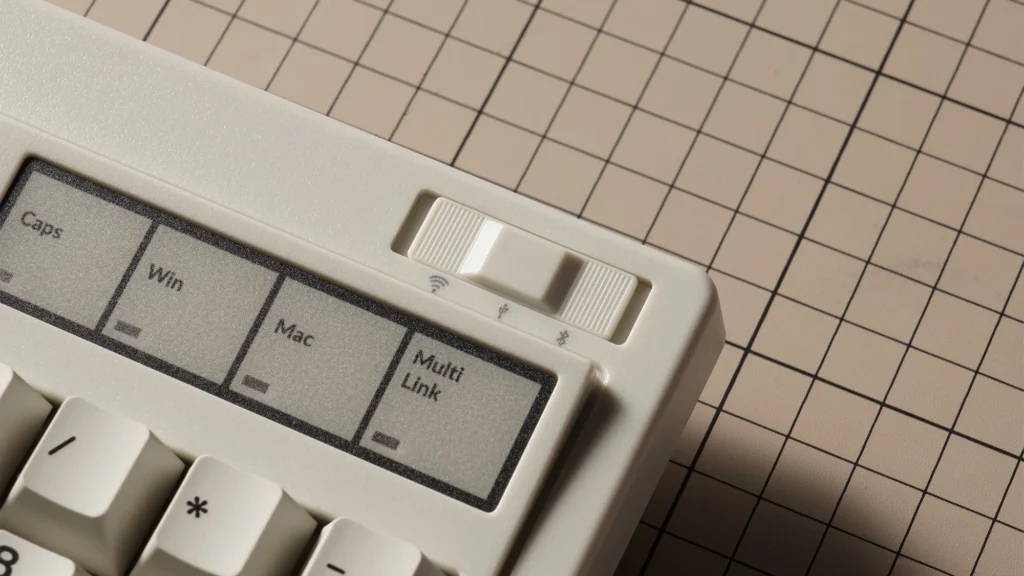
You’ve got 2.4 GHz wireless as the main event, and it’s fast. Properly fast. The 1000Hz polling rate keeps everything feeling immediate, to the point where I stopped thinking about whether I was wired or not. Which is probably the goal. I used it for a mix of typing and a few late-night gaming sessions, and there wasn’t a moment when it felt like it was lagging behind me. If anything, I forgot it wasn’t plugged in half the time… until I reached for a cable that wasn’t there.
Then there’s Bluetooth 5.3, which feels a bit more everyday, but also more flexible. You can pair it with up to three devices and jump between them with a quick switch. I ended up bouncing between a work laptop and my main computer more often than I thought I would. It just made sense once it was there. No reconnecting, no fiddling. It quietly keeps up with whatever you’re doing.
And yes, there’s still a wired mode. A proper USB‑C connection with a colour-matched braided cable, which is a nice touch… even if I’ll admit I mostly left it in the box at first. When you do plug it in, though, it’s instant. No latency, no battery thoughts in the back of your mind, just that direct connection. It also makes those moments where everything needs to be simple feel, well, simple.
There’s a small toggle for switching between Mac and Windows layouts as well, which I appreciate more than I expected. It’s the kind of feature that sounds minor until you actually swap between systems and your muscle memory doesn’t betray you. Keychron includes the extra keycaps, too, so it all lines up visually. No odd compromises or half-solutions. And as a Mac user, it’s nice to be thought of as a real user rather than an afterthought.
Altogether, it ends up feeling very adaptable. It’s still a big, nostalgic-looking board sitting in the middle of everything… but it quietly behaves like something far more current.
(Writer’s Note: Although in my Keychron R6 quick review video, I did take some time to find the key combo – it’s Function Caps Lock for those playing at home… hold it for a few seconds to activate and change from Windows to Mac. You’ll thank me later)
Customisation: QMK & Hot-Swappable Switches
This is where the Keychron R6 starts to feel like it’s made for people who enjoy tinkering. Or at least the idea of tinkering. I definitely fall into that second category sometimes… I like knowing I could customise everything, even if I don’t always follow through.
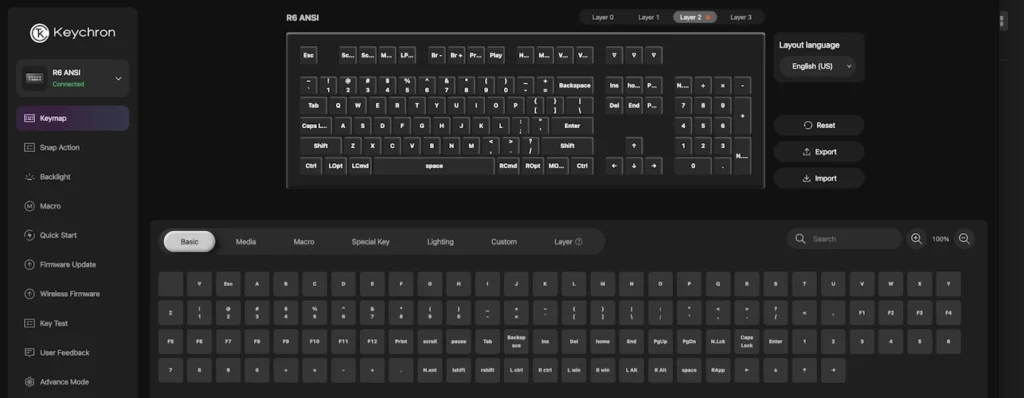
The Keychron R6 comes with full QMK support, which basically means every key can be remapped, every macro can be tweaked, and you can go as deep as you like. There’s a web-based Keychron Launcher for it too, which I appreciated more than expected. No downloads, no extra software sitting in the background doing nothing, just open a browser and get on with it. Simple, in theory anyway. I lost a bit of time in there just experimenting. Nothing groundbreaking, just… seeing what felt right.
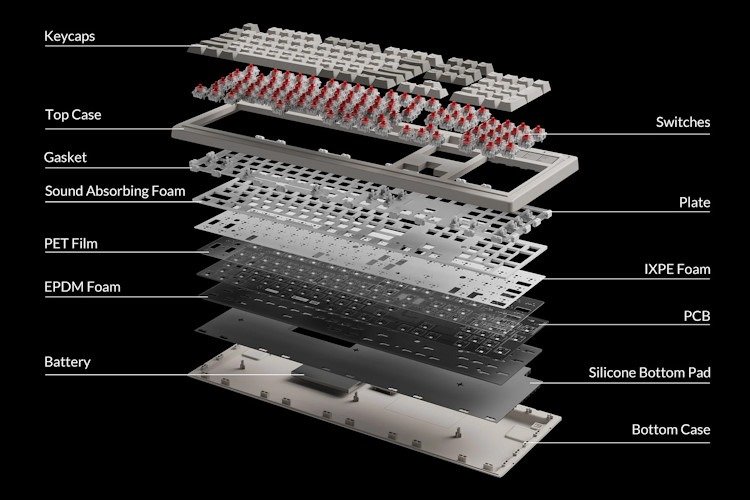
On the hardware side, it’s hot-swappable, which is always reassuring. The stock boards usually come with Super Brown tactile switches, and they’re solid. Familiar. There’s a nice bump, nothing too aggressive, nothing too soft either. I quite liked them, which made the idea of swapping them out feel slightly unnecessary… but also very tempting.
The good thing is you can swap in pretty much any standard 3-pin or 5-pin MX switch without soldering, no stress. That opens the door to a lot of experimentation. Different feels, different sounds, different moods depending on the day. I haven’t fully gone down that rabbit hole yet, but it’s absolutely there waiting.
(That said, if anyone out there is looking to offload some switches for “testing purposes”… I am very available.)
There are a couple of smaller touches that round things out nicely too:
- Internal sound dampening: There’s foam inside to absorb some of the ping, and it works. The typing sound is cleaner, less hollow. Still mechanical, still present, just not… echoing across the room like a typewriter in a quiet office. I didn’t realise how much that would matter until I used it late at night and didn’t feel like I was announcing every keystroke.
- Backlighting: Full RGB, which somehow doesn’t feel out of place here. The board looks like it belongs in another decade, and then you turn the lights on and it quietly reminds you it doesn’t. There are a bunch of effects to play with. I set up a custom lighting pattern, changed it twice, and then settled on something fairly subtle. For now. It’s nice having the option.
What stands out is how all of this comes together. You’ve got this very classic-looking board, something that feels grounded and a bit nostalgic, but it’s layered with modern flexibility. It doesn’t force you to customise it. You can just use it as-is and be perfectly happy.
But if you feel like tweaking, adjusting, making it your own… It’s ready for that too.
The Verdict
The Keychron R6 lands in a really interesting spot. It leans hard into that retro, almost industrial feel, but underneath it behaves like something far more current. You’ve got reliable 2.4GHz wireless, flexible firmware, and all the little modern conveniences working quietly in the background. It doesn’t feel like a clash of old and new. It feels… intentional, I suppose. Like, both parts were meant to sit together from the start.
I didn’t expect the layout to hit me the way it did, though.
The moment I put my hands on it, there was this brief pause. Not dramatic or anything, just that split second where something feels familiar before you can explain why and even before you hit a single key. It took me straight back to being a teenager, sitting at a desk that probably wasn’t meant for a computer that big, figuring things out as I went.
And then I started typing, and it just… clicked. Literally, but also mentally.
There wasn’t a learning curve. No adjustment period beyond maybe a few minutes of getting comfortable again. The spacing, the travel, even the weight of the board under my hands, all brought back that muscle memory I didn’t realise I’d kept. It felt easy. Natural in a way that smaller layouts don’t always manage, at least not for me.
And I think that’s what surprised me most. Not the nostalgia itself, but how usable it was without any friction. It wasn’t just reminding me of older keyboards; it actually felt better to use in day-to-day work. Comfortable, steady, and just a little bit satisfying every time your fingers fall into rhythm.
By the end of it, I stopped thinking about what it was trying to be. It’s just a really well-rounded keyboard that happens to look like it came from another era… like me. And maybe that’s the appeal. It doesn’t chase trends. It just does its thing, and does it well.
Technical Specifications:
- Price: $149.00 AUD
- Layout: 100% Full Size
- Connectivity: 2.4 GHz / BT 5.3 / Wired
- Switch Type: Keychron Super (Red, Brown, or Banana)
- Polling Rate: 1000Hz (2.4GHz / Wired)
For more details, check out the Keychron R6 via our affiliate link, and for my unboxing and Quick Review, check out my YouTube.



Recent Comments