
First entry in the Redragon Pro Series Ecosystem coverage
I’ve been spending time with the new Redragon “Pro” lineup, and the Galatin Pro keyboard felt like the right place to start. It’s the centrepiece of the whole sub‑$250 wireless ecosystem idea that Electronic Rebellion is pushing here in Australia. I didn’t expect to care much about that angle at first, but after looking at the pricing of the usual big brands again, I caught myself doing the maths twice. A full wireless suite for around $245 AUD is… well, it’s unusual. And a little refreshing.
And that price includes the H510RGB‑PRO Zeus Pro headset and the M693‑RGB Trident Pro mouse. All wireless. All part of the same ecosystem. I actually stopped for a moment and thought, hang on… $245 AUD? That can’t be right. I even checked the page again & even reached out to the company representative that sent me the products, because it felt like one of those too‑good‑to‑be‑real bundles you see on clearance shelves. But no, that’s the pitch. A complete tri‑mode setup for less than what some brands charge for a single keyboard.
Once that sank in, the Redragon Galatin Pro started to make more sense as the opening act. It’s the board that sets the tone for the whole series. Redragon calls it their flagship, and I think that’s fair. Maybe even a bit bold. But after a week of typing on it, I can see why they’re confident. There’s a kind of quiet ambition in the way it’s built, not flashy for the sake of it, but clearly trying to punch above its price bracket.
I kept finding myself noticing small things: the weight, the softness of the gasket mount, the way the screen lights up when you plug it in. None of it screams “budget,” which is probably the point. It feels like Redragon is trying to prove something with this series, and the Galatin Pro is their way of saying, “Yes, we can do this too.”
And honestly, it’s a surprisingly strong start.
First Impressions
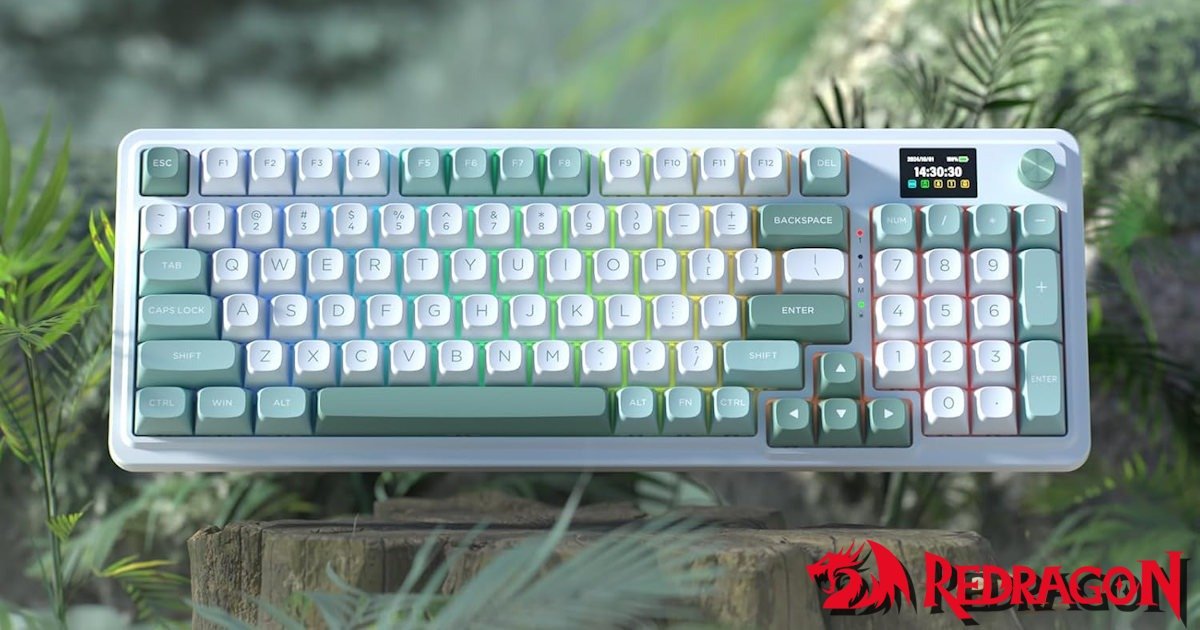
The layout of the Redragon Galatin Pro Keyboard is the first thing that stood out. It’s a 96% compact full‑size board, which sounds like a contradiction until you actually use one. You get the numpad, the arrows, the function row, everything, but the footprint is noticeably smaller than a traditional full‑size keyboard. I remember sliding it onto my desk and realising I suddenly had space again. Not a dramatic amount, but enough that I noticed it every time I reached for my mouse.
The version I picked up is the white and green model, and I have to admit, it caught my eye more than I expected. There’s something clean about it, almost calming. The soft green accents break up the white in a way that feels intentional rather than flashy. I kept glancing at it during the first hour of use, partly because it looked different from the usual black‑on‑black boards I’ve used for years, and partly because the colours just… worked. It’s the kind of aesthetic that grows on you the longer it sits on your desk.
The build feels heavier than I expected, especially given the Redragon Galatin Pro Keyboard price point. Not heavy in a bad way, more like the kind of weight that hints at layers inside. And there are layers: silicon, EVA, IXPE. The whole gasket‑mount stack. I’ve built multiple custom keyboards before, and I’m not saying this feels identical, but the moment I pressed the first key, I paused. The sound had that soft, cushioned “thock” that people chase in far more expensive builds. It surprised me. I even pressed a few keys again just to check I wasn’t imagining it.
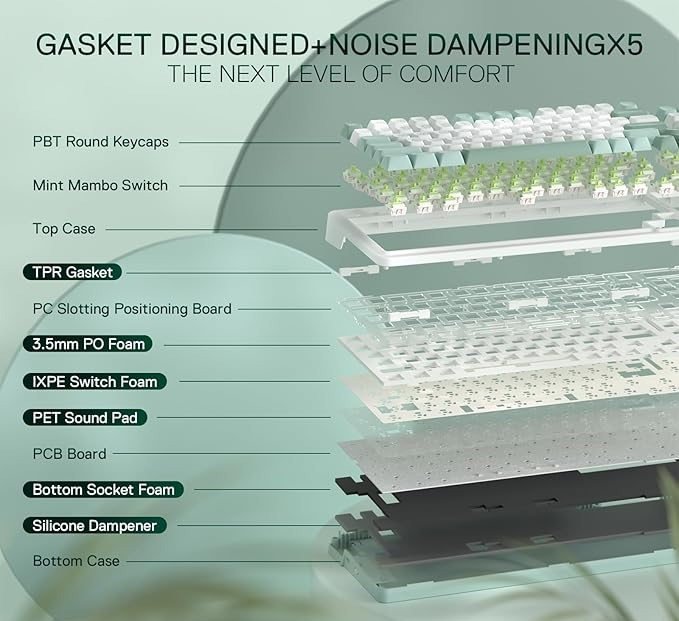
It wasn’t until recently that I started adding some of these extra layers into my own builds. Mostly, it was a way to keep costs down, which is why the price point here still catches me off guard a little.
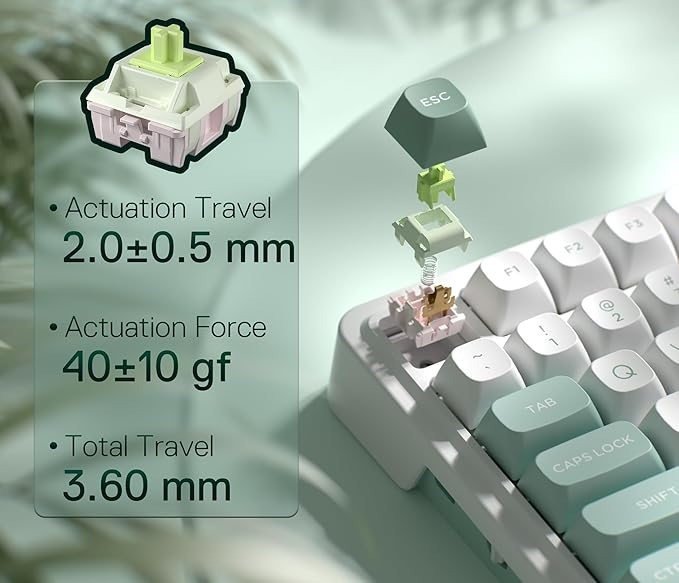
The Mint Mambo switches definitely play a part in that. They’re linear, but they have this slightly creamy feel that pairs really well with the gasket mount. There’s a smoothness to the travel that made me slow down for a moment, almost like I wanted to appreciate the texture of the keystroke. The colour of the switches, that pale mint tone, also fits the whole white‑and‑green theme a little too perfectly. I know most people won’t see the switches once the keycaps are on, but I liked knowing they matched. It made the whole board feel more cohesive, like someone actually thought about the aesthetic instead of just throwing parts together.
Typing Experience
After a few minutes of typing, the combination of the gasket mount and the Mint Mambos settled into this soft, almost plush sound profile. Not muted, not loud, just… pleasant. I found myself typing a little slower at first, listening to the board more than I usually would. It’s funny how a keyboard can make you do that. You start paying attention to things you normally ignore, the way a key rebounds, the tiny bit of give before bottom‑out, the way the sound changes depending on how tired your hands are.
The custom Mambo linear switches are pre‑lubed, and they feel smoother than I expected from a prebuilt board. There’s a slight softness at the bottom-out that I kept noticing during longer typing sessions. It’s subtle, but it adds to that cushioned feel the gasket mount is trying to deliver. Every now and then, I’d hit a key off‑centre and expect some scratch or wobble, but it never really happened. The board just absorbed the impact and carried on. It’s almost forgiving in a way.
At one point, I caught myself typing a paragraph just to hear how the spacebar sounded on its own. It has that deeper, rounded tone that makes you tap it a few extra times for no real reason. Maybe that’s just me, but I don’t usually do that unless a board has something interesting going on acoustically.
I switched back to a standard mechanical board, I keep around, just to compare. The difference was immediate. Tha keyboard felt harsher, louder, almost brittle. The Galatin Pro felt calmer. More controlled. I’m not sure everyone will care about that, but if you type a lot, which I do with the website & my job, or you’re sensitive to sound, it’s the kind of thing that sticks with you. It’s like switching from a hard wooden chair to something with a bit of padding. You don’t notice it right away, but after a while, you never really want to go back.
There was a moment where I wondered if the board was almost too soft. Maybe a little too polite. Then, a few hours later, I changed my mind again. As I just want something that feels easy to type on, something that doesn’t fight you. The Redragon Galatin Pro is exactly that, and I ended up appreciating that more than I expected.
It’s the kind of typing experience that doesn’t try to impress you with volume or sharpness. It just settles in quietly and makes everything feel a bit smoother, a bit more relaxed. And once you get used to that, it’s surprisingly hard to give up.
The LCD Screen and Knob
The little LCD screen on the Redragon Galatin Pro is one of those features that sounds gimmicky until you start playing with it. I loaded a few GIFs, then swapped to system stats, then back to GIFs because it made me smile. It’s not essential, but it adds personality. I like glancing at it while music is playing or when I’m switching profiles. Sometimes I’ll throw up a small animation just for the fun of it, and other times I’ll keep it practical with CPU temps or battery status. It’s a strange mix of playful and useful, and I think that’s why it works.
The screen also makes the Redragon Galatin Pro keyboard feel more alive. When you plug it in, there’s this sense that it’s not just a passive slab of keys anymore, it’s a little dashboard. I didn’t expect to care about that, but I found myself checking it more often than I thought I would. Even something as simple as seeing the time pop up while I’m working felt oddly convenient.
The rotary knob is more practical. Volume control, media skipping, brightness, it’s all instant. I didn’t realise how often I reached for it until I tried using a keyboard without one again. It’s one of those features that sneaks into your routine quietly. You don’t think about it much, but then you’re scrolling through a playlist or adjusting sound levels mid‑game, and suddenly it feels indispensable.
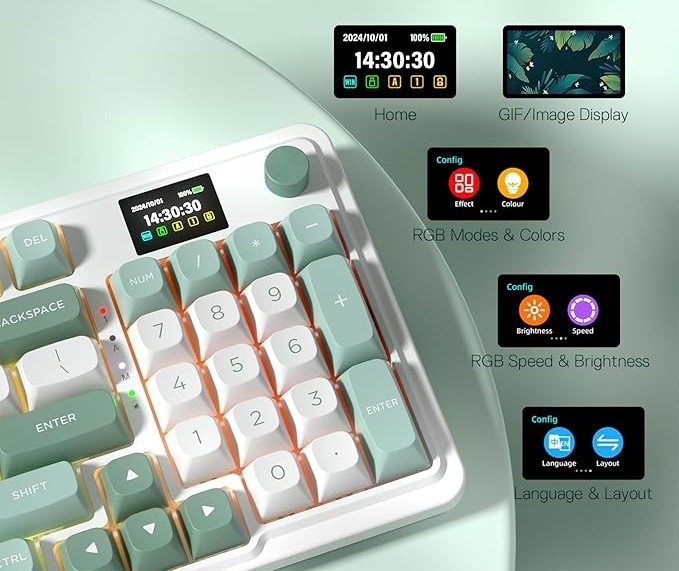
There’s also a tactile satisfaction to the knob itself. It has just enough resistance to feel deliberate, not loose or cheap. I caught myself spinning it absent‑mindedly a few times, almost like a fidget toy, which probably wasn’t the intended use but says something about how well it’s built. Which again, at this pricepoint seem insane. As Ben reviewed another keyboard for DezDoes, considerably more expensive that had this feature and this feels exactly the same. Redragon Galatin Pro is actually scaring me. As I can’t figure our how that do it.
Together, the screen and knob give the Galatin Pro a kind of personality that most boards in this price range don’t even attempt. One’s playful, the other’s practical, and the combination makes the keyboard feel more like part of a setup rather than just another input device. It’s subtle, but once you get used to having them, you don’t really want to go back.
Connectivity and Wireless Performance
Tri‑mode connectivity is becoming more common, but it’s still impressive at this price. USB‑C for wired, Bluetooth 3.0/5.0, and 2.4G wireless. I used it mostly on 2.4G, and the connection stayed stable the entire time. No noticeable delay, even in games. Bluetooth was fine too, though I only used it briefly on a tablet.
Switching between devices is quick enough that I didn’t think about it much, until writing the review and had to go back to retest, even though I had used this feature many times while testing the Redragon Galatin Pro. That’s a good sign. It’s the kind of feature that fades into the background once it works properly; you just tap the shortcut, and suddenly you’re typing on a different device. I moved between my desktop, a laptop, and even my phone a couple of times, and the transition was smooth enough that I barely registered it.
The wired USB‑C option is there when you want absolute reliability, or when you’re charging, and I found myself plugging in occasionally just out of habit. But honestly, the wireless modes held up so well that I didn’t feel like I was sacrificing anything by staying untethered. Which I do with my current keyboard, which again, costs more than the Redragon Galatin Pro
Battery life hasn’t been a problem so far. I didn’t track it obsessively, but after several days of mixed use, gaming, writing, a bit of Bluetooth on the tablet, I never hit a point where I felt anxious about running out of charge. The LCD screen even helps here, since you can check battery status at a glance instead of guessing.
There’s something liberating about knowing the keyboard can handle multiple roles without fuss. One moment it’s locked into a fast 2.4G connection for gaming, the next it’s paired with a tablet for casual browsing. It doesn’t demand attention, and that’s probably the best compliment I can give. When connectivity feels invisible, you know it’s doing its job.
Everyday Use

After a few days, the keyboard settled into my routine. I typed articles on it, played a few games, even used the numpad more than I expected. The compact layout helped more than I thought it would. I didn’t feel cramped, and I didn’t miss any keys. In fact, the slightly smaller footprint made my desk feel tidier, which I appreciated more than I thought I would, easily as my housemate has a bit of OCD and loves pointing out how cluttered my desk is. It’s one of those subtle changes that sneaks up on you, you don’t notice it at first, but after a while you realise you’re moving more freely.
Gaming sessions felt comfortable, too. The 2.4G wireless connection held steady, and the board never gave me that nagging sense of input lag. I swapped between genres, a bit of fast‑paced FPS on Farlight 84, then some slower strategy titles….. well, it was World of Warcraft, but I’m calling it a slower strategy title. Redragon Galatin Pro kept up without fuss. The numpad even came in handy for shortcuts I’d usually ignore, which was a nice surprise.
The RGB lighting is bright and clean. It syncs with the rest of the Pro series, though I’ll get into that more when I review the mouse and headset. For now, I’ll just say the lighting looks better than the price suggests. The colours are vivid without being overwhelming, and the diffusion across the white‑and‑green frame adds a softer glow than I expected. I found myself experimenting with different patterns, waves, static colours, even a few custom profiles, just because it was fun to see how the board transformed under different lighting moods.
Day to day, the Redragon Galatin Pro feels like it belongs on the desk rather than just sitting there. It’s not trying to dominate the setup, but it adds enough personality that you notice it. Between the compact layout, the smooth typing feel, and the lighting that ties everything together, it became less of a test unit and more of a daily driver. And that’s probably the best compliment I can give, it stopped feeling like “a new keyboard” and started feeling like my keyboard.
Value and Positioning
At $108 AUD (discounted from $144), the Redragon Galatin Pro feels like it’s punching well above its weight. That price point is unusual for a keyboard with this feature set. The gasket mount, the LCD screen, the rotary knob, and tri‑mode wireless connectivity are all features that usually push a board into the $200+ range. Seeing them bundled here, as part of a wider ecosystem that stays under $250 AUD for keyboard, mouse, and headset combined, makes the whole package feel disruptive in the best way.
It’s worth pausing on that for a moment. The big brands, Razer, Logitech, and Corsair, often charge more than double for similar wireless setups. Redragon isn’t pretending to replace those high‑end customs or boutique builds, but it’s clearly trying to democratise the enthusiast experience. You get a taste of premium design without the premium barrier or pricepoint.
The Redragon Galatin Pro itself feels like the anchor of this ecosystem. It’s the piece that sets the tone, and it does so convincingly. The typing experience leans toward soft and cushioned, the LCD adds personality, and the knob sneaks into your routine until you wonder how you managed without it. At this price, those touches aren’t just nice extras, they’re the reason the keyboard feels like a flagship.
I’m not saying it replaces high‑end customs keyboards. It doesn’t, especially as I love building them, and don’t want to stop making them. But it brings a lot of that experience into a space where more people can actually try it. And that’s the real value here: accessibility. For under $150 AUD, you’re getting a board that feels premium enough to surprise you, while still leaving room in the budget for the rest of the Pro series or to customise it the way you want.
If anything, the current special pricing makes the Redragon Galatin Pro even harder to ignore. It’s not just affordable, it’s positioned as a gateway into enthusiast‑style features without the usual financial leap. That’s a bold move, and it’s one that makes the Redragon Pro ecosystem genuinely worth paying attention to.

Final Thoughts
The Redragon Galatin Pro is a strong start to the Redragon Pro Series. It feels like the anchor of the ecosystem, the piece that sets the tone for everything else. I enjoyed using it more than I expected, and I kept finding small moments where it surprised me, the softness of the keys, the weight of the chassis, the little animations on the screen.
At its current price of around $108 AUD (down from $144), it’s hard not to see it as punching above its weight. The gasket mount, the LCD screen, the rotary knob, and tri‑mode wireless connectivity are features that usually belong to boards well past the $200 mark. Having them here, in a keyboard that’s part of a full wireless suite under $250 AUD, makes the whole package feel disruptive. It’s not just about affordability, it’s about accessibility. More people can now experience enthusiast‑style features without the usual financial leap.
I’m not saying it replaces high‑end customs. It doesn’t. But it borrows enough of that premium feel to make you pause and notice. The typing experience leans soft and cushioned, the connectivity feels invisible in the best way, and the design, especially in the white and green aesthetic with Mint Mambo switches, adds personality without being overbearing.
If the rest of the Pro lineup follows this direction, the whole “Sub‑$250 Wireless Ecosystem” idea might actually hold up. And that’s what excites me most. The Redragon Galatin Pro isn’t just a good keyboard for the money; it’s a statement piece that suggests Redragon is serious about reshaping what budget wireless setups can look and feel like.
In short, it’s a flagship that earns the title, not by being perfect, but by being ambitious enough to surprise you at every turn.





One Comment
[…] admit, this was the one I was nervous about. The Galatin Pro keyboard surprised me, the Trident Pro mouse impressed me, but headsets are different. I’ve been using the […]
Comments are closed.