
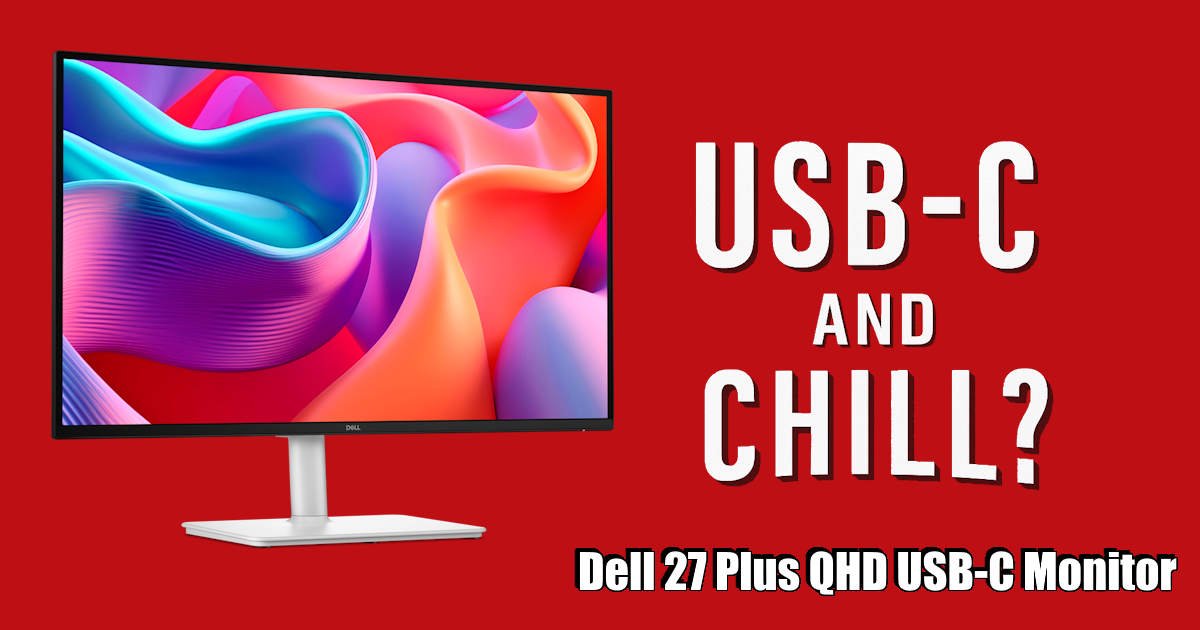
The Dell 27 Plus QHD USB-C Monitor (S2725DC) delivers crisp visuals and solid connectivity. It’s a good fit for work and casual play, though some design choices might leave you wondering.
First Impressions
Unboxing the Dell 27 Plus felt… fine. Not exciting, not disappointing. Just fine. The packaging was neat, protective enough, and the monitor itself looked clean, minimalist, with a matte finish that doesn’t scream for attention. I remember thinking, “Okay, this’ll do.” The stand was easy to attach, no tools needed, which I appreciated. I’ve had monitors in the past that made setup feel like assembling the Horse of Troy. So this was quite refreshing.
The silver-grey tone is a nice touch. It’s not black, which is oddly satisfying. I didn’t expect to care about the colour, but it grew on me. It blends into my workspace without dominating it, while giving it a lightness that makes the workspace feel more open.
Once it was on the desk, I gave it a quick tilt, just to see how flexible it was. It moved smoothly, though not with the kind of resistance you get from a premium arm. More like a polite nod than a firm handshake. Still, it held its position, which is what matters. I didn’t have to wrestle with it, and that’s a win in my book.
Plugging the Dell 27 Plus QHD USB-C Monitor in was straightforward. USB-C to my laptop, and everything lit up without fuss. No driver drama, no flickering handshake issues. That said, the cable included in the box felt a bit short. Maybe that’s just me, I like a little slack in my setup, but I ended up swapping it for a longer one I had lying around.
The bezels are slim, which I like. They don’t vanish completely, but they don’t draw attention either. I’ve used monitors with chunkier frames that made everything feel boxed in. This one feels more open, more modern. Not quite edge-to-edge, but close enough that I didn’t think about it after the first hour.
One thing I did notice, though, and maybe this is just a personal quirk, the buttons on the underside are a bit fiddly. I always forget which one does what, and there’s no tactile difference between them. I found myself pressing the wrong one more than once, then backing out of menus I didn’t mean to open. It’s not a dealbreaker, but it’s the kind of thing that makes you sigh a little every time you need to adjust brightness.
Still, first impressions of the Dell 27 Plus QHD USB-C Monitor? Solid. It’s the kind of monitor that doesn’t try to wow you out of the box; it just quietly gets to work. And sometimes, that’s exactly what you want.
Display Quality
Let’s start with the basics: the QHD resolution is sharp. Like, really sharp. Text pops, colours have that nice, vivid-but-not-overcooked look, and the 144Hz refresh rate makes everything glide. Scrolling through long documents feels smooth and oddly satisfying, which is good, because long documents seem to be my entire life lately.
Gaming? I gave it a spin. Nothing too intense, just a few mid-range titles to see how it handled, and mostly because my little potato of a PC can’t do high-end. And honestly? the Dell 27 Plus QHD USB-C Monitor did better than I expected. Not going to match your high-end gaming monitor, but I’d gladly use this as my main monitor. I didn’t feel like I was compromising, which is saying something.

Brightness, though… hmm. It’s fine, and that is coming from someone who keeps my monitors at 45% brightness. I set the Dell 27 Plus QHD USB-C Monitor to my normal brightness, but found myself nudging it up, expecting more punch, and it got there eventually, but much higher than I would normally have it. Maybe I’ve been spoiled by screens that blast light like they’re trying to impress the sun. Or maybe the anti-glare coating is just doing its job a little too enthusiastically. Indoors, it’s fine. In direct sunlight? It starts to feel a bit muted.
Colour accuracy seemed solid. I didn’t break out any fancy calibration tools, just pulled up a few photos and a couple of YouTube videos. Skin tones looked natural, blues didn’t drift into icy territory, and nothing felt off. For everyday use, the Dell 27 Plus QHD USB-C Monitor is great. For creative work? Maybe. Depends on how obsessive you are. I’m not, so I didn’t notice anything worth complaining about.
Video playback? Surprisingly great. The blacks aren’t OLED-deep, and yeah, there’s a faint glow around the edges in darker scenes, but it didn’t stop my housemate and me from binge-watching Selling Sunset with the monitor and laptop perched on my bedside table. The QHD resolution made the drama pop, and the USB-C connection meant one cable did it all, power & display; So just USB-C and chill. It’s the kind of setup that makes you forget you’re using a monitor and not just watching a TV and just enjoy the show.
And the speakers. Yep, they exist. I used them once. And you know how I feel about these so-called speakers are 3 watts of wasted space. They’re okay for quick Zoom calls, but they sound thin, like they’re trying their best. But their best is like a little kid trying to stay in the lines of his colouring book. I switched back to my usual setup pretty fast & used a Bluetooth speaking while watching Selling Sunset (yes, I don’t know why I love that show, the drama of that show is amazing. It’s my guilty pleasure! Don’t judge)
Connectivity and Convenience
USB-C is the star here. One cable, and my laptop’s charging while the display lights up. That’s the kind of simplicity I like. No extra clutter, no weird dongles. Just plug in and go. Okay, a few times it takes a bit longer than I’d prefer, like it’s thinking about it first, but it always gets there. Reliable! And to be fair, I think this is more my work laptop than the monitor itself.
There’s also HDMI and DisplayPort, which I mostly ignored, until I decided to hook up my console to the Dell 27 Plus QHD USB-C Monitor. I’ve been meaning to play more Xbox for ages. It’s one of those “weekend projects” that never quite becomes a project. You know the type. But this time? It actually happened.
Being able to tap a button at 5 pm… okay, 4pm, but let’s keep that between us, and instantly switch from spreadsheets to gaming? That was magic. Work mode faded, gamer mode kicked in, and I remembered how much I missed it. The console, the controller, the whole vibe. It weird to think that the missing piece was just a great monitor with the required ports that Dell 27 Plus QHD USB-C Monitor has.
Having USB-C for my work laptop, DisplayPort for my PC, and a spare HDMI just waiting for the Xbox? That setup felt luxurious. Like everything had its place, and I didn’t have to unplug or rearrange a single thing or have all the cables of my KVM Switch on my desk. Heavenly might be a strong word, but honestly… not far off.
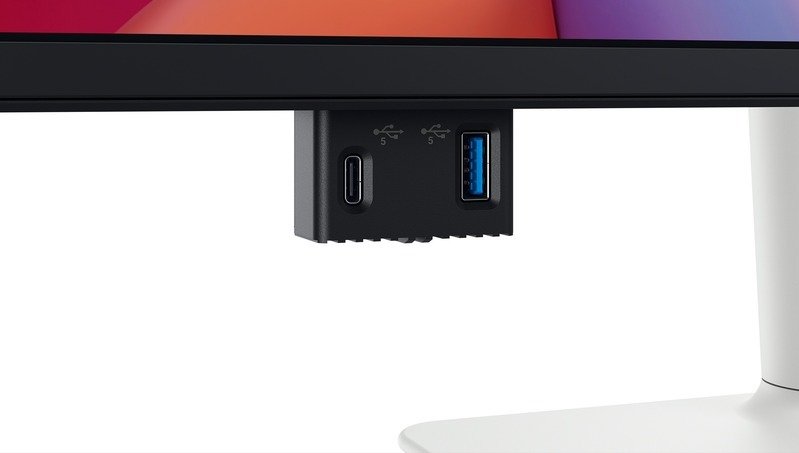
One of my favourite features? That integrated USB hub and not just because it works, but because it feels good to use. The pop-down design is slick, almost like the monitor is saying, “Here, let me help you with that.” I plugged in my keyboard and my webcam, and boom! instant connection, no fuss. I then pluged in a and a flash drive and speeds were solid for everyday tasks, and while I wouldn’t throw massive video files at it, for quick transfers and peripherals, it’s a dream.
It’s the kind of thoughtful design that makes you smile every time you use it. The pop-down access is especially satisfying, no awkward reaching around the back or fumbling blindly. Just flip it down, plug in, and go.
That said, it’s worth noting that the hub only offers USB-C and USB-A ports. For most setups, that’s fine, but if you’re rocking older peripherals or need more diverse I/O options, it might feel a bit limiting. A couple more ports, would’ve taken it from great to perfect, but lets be real, this is just me being greedy and too lazy to bend to the side and using the I/O in my PC. Still, for what it offers, it’s a quiet little win that adds real-world convenience to an already well-rounded setup.

The stand adjusts easily. Height, tilt, swivel; it’s all smooth. No creaks, no resistance. I’ve had monitors that felt like they were fighting me every time I tried to reposition them. This one just moves. And then stays. I’ve bumped the desk a few times, and it didn’t wobble or shift. That’s a small win I didn’t know I needed.
Cable management is… there. Sort of. There’s a little clip on the back that helps corral things, but it’s not exactly elegant. I ended up using a few Velcro ties to keep things tidy. Not a dealbreaker, just one of those areas where you can tell they didn’t go all-in.
Overall, it’s a setup that doesn’t get in your way. It’s not flashy, but it’s functional. And when you’re trying to get through a workday without fiddling with cables or adjusting your screen for the fifth time, that kind of quiet reliability matters.
Final Thoughts
The Dell 27 Plus QHD USB-C Monitor isn’t trying to be the hero of your setup. It’s more like the dependable sidekick, the one that shows up, does the job, and doesn’t make a fuss about it. It’s not flashy, and it won’t win any awards for innovation, but after a few weeks of daily use, I’ve come to appreciate its quiet competence.
It handles work with ease. Writing, editing, and video calls; it’s comfortable, clear, and easy on the eyes. The display is sharp, the refresh rate smooth, and while it won’t blow you away with brightness or contrast, it’s consistent. And sometimes, consistent is better than impressive.
Gaming? Casual stuff feels great. More demanding titles might stretch its limits, but for someone who’s not chasing ultra settings or competitive edge, the Dell 27 Plus QHD USB-C Monitor more than enough. The ability to switch between devices, laptop, PC, console, with zero drama? That’s where it really shines. It’s the kind of flexibility that makes you feel like your desk is finally working with you, not against you.
Sure, there are quirks. The menu buttons are fiddly. The speakers are… well, they exist. And the cable management could use a second draft. But none of these are dealbreakers. They’re just the little imperfections that remind you this isn’t a premium flagship, it’s a well-balanced, thoughtfully designed monitor that knows its lane and stays in it.
If you’re looking for something reliable, versatile, and easy to live with, the Dell 27 Plus QHD USB-C Monitor makes a strong case for itself. It’s not trying to be everything. It’s just trying to be good at what matters. And honestly? It succeeds.




Recent Comments