
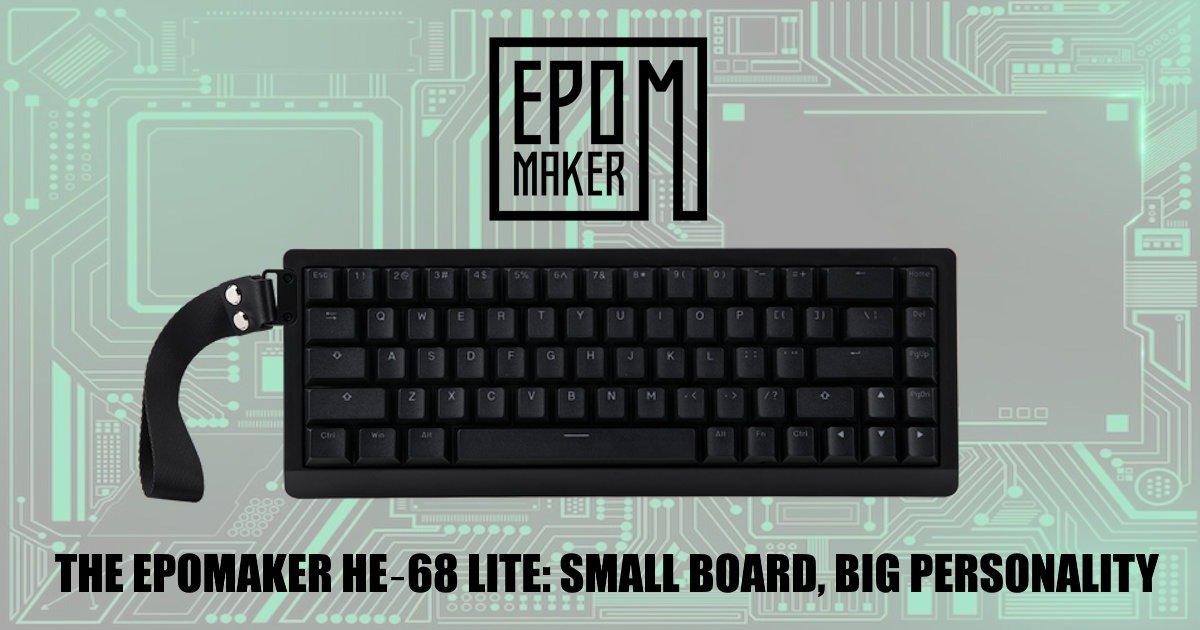
I have been looking for a new keyboard for my workstation at home for a while now. I wanted something small because my desk space is already pretty limited, and I’ve been trying to shift away from using my laptop’s keyboard. Not that there is anything wrong with the Surface Pro keyboard, it’s actually quite good, but I wanted the laptop to sit a bit further back. I spend a lot of my workday on Teams calls, and having the laptop right in front of me ended up feeling a little too close for comfort.
So when EPOMAKER reached out and asked if I wanted to review the HE68, a 68‑key wired keyboard with bright RGB lighting, I didn’t see any reason to turn that down.
The HE68 is branded as a gaming keyboard, fitted with Hall Effect magnetic switches, adjustable actuation, and an extremely fast 8 kHz polling and scan rate. It’s probably unnecessary for basic office work, at least on paper, but I’ve always thought office setups shouldn’t settle for less when they don’t have to.
Opening the Box
As usual, I filmed the unboxing. There’s nothing wrong with what EPOMAKER has done here, and nothing surprising either. It’s all straightforward and neat. The box has plenty of detail about the keyboard, the reveal is simple, and everything inside is exactly what you’d expect.
What’s in the Box
- HE68 Lite keyboard
- Two spare switches
- Carry strap with the accessories required to install it
- Braided USB‑C to USB‑A cable
- Keycap/switch removal tool
- Mini screwdriver for attaching the strap
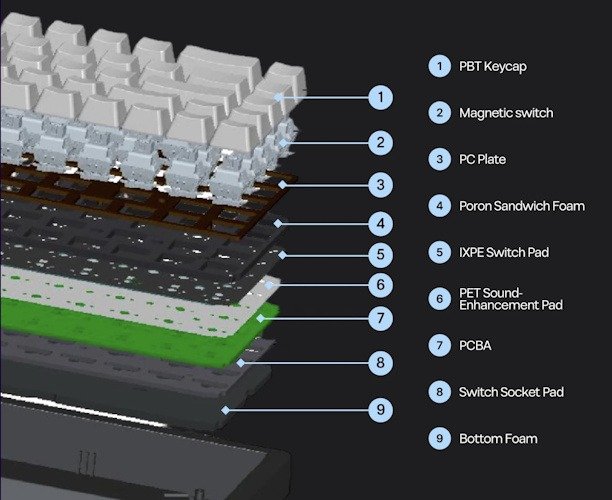
The EPOMAKER HE‑68 Lite is light, built from ABS plastic with a polycarbonate plate, but it doesn’t have that fragile, hollow feeling you sometimes get from lighter keyboards. It’s surprisingly solid for something without a battery inside. You pick it up expecting it to feel a bit flimsy, and then there’s this moment of, “Oh, alright, you’re sturdier than you look.” The lighter weight makes sense once you remember it doesn’t carry any wireless hardware, but even so, the overall build feels more confident than you’d assume at first glance.
The included cable is better than expected, too. It’s a nice length, braided, and that slightly fancy gold‑plated USB‑A connector gives it a touch of personality. It slots into my dock without fuss, which I appreciate, because I’ve had cables in the past that seemed to resent docking stations and would disconnect at the slightest nudge.
Now, if you’re using a mostly USB‑C laptop ecosystem, the lack of a USB‑C to C cable may cause a tiny eye‑roll. Modern laptops, especially slim ones, almost expect everything to be USB‑C now. But given that the EPOMAKER HE‑68 Lite is aimed at the gaming crowd, USB‑A is still the norm on most towers. I’ve drifted into the USB‑C‑only mindset myself without noticing, and suddenly everything in my setup needs a dongle, or in the Surface Pro’s case, a dock that sits there like royalty requiring constant attention. So perhaps that particular frustration is more of a “me” issue than an EPOMAKER one.
In day‑to‑day use, the EPOMAKER HE‑68 Lite feels sturdy with almost no flex, even if you press a little harder than necessary just to test it. The fixed typing angle hits that comfortable middle ground where it never calls attention to itself. After several long workdays, I found no wrist strain or awkward positioning, which is always a relief.
It sits neatly on my desk without taking up much space. Its compact footprint means it would travel well, slip it into a backpack, and you wouldn’t worry about it bending or getting knocked around. Though realistically, mine spends its life acting as the centrepiece of my home setup rather than going on adventures.
I did give the carry strap a try. It’s an interesting addition, giving the keyboard an outdoorsy “ready for anything” vibe, which made me laugh a little because I mostly use it for spreadsheets and emails. On the desk, the strap kept drifting into the way, tapping the surface and generally being a distraction. So I took it off and popped the rubber cover back on. Fortunately, it only uses two tiny screws, so reinstalling it later will be quick if the EPOMAKER HE‑68 Lite ever decides it wants to become a travel companion.
Typing Experience
Coming from mechanical keyboards, I tend to rotate between my Yunzii AL80 and the Keychron K2 depending on the day. The Hall Effect magnetic switches on the EPOMAKER HE‑68 Lite took a little time to settle into. Mechanical switches have a particular rhythm, a familiar resistance, and I’ve grown used to that slightly firmer feel. With the EPOMAKER HE‑68 Lite, I noticed almost immediately that I had to press the keys a little differently. Not harder, just… differently. My fingers had to adjust, like learning the subtle quirks of a new car’s accelerator.
For anyone who hasn’t used Hall Effect switches before, they’re a bit of a shift in thinking. Instead of relying on metal contacts, they use magnets and sensors. There’s a magnet attached to the bottom of each key stem, and a sensor built into the PCB that detects the magnetic field as the key moves. It’s based on the Hall Effect principle, something I won’t pretend to fully explain here or could do it justice if I did. But the important part is that it actually works incredibly well in practice.
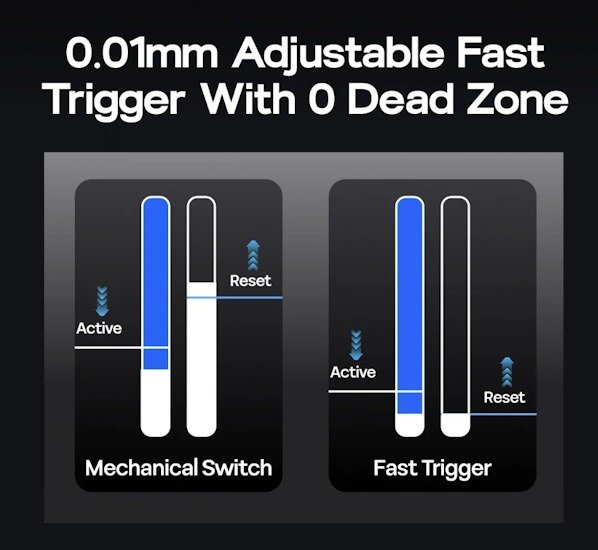
One of the biggest advantages is the reset speed. It’s instant. The moment the switch starts to move upward again, it resets and is ready for the next input. With mechanical switches, you have to travel past the actuation point again before they’ll register another press, which introduces a small delay. It’s tiny, barely noticeable in everyday typing, but in gaming? I can see how that could make a real difference, especially in those twitchy, high‑pressure moments… like my training for the Excel World Championships. That is a real thing, looks it up, you’ll thank me later.
With the right software, you can reduce the actuation distance even further. Gamers will absolutely appreciate that level of control. I’m sure there are people out there who can feel the difference down to the millisecond. I’m not one of them, but even I can acknowledge the potential advantage.
For me, the biggest difference with the EPOMAKER HE‑68 Lite’s switches is the springs. I can feel them more than on my mechanical boards, almost like a gentle cushion under every press. It doesn’t slow me down; I still type at my usual pace, which is embarrassingly slow compared to my wife, who types like someone racing the clock, but the sensation is softer, a bit spongier. Not unpleasant, just different. I’d definitely recommend trying a Hall Effect keyboard before committing, because it may not be everyone’s preferred feel. I’ve grown used to it now, and it’s become part of the everyday comfort of my desk setup.
And then there’s the sound. The EPOMAKER HE‑68 Lite has five layers of sound dampening, which makes it surprisingly quiet. Not silent, but muted in a way that feels intentional. It’s great for late‑night gaming sessions when you don’t want to wake anyone, and equally handy during Teams calls when you’re typing an email or, let’s be honest, sending a meme to a co‑worker, and you’d rather the rest of the meeting didn’t hear every keystroke echoing through your microphone. It’s discreet in all the right ways.
RGB and Customisation
The EPOMAKER HE‑68 Lite keeps things simple in terms of connectivity; it’s wired‑only, which is exactly what allows that wild 8 kHz polling rate to exist in the first place. There’s something reassuring about a keyboard that doesn’t bother pretending to be wireless when it knows speed is its whole personality. You manage the onboard features through a mix of function key shortcuts: RGB lighting modes, brightness levels, and even mapping the number row to function keys when you need them. It’s all fairly intuitive once you’ve done it a couple of times.
The quick start guide helps a lot during the first setup, giving you just enough information so you don’t feel lost, but not so much that you feel overwhelmed. EPOMAKER also has software available on their website, and this is where things open up a bit more. Suddenly, the EPOMAKER HE‑68 Lite becomes far more customisable than its minimal appearance suggests.
Within the software, you can adjust four different actuation levels, each with its own behaviour. It almost feels strange at first, giving individual keys their own personalities. You can build macros too, letting a single key press trigger multiple actions. It’s a level of responsiveness that’s genuinely impressive, the sort of thing competitive players obsess over. I’m absolutely not one of those people, but even I had a moment of “oh wow, okay, this is faster than I expected.”
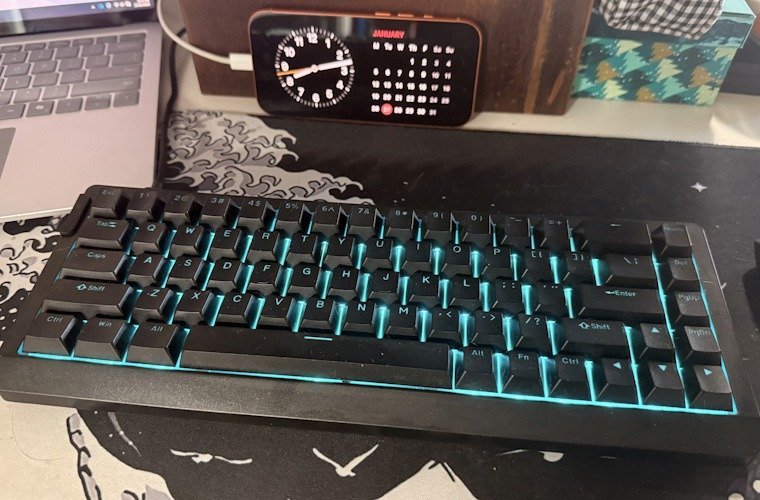
RGB customisation is also handled much better through the software than through the onboard shortcuts. You can cycle colours and patterns using the keyboard itself, but if you want to get really specific, brightness, speed, transitions, static colours, and reactive lighting, the software is the better route. I tend to prefer a simple single‑colour look, usually blue, with no animation. But if you’re someone who loves a swirling, shimmering rainbow effect that looks like your keyboard is hosting a miniature light show, the EPOMAKER HE‑68 Lite will happily enable that.
The software itself is… fine. Not groundbreaking, but not frustrating either. It loads quickly, responds predictably, and gives you control over everything the keyboard can do without making you jump through hoops. It’s definitely an improvement over the keyboards that rely on browser‑based configurators, which always feel a bit awkward. For people who enjoy customising every detail of their setup, colours, actuation, macros, the whole lot, there’s more than enough here to play with. And if you’re like me and just want something that looks clean and behaves consistently, the software lets you set it once and forget about it.
Final Thoughts
The EPOMAKER HE‑68 Lite is exactly what it presents itself as, a lightweight, portable 65% keyboard that, at first glance, could easily pass for a standard office model. The black version especially has that “I belong in a cubicle” look. But the moment you actually start using it, you realise there’s a surprising amount of power hiding under that modest exterior. It’s a bit like meeting someone quiet at first and then discovering they have this whole unexpected competitive streak.
The Hall Effect switches genuinely change the typing experience. The responsiveness feels different in a way that’s hard to describe until you’ve spent a day with it. For gamers, that super‑quick reset and adjustable actuation could absolutely be the edge they rely on in those split‑second moments. For office use, which is where I spend most of my time, the EPOMAKER HE‑68 Lite offers a smooth, controlled, almost elegant feel, with barely any noise and practically no fatigue. It’s the sort of keyboard you can use through a full day of meetings, emails, and a few sneaky after‑hours sessions without feeling like your fingers have been through anything strenuous.
My daily work isn’t even remotely gaming‑focused, but the EPOMAKER HE‑68 Lite has handled the typical office workload like it was designed for it. Long reports, rapid‑fire message replies, spreadsheet marathons, not once did I feel any discomfort. I even packed it into my bag and took it to the office, proudly replacing one of those generic HP or Dell keyboards every workplace seems to have piles of. You know the ones: grey, clacky, and somehow always sticky even when they look clean.
The biggest surprise, though, remains the price. At around $49.99 USD (roughly $88 AUD, but currently on special on Amazon for $66.39), the amount of customisation, performance, and polish you get feels almost suspiciously good. I genuinely expected corners to be cut somewhere, but after weeks of daily use, nothing has revealed itself as a compromise. I was a little concerned about the fixed height at first. I tend to nitpick about ergonomics, but after settling into it, that worry disappeared entirely. It’s just… comfortable.
EPOMAKER is a new brand for me, and I wasn’t sure what to expect going in. But after living with the EPOMAKER HE‑68 Lite, I’m honestly keen to explore more of their lineup. There’s something refreshingly confident about this board, not loud or flashy, just capable in a way that quietly wins you over. It’s going to take a very impressive keyboard to earn a spot on my desk over this one, and right now, the EPOMAKER HE‑68 Lite doesn’t seem in danger of being replaced anytime soon.





One Comment
[…] shares some DNA with the Epomaker HE 68 Lite, especially with its Hall Effect switches, and that part feels familiar in a good way. What […]
Comments are closed.