
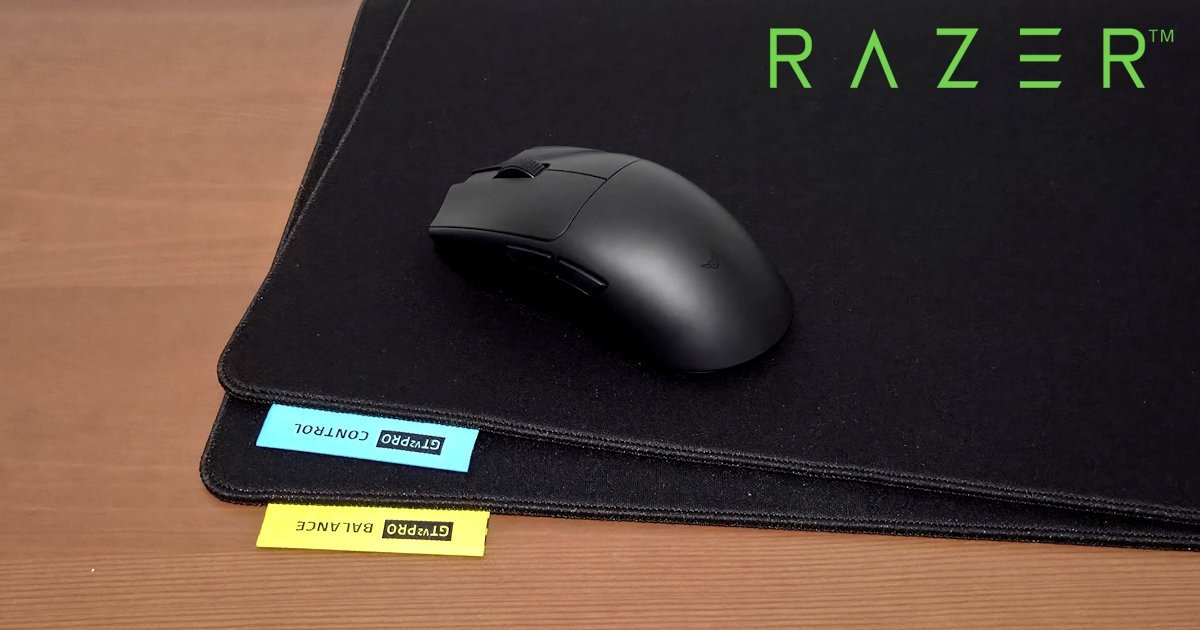
A familiar shape, sharpened edges, and a setup that quietly gets out of the way
I’ll be honest, when I heard Razer Viper V4 Pro, my first reaction was surprise. Wasn’t it only yesterday that the Razer Viper V3 was doing the rounds? (A quick Google check confirms it was actually 2024, but in tech years, that’s practically last week). The Razer Viper V3 was already locked in as an esports staple. The Viper line has been a competitive powerhouse for years now, almost permanently present on pro desks, and weirdly… It’s also the one Razer mouse I’ve never reviewed or owned. Yet, if you’ve seen me game, that makes a lot of sense.
Picking it up for the first time, there was a bit of excitement mixed in with curiosity. This wasn’t a new shape trying to prove itself. This was a mouse with a reputation. And immediately, it felt earned. Light without feeling fragile. Purposeful without feeling clinical. It didn’t put on a show. It just felt ready to kick butt and take names, like it had been waiting to burst out of the box.
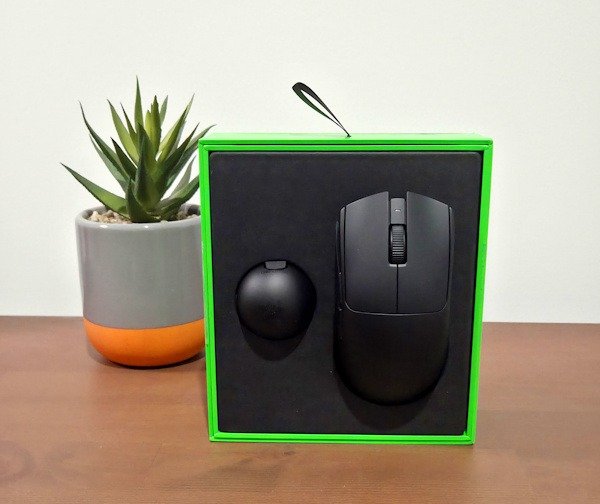
Shape and Feel: Nothing New, and That’s Fine
The shape of the Razer Viper V4 Pro hasn’t changed much, and that’s very clearly a deliberate choice. It’s low profile, symmetrical, and refreshingly free of dramatic curves or sculpted aggression. There’s no attempt to guide your hand or dictate how you should hold it. It just exists, neutral, confident. That kind of restraint is rare.
While its design naturally suits fingertip and claw grips, what surprised me was how easily I settled into a relaxed claw without even thinking about it. I’m usually a palm grip guy, but here there was no adjustment period, no conscious effort. My hand simply found its place and stayed there. I noticed the game more than the mouse itself, which sounds obvious, but isn’t always the case. I was never trying to readjust or look down on occasion to see where I was.
That’s really the defining trait. The Viper V4 Pro doesn’t demand adaptation or reward one grip style over another. You put your hand down, and it feels mutual, like the mouse is meeting you halfway, then becoming an extension of your hand.
The surface finish plays a big role in that. It’s subtle: not overly textured, not slick or powdery. Even after longer sessions, the shell never felt slippery, but it also never clung to my hand. No hotspots, no pressure points, no moments where I caught myself shifting grip because something felt off. I kept waiting for that tiny annoyance to show up, and it just didn’t. Which says a lot, as I’ve just found a new Guild in World of Warcraft, and I’ve been playing non-stop, and it feels like an hour.
It’s boring feedback, honestly, but in the best possible way. Competitive gear should disappear once you’re using it. And in that sense, the Razer Viper V4 Pro absolutely nails it.
Weight and Balance: Light, but Grounded
At 49 grams, it weighs about as much as a Kit Kat Chunky (I still mourn the Biscoff version), and that weightlessness is felt the second it leaves the desk. It’s genuinely light, even by modern esports standards, but what matters more than the number itself is where that weight sits. This mouse feels balanced right through the middle. Not forward‑leaning. Not tail‑heavy. Just centred, almost perfectly, under your grip. It’s rather impressive how balanced it feels.
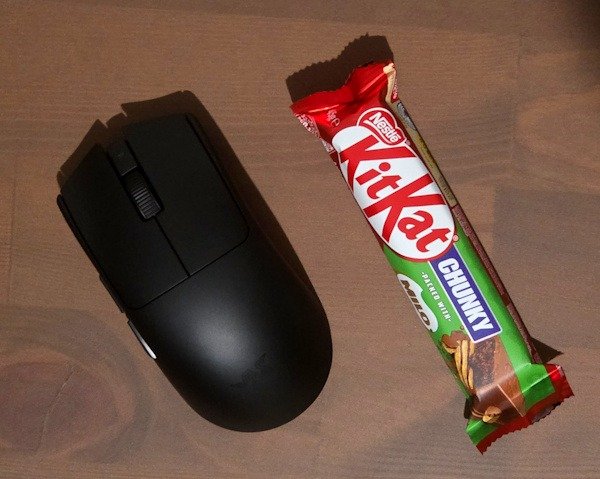
That balance point is noticeable the moment you start playing. When you lift and reset the mouse, it comes up cleanly without tipping. When you drop it back down, it lands flat. There’s no moment where the nose dips or the back feels like it’s lagging behind. Everything feels evenly distributed, which makes the low weight feel controlled rather than floaty.
I tested the Razer Viper V4 Pro across longer FPS sessions and everyday desktop use, and the balance held up consistently in both. Micro‑adjustments felt deliberate, especially during slower tracking moments where control matters more than speed. Flicks were quick and sharp, but they didn’t overshoot unless I genuinely pushed them too far. That sounds obvious, but lightweight mice don’t always manage this. Some feel fast but nervous. This one doesn’t.
There’s a quiet confidence to how it moves. The mouse never feels like it’s racing ahead of your hand, and it never feels like it’s resisting you either. I think that confidence comes directly from the internal redesign Razer talked about during the media briefing. A smaller PCB. A cleaner internal layout. Less wasted space. You don’t see any of that while you’re playing, obviously, but you absolutely feel the result of it in how stable the mouse feels despite being so light. Having reviewed several esports mouses recently, this isn’t always the case.
At 49 grams, the Razer Viper V4 Pro sits in that sweet spot where the weight disappears, but the control doesn’t. It feels grounded in motion, predictable in resets, and comfortable over longer sessions. After a while, the balance becomes something you stop thinking about entirely. And for a competitive mouse, that’s exactly where you want to end up.
Clicks and Scroll: Quietly Excellent
Razer’s optical switches are at a point now where they feel… finished. That’s the simplest way I can put it. Not experimental. Not flashy. Just confident. Using the Razer Viper V4 Pro, it feels like Razer has stopped trying to prove optical switches belong in esports mice and instead focused on perfecting how they should actually feel.
Clicks are crisp without being sharp. There’s a clear actuation point, a solid physical confirmation, and none of that vague softness that sometimes sneaks into ultra‑light designs. Every click feels intentional. I never once found myself wondering if an input registered, even during faster sequences where timing matters. That kind of reliability ends up mattering more than raw click speed, at least in real play, where pressure and fatigue are very real things. I am very far from a professional, but I truly noticed it more teh more I used it.
What I appreciated most was the consistency. Left and right clicks felt matched. No difference in resistance. No strange variance over time. After longer sessions, they didn’t feel fatigued or stiff, just steady. The Razer Viper V4 Pro doesn’t reward smashing the buttons harder than necessary. It responds cleanly whether you’re relaxed or tense, which is exactly what you want in a competitive mouse.
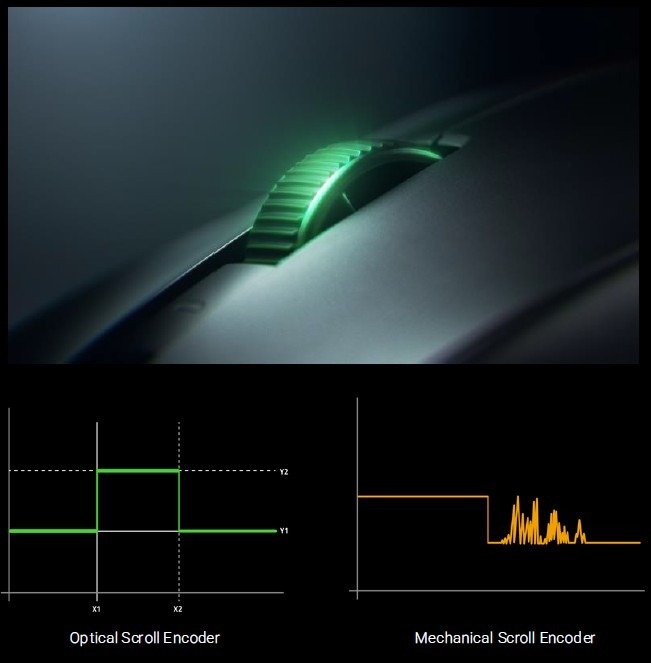
The scroll wheel deserves its own mention, too. Historically, Razer’s scroll wheels have occasionally felt like a legacy carry-over—functional, but dated. This one breaks the cycle. Begin a sticking point for so many, but not this one. It’s optical, and it shows in all the right ways. Each step is clean and predictable. No accidental inputs. No jitter. No weird bounce when switching directions. Scrolling through weapons, hopping menus, or even just moving through long webpages felt controlled and consistent every single time.
It’s not a flashy scroll wheel. It doesn’t try to impress you with resistance tricks or exaggerated tactility. It just works. Reliably. Quietly. Over and over again. And paired with the clicks, it reinforces the overall feeling that the Razer Viper V4 Pro isn’t chasing attention here. It’s built to disappear once the match starts.
Which, honestly, might be the best compliment you can give input hardware.
Sensor and Performance: It Disappears (Which Is the Point)
The Focus Pro 50K sensor in the Razer Viper V4 Pro is… well, amazing. Predictably amazing. And I don’t mean that dismissively. I mean it in the way you talk about something that does exactly what it’s meant to do, every single time, without drama.
Tracking is precise, stable, and completely free of odd behaviour. No spin‑outs. No jitter. No moments where the cursor felt like it was guessing what I wanted. Movements feel clean and connected, and paired with the higher polling options, the mouse feels immediate without ever tipping into that nervous, over‑sensitive territory some high‑end mice fall into. Which I have found many times in the past.
What stood out more than raw performance, though, was how quickly the sensor faded into the background. After a while, I stopped thinking about it entirely. That’s usually the clearest sign a sensor is doing its job properly. I wasn’t tweaking DPI mid‑match… or after a horrible loss. I wasn’t chasing some mythical “perfect” setting. I set it once, nudged it by a few points, and thought, “That’ll do, pig, that’ll do!” And I haven’t changed it since, which is rare for me.
The Razer Viper V4 Pro feels very honest in that sense. What you put in is what you get out. If a shot misses, it feels like a human error, not a hardware one. Much to my annoyance, as I was not able to blame the mouse. That kind of trust builds quickly, and once it’s there, you stop questioning the mouse altogether.
And honestly, that’s ideal. In competitive play, especially, the last thing you want is to be thinking about your sensor. The Razer Viper V4 Pro lets you forget it’s even there allows you to focus on what truly matters and not question the performance hardware.
Battery Life: Set It and Forget It
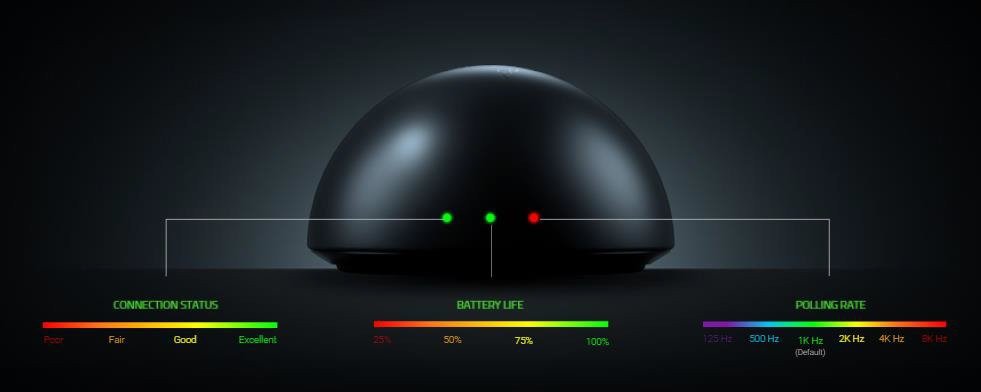
Battery life is one of those things you only really notice when it’s bad. When it’s good, it fades into the background and just quietly does its job. The Razer Viper V4 Pro sits firmly in that second camp. With up to 180 hours of battery life at 1000 Hz, it’s built to outlast pretty much anything you can throw at it.
I used it heavily across several days, long FPS sessions, and general day‑to‑day use without giving it much thought. Not once did I get that low‑level “should I check the percentage?” anxiety that lightweight wireless mice sometimes trigger. No battery micromanagement. No mental calculations about how long I’d been playing. It simply kept going.
When I eventually plugged it in, it was out of habit rather than necessity. The mouse never pushed me into it, and that alone says a lot. It feels like the kind of peripheral you could forget to charge for a few days and still be completely fine, exactly what you want from something designed for competitive play.
The redesigned dongle adds a small but genuinely useful touch here, too. Being able to see connection status and get quick visual feedback at a glance isn’t flashy, but it’s practical. It fits the Viper V4 Pro’s whole personality: understated, intentional, and focused on the things that actually matter.
That theme runs through the entire mouse. Nothing is shouting for attention. Everything is simply doing its job. And when it comes to battery life, that kind of quiet reliability is worth far more than any headline number on a box… especially when you are notorious for forgetting to charge your peripherals.
Software: Where the Beast Becomes Godly
Razer Synapse is still Razer Synapse. Powerful. Deep. Slightly intimidating if you scroll too far, too fast. That hasn’t changed. But with the Razer Viper V4 Pro, it finally feels like the software exists to support the hardware, not compete with it.
At a basic level, setup is refreshingly simple. DPI, polling rate, lift‑off distance, button remapping, all the usual essentials are right where you expect them to be. You can configure the mouse in a few minutes and never open Synapse again if that’s your style. And honestly, the Razer Viper V4 Pro performs well enough out of the box that you could do exactly that and be perfectly happy.
But if you do go deeper, this is where things get impressive.
One of the standout features is Swipe Angle Calibration.
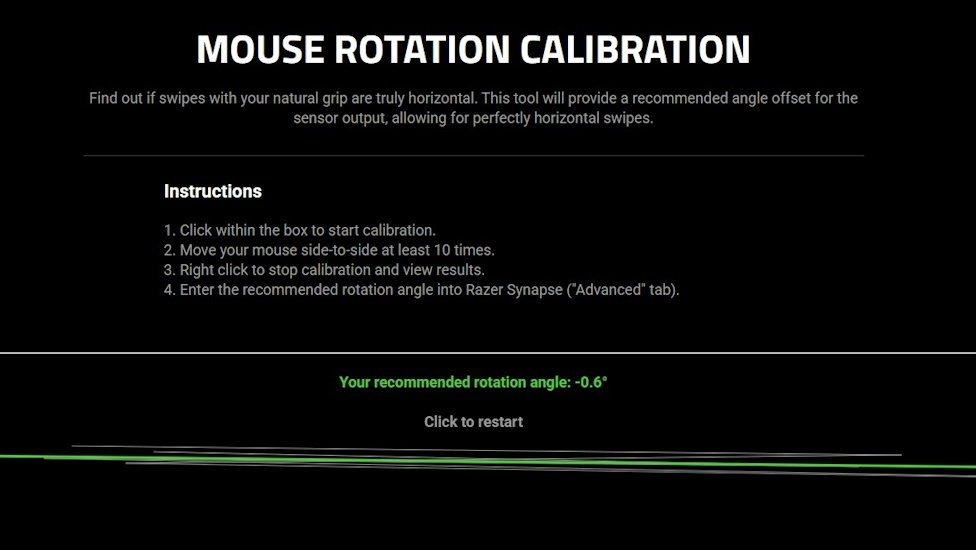
This isn’t a gimmick, and it’s not there to “fix” bad habits. It’s designed to refine the natural angle of your swipe, especially during long horizontal movements, and subtly compensate so your tracking stays true. It doesn’t force straight lines. It just removes the tiny inconsistencies that build up over time. Once it’s dialled in, you stop noticing the feature entirely. You just notice that everything feels cleaner. As someone who holds my mouse at a 45-degree angle, this feature alone sold me on this mouse, as I often find myself swiping right. Then watch as the cursor goes down and to the right, sometimes missing everything I was aiming at. Yet with this, I can make my uncoordinated position work for me.
Then there’s the level of control over sensitivity. DPI adjustments down to single‑point increments. Not presets. Not 50 or 100‑point jumps. One DPI at a time. It sounds excessive until you remember how many competitive players live inside a razor‑thin sensitivity window where even tiny changes matter. Being able to match your exact feel, rather than approximate it, is genuinely useful. Personally, I couldn’t tell the difference between 8000 and 8013, but I’m not a professional, but I can see why this is such a huge advantage. As microseconds can be the difference between holding the trophy or coming in second.
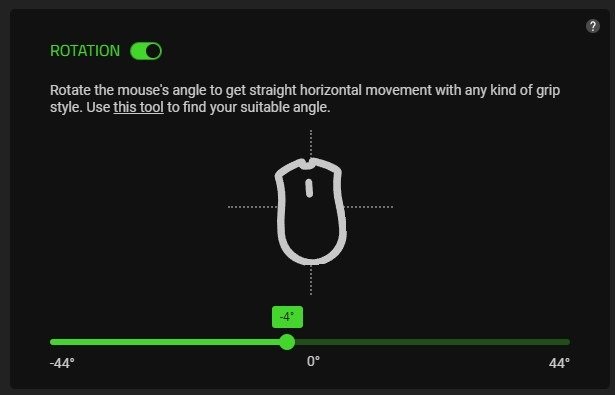
The Razer Viper V4 Pro also supports dynamic sensitivity, letting you define different DPI behaviours depending on context or movement. It’s subtle, but it gives you more control over how the mouse responds during fast transitions or angled swipes, especially when paired with the calibration tools.
Polling rate adjustment is handled in a way that feels practical rather than buried. You can change it directly on the mouse using a simple scroll‑wheel + bottom‑button combination, without tabbing out mid‑session. Both wired and wireless modes support high polling rates equally, so the experience stays consistent no matter how you’re connected.
Under the hood, Razer’s sensor framing and motion synchronisation quietly do a lot of heavy lifting. The sensor captures and reports data in sync with the system’s polling intervals, reducing jitter and unnecessary corrections. You don’t see the benefit on a graph while you’re playing, you feel it in how stable your tracking remains, even during fast or uneven swipes. It’s subtle, but once you get used to it, going back feels wrong.
What impressed me most is that none of this feels mandatory. None of it nags you. None of it exists to “fix” the mouse. These tools are there if you want to refine things further, not because the hardware needs saving, but because the option to perfect your setup is part of the experience.
And crucially, nothing in Synapse feels half‑baked. No experimental toggles pretending to be essentials. No pop‑ups begging for optimisation. No sense that you’re compensating for hardware shortcomings. Everything works exactly as described, which sounds like a low bar until you remember how often peripheral software gets in the way.
The Razer Viper V4 Pro is already a beast on its own. But Synapse is what elevates it into that god‑tier territory, not by overwhelming you with features, but by giving you the tools to make the mouse disappear entirely. When hardware and software align like this, the result isn’t flashier gameplay. It’s calmer. Cleaner. More confident. And that, honestly, is where real performance lives.
Pairing It With the Razer Gigantus V2 Pro
(aka: The Part Where I Publicly Apologise to Mouse Mats, and realise they aren’t all the same)
A good mouse only tells half the story. The surface underneath it does far more heavy lifting than most of us, or so the Razer Press conference told us. But I’ll be honest, I didn’t fully believe it. As a mouse mat is a mouse mat, or so I thought.
Pairing the Razer Viper V4 Pro with the Gigantus V2 Pro mats was one of those moments where you think you know what’s coming… and then reality taps you on the shoulder and whispers, “Sweetie, no.”
When the mats first arrived, my excitement level was somewhere between “polite nod” and “I already own a mouse pad, thanks.” They showed up a week after I’d been using the Razer Viper V4 Pro daily, so I was already deep into my opinions and not exactly expecting a revelation. But it felt wrong not to try them, so I swapped them in, prepared to think ‘Cool, it’s a mouse mat, exactly like my current one’, and move on with my life. Instead, I ended up rethinking everything I thought I knew about surfaces.
The Gigantus V2 Pro lineup isn’t just “one pad in five sizes.” It’s a full ecosystem built around different friction profiles, foam densities, and play styles, and the Razer Viper V4 Pro’s sensor tech (especially its framing and motion‑sync behaviour) reacts to each one in surprisingly distinct ways. The moment I started playing, it became embarrassingly clear how much of my previous experience had been shaped by the mat under the mouse rather than the mouse itself.
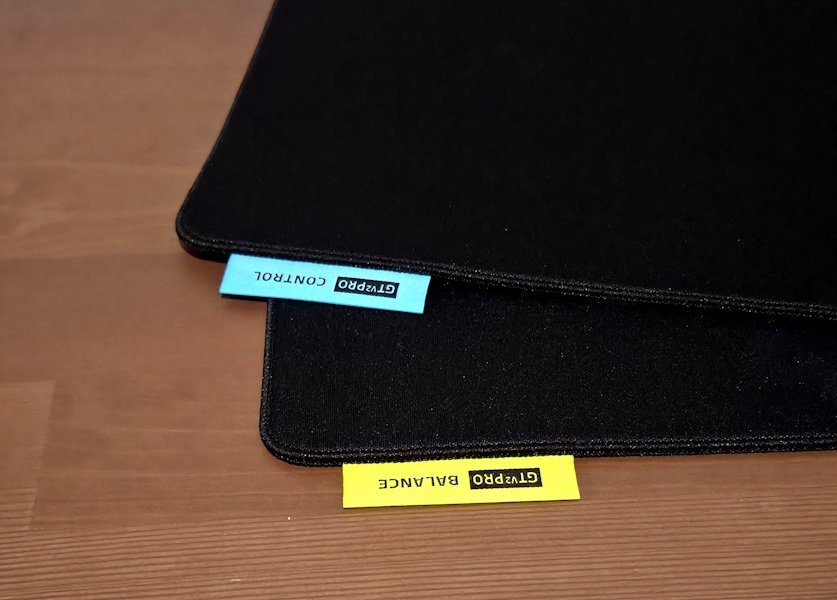
The Gigantus V2 Pro range is built around five distinct friction profiles, each tuned for different play styles, foam densities, and glide characteristics:
- Speed – ultra‑fast glide, minimal resistance
- Balanced – smooth glide with controlled stopping
- Control – higher friction, precision‑focused
- Heavy Control – maximum stopping power, deliberate movement
- Zero Gravity – extremely low static friction, effortless micro‑adjustments
(I received the Balanced and Controlled, but the full lineup is genuinely designed to cover the entire speed‑to‑control spectrum.)
And here’s the thing: The Viper V4 Pro feels different on each one. Not in a “the mouse changes” way, but in a “the mat unlocks different parts of the mouse” way.
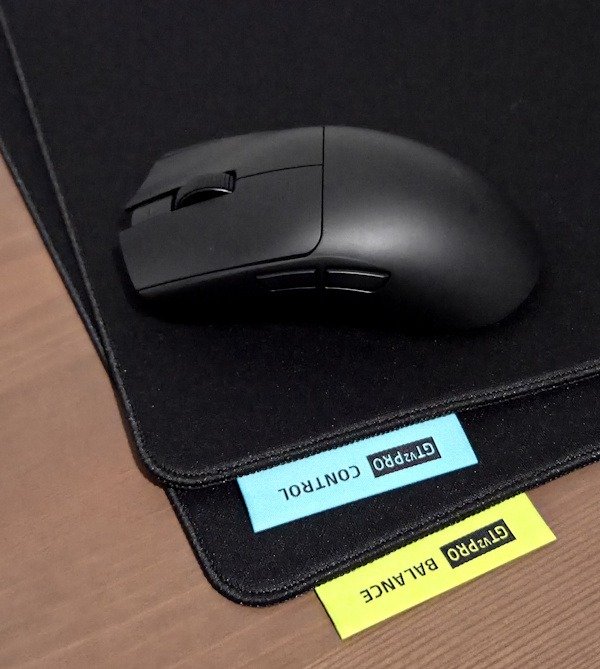
Razer Gigantus V2 Pro – Balanced
The Balanced mat blindsided me in the best possible way. I expected “fine.” I got “oh… this is nice.” It lives in that perfect middle zone where nothing feels exaggerated or dramatic. Glide is smooth without turning into an ice rink, and stopping power is there when you need it without grabbing the mouse like an over‑enthusiastic toddler.
Paired with the Razer Viper V4 Pro, it just felt instantly right. Flicks snapped exactly where I wanted them. Tracking stayed steady in both X and Y, like it had something to prove. Long swipes stayed on course, and micro‑corrections didn’t feel like effort or compensation; they just happened. I never once felt like I was fighting the surface.
For mixed genres, long sessions, or just general everyday gaming chaos, the Balanced mat makes total sense. It doesn’t nudge you toward speed or control. It lets you decide in the moment. And after a few hours, I didn’t want to swap to the Controlled or my old mouse mat. It’s the kind of surface that quietly disappears into the experience, which, honestly, makes your ouse just feel better.
Razer Gigantus V2 Pro – Controlled
The Controlled version is a completely different vibe, and very intentionally so. There’s more friction, more resistance, and a general sense that the mat is politely tapping the brakes for you. Everything slows down just enough to make every movement feel deliberate, like your aim suddenly enrolled in a mindfulness course. I loved this mat for the Sniper Elite games, as I know this is going to sound strange and it’s kind of the point of this mat, but I felt like I had more control.
I won’t pretend I adapted instantly. My flicks came up short, my muscle memory had a small identity crisis, and for a moment I felt like I’d forgotten how to mouse. But once things settled, something genuinely interesting happened: my aim chilled out. It felt calmer. Less twitchy. More confident in those tiny micro‑adjustments that usually require a warm‑up routine and a prayer.
For tactical shooters, slower pacing, or any moment where tracking accuracy matters more than raw speed, this mat absolutely shines. Paired with the Razer Viper V4 Pro, the whole setup felt steady and composed, like the mouse and mat had agreed to work together instead of competing for control. The surface never fought the sensor, and the sensor never overpowered the surface. It was all very intentional, very grounded.
I wouldn’t use the Controlled mat for everything, but when you’re in the right game or the right mood, it’s excellent. And more importantly, it drove home just how dramatically a surface can change the feel of a mouse, even one as consistent and well‑behaved as the Razer Viper V4 Pro.
Living With the Combo
What surprised me most wasn’t that the Gigantus V2 Pro mats were good. It was how clearly they changed the personality of the Razer Viper V4 Pro without ever feeling like a compromise. Same mouse. Same settings. Completely different feel depending on the surface. That’s when it clicked. This wasn’t an accessory. It was part of the system.
By the end of testing, I found myself swapping mats depending on what I was playing, something I’d never bothered doing before. And that alone says a lot. The Razer Viper V4 Pro is already an excellent mouse, but paired with the right Gigantus V2 Pro surface, it feels more complete. More intentional.
And yeah, I’ll admit it. I went from “oh, a mouse mat” to genuinely caring which one was on my desk. I honestly don’t know if I’ll look at the humble mouse mat the same again. Like, who knew they could make such a difference?
Final Thoughts
The Razer Viper V4 Pro isn’t the kind of mouse that tries to sweep you off your feet mid‑match. It’s not flashy. It’s not needy. It’s not tapping you on the shoulder every five minutes, asking if you’ve noticed how cool it is. Instead, it just… works. Quietly. Consistently. Almost suspiciously well. And the longer you use it, the more you realise how little you’ve been thinking about it, which is exactly the point.
Over time, that restraint starts to feel intentional. The shape fades into your grip like an extension of your hand. The weight disappears into your hand. The sensor becomes this invisible little gremlin doing perfect maths in the background. Even the clicks and scrolls stop registering as “inputs” and start feeling like extensions of your own decisions. Everything becomes honest, predictable, and wonderfully unremarkable in the best possible way. It makes you realise why the best in the world adore this mouse; it is the right tool for the job.
Pair it with the Razer Gigantus V2 Pro, especially the Balanced mat, and the whole setup settles into this beautifully cohesive rhythm. Nothing shouts. Nothing distracts. The mouse glides when it should, stops when you expect it to, and stays consistent no matter how long you’ve been playing. Your attention stays exactly where it belongs: in the game, in the moment, on the shot you either land or you don’t… ok, more often than not, don’t land. Yet, I feel more confident when taking said shots, and I’m noticing real improvements.
What genuinely surprised me was how adaptable the whole experience felt. Switching between the Balanced and Controlled mats didn’t just change the surface; it changed the personality of the mouse. Not in a “this feels wrong now” way, but in a “oh, this is a different flavour of right” way. It highlighted how well the Razer Viper V4 Pro responds to its environment, and how much thought has gone into making it part of a system rather than a standalone showpiece.
And honestly, that might be the highest compliment I can give it. The Razer Viper V4 Pro never made me feel like I had to adapt to it. It didn’t force a grip style, or a sensitivity, or a learning curve. It adapted to me, to how I move, how I aim, how I play on different days in different games with different moods. It’s a mouse that quietly moulds itself around the player instead of demanding the player mould themselves around the mouse. And do yourself a favour, spend some time with Razer Synapse, it truly will allow you to make this mouse your own… even if you are a little uncoordinated with how you use your mouse.
The Razer Viper V4 Pro is not the kind of mouse that wins games for you. But it is the kind that never gets in your way. And in competitive play, or honestly, any play, that quiet confidence ends up mattering more than anything else.





Recent Comments