

That’s the question I kept circling back to while reviewing Dell’s latest batch of displays. The Dell 32 Plus 4K Monitor S3225QS stood out, not because it’s flashy or packed with gimmicks, but because it seemed to quietly promise a lot, and be more reasonable for everyday users for everyday use. A 31.5-inch 4K panel, 120Hz refresh rate, and a clean, no-nonsense design. On paper, it looked like it could be a sweet spot for people who want a bit of everything: productivity, media, and gaming.
But as anyone who’s spent time with monitors knows, specs don’t always tell the full story. So, is this the monitor that finally nails that sweet spot between performance and practicality, or does it fall short once you start living with it?
First Impressions
Unboxing the Dell 32 Plus 4K Monitor, the first thing I noticed was how understated it is. No RGB, no aggressive branding, no curve—just a flat, matte-finished panel with slim bezels and a sturdy stand. It’s the kind of monitor that doesn’t try to impress you right away, which, oddly enough, made me like it more.
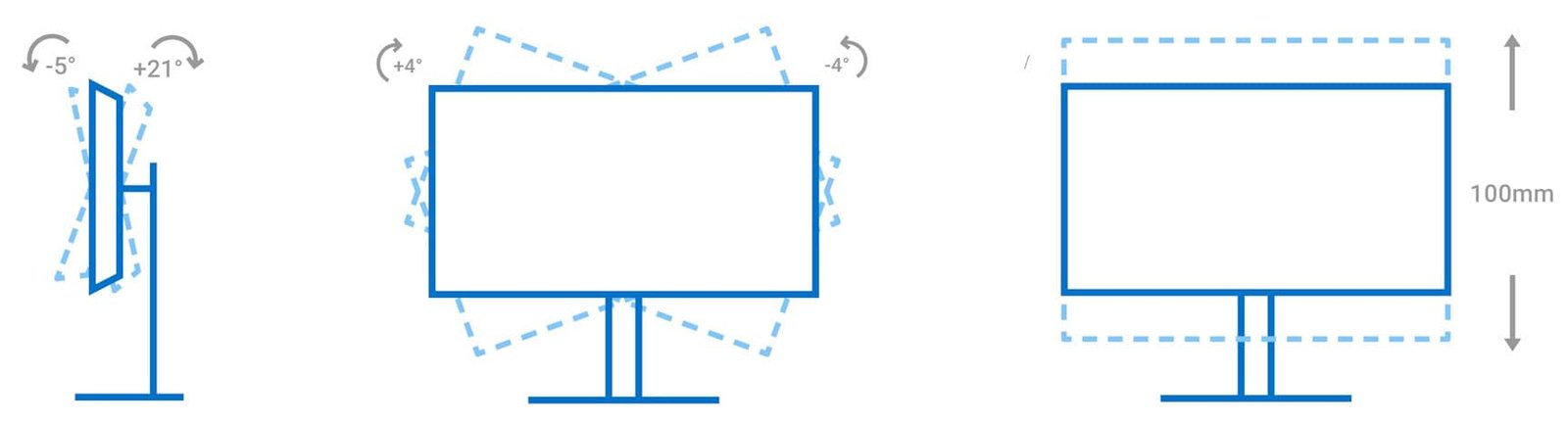
Setup was quick. The stand clicks into place without tools, and the monitor feels solid once assembled. It’s adjustable for height and tilt, and it even has a bit of pivot—though no swivel, which I only remembered when I tried to angle it slightly during a call and ended up shifting the whole base instead.
One thing that jumped out immediately: no USB-C. And no USB hub at all, actually. That felt like a miss, especially in 2025. I’ve reviewed cheaper monitors that at least throw in a couple of ports for convenience.

Display Quality
This is where the Dell 32 Plus 4K Monitor S3225QS starts to earn its keep. The 4K resolution on a 32-inch screen hits a sweet spot—everything looks sharp, but you’re not squinting at tiny text. The VA panel delivers rich contrast and deep blacks, which makes a difference when watching darker content or editing photos. It’s not quite professional-grade colour accuracy, but for most people you won’t even notice; it’s more than enough.
And then there’s the 120Hz refresh rate. I’ll admit, I didn’t expect to care. But once you start scrolling through long documents or even just moving windows around, it’s hard not to notice how smooth everything feels. I even ran a few games, my beloved World Of Warcraft & Farlight 84, not a hugely taxing title, and it held up surprisingly well. FreeSync support helps keep things tear-free, and input lag felt minimal, especially while playing the FPS Farlight.
For productivity, this monitor is a workhorse. I often have multiple windows open, an ADHD amount of browsers, Teams, multiple documents, several large spreadsheets, and the extra screen real estate makes multitasking feel less like juggling and more like… well, just working effectively. Which is unusual, as I use two 24-inch monitors at work, but this one monitor felt bigger & allowed me to easily switch between tasks. Not to mention, as someone who works on large spreadsheets, the real estate allowed me to easily see everything & the clarity is so great that even if I shrink the spreadsheet to 90%, you can easily read the small font. The flat panel helps here, too. No distortion at the edges, no weird reflections. Just a big, clear workspace.
The built-in speakers are, let’s say, functional. They’ll get you through a video call or a podcast, but I don’t know why they are there. As a cheap Temu speaker would have been better. If audio matters to you, you’ll want to plug in something external quickly.

Design & Ergonomics
One of the first things that stood out to me, even before I powered it on, was the colour. The Dell 32 Plus 4K Monitor has a matte white finish. And honestly? It’s a refreshing change. Most monitors tend to default to black or, if they are being adventurous, a dark grey, which is fine, but this lighter tone gives it a more modern, almost calming presence on the desk. It brightens up the workspace in a subtle but noticeable way.
The design overall is minimal and well thought out. The bezels are slim, the lines are clean, and there’s nothing flashy or over-designed. It doesn’t scream for attention, but it quietly draws the eye, especially in setups where aesthetics matter or you have a clean white build. Like way too any of my friends had. One of them actually popped around when I had it set up & demanded to know where he could get it, as it would look “sick with my setup.” Before purchasing two of them on the spot.
The stand is solid—no wobble, no creaking. It offers a decent range of motion: height adjustment, tilt, and a bit of slant. That’s enough for most setups, though I did find myself instinctively trying to swivel it during a video call, only to realise… right, no swivel. It’s not a huge deal, but it’s one of those small ergonomic touches that you don’t miss, until you do.
The build quality overall feels very good. The material feels premium but not as crazy luxurious as the top-end models. The panel stays firmly in place, and the matte anti-glare coating has been a quiet hero during bright afternoons in my north-facing office. I’ve got a window just off to the side of my desk, and I haven’t had to reposition the monitor once to avoid reflections. That’s rare, and it’s nice having natural light fill the room again.
Now, the lack of a USB hub? That’s a bit of a letdown. I’ve tested other monitors in this price range that at least throw in a couple of USB-A ports, and it’s one of those conveniences that you don’t realise you rely on until it’s gone. I’ve caught myself reaching behind the monitor more than once to plug in my mouse for recharging or to plug in my phone, only to remember—right, nothing there.
Final Thoughts
So, where does the Dell 32 Plus 4K Monitor land? It’s not a headline-grabber like some of the OLEDs or ultra-premium gaming displays I’ve reviewed recently. But that’s not what it’s aiming for, and honestly, that’s part of its charm. What it does deliver is a sharp, spacious, and surprisingly smooth experience that fits effortlessly into a work or casual gaming setup, at a price point that is much easier on the pockets. It does bring a quiet sense of refinement, especially with the white finish, that adds a bit of elegance without trying too hard.
Would I recommend it? Absolutely—especially if you’re after a reliable, no-fuss 4K monitor that handles a bit of everything with confidence. And that’s exactly what you want on your desk.





Recent Comments