
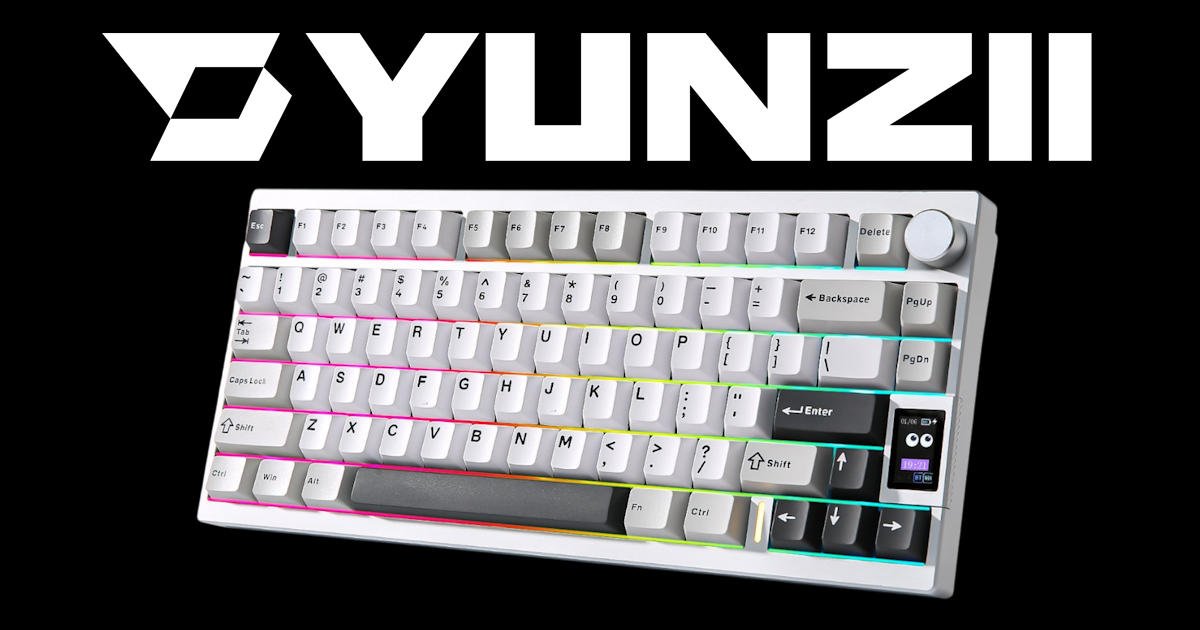
Founded in 2018 by a group of keyboard enthusiasts with claimed experience in industrial design and manufacturing, Yunzii was a name I hadn’t come across. Not once. It just hadn’t crossed my radar.
That’s not to say I’m completely out of the loop. I follow the usual suspects in the mechanical keyboard world, and I’ve tested a fair few boards over the years. But Yunzii? No idea.
When the offer came through to review the Yunzii AL80 mechanical wireless keyboard, I said yes without thinking too hard. I was curious. A little sceptical, maybe. But mostly curious.
I mentioned it in our group chat, and Editor Dez, who’s built more custom keyboards than I care to count, chimed in straight away. “You’ve got to try it,” he said. “You won’t regret it.” Dez doesn’t usually push gear unless it’s genuinely worth a look, so I figured there had to be something to it.
That flicker of curiosity turned into proper excitement
Stepping Outside the Usual
I usually stick to what I know. That means either the built-in MacBook Pro keyboard (which, honestly, is better than people give it credit for) or my trusty Keychron K2. Both have served me well, and I’ve never felt much urge to stray. Familiarity has its perks.
So when the Yunzii AL80 landed on my desk, I wasn’t exactly hunting for a replacement. My setup worked. It was comfortable, reliable. But I was open to being surprised.
I’ll admit, I hesitated. Getting into a new board can be a slippery slope. One thing leads to another, switch testing, keycap swaps, firmware tweaks, and before you know it, you’re deep in Viable Interrupt Alternative (VIA) trying to remap your media keys for the fifth time. It’s fun, sure, but it can spiral.
Editor Dez, once told me the most expensive keyboard he’s ever put together cost over $350. “Pretty cheap,” he said with a shrug. That’s the kind of mindset he brings to the hobby. So when he told me I had to try the Yunzii AL80, I paid attention. Dez doesn’t hype things unless they’re worth it.
Something about this one felt different. Maybe it was his confidence. Maybe it was the clean, minimal design. Whatever it was, I found myself leaning in.
Then I opened the box.

First Impressions Matter
It’s strange how quickly your expectations can shift. I lifted the Yunzii AL80 out of its packaging and immediately noticed the weight. Not just heavy for the sake of it, but solid. Substantial. The kind of heft that makes you pause for a second and think, alright, this might actually be something.
There’s something reassuring about that first moment—when a product feels like it’s been built with intention. The Yunzii AL80 didn’t feel like a toy or a rushed prototype. It felt deliberate. Balanced. Like someone had actually cared about how it would sit on a desk.
The finish was clean. No rough edges, no cheap plastic sheen. Just a smooth, matte aluminium body that felt premium without trying too hard. I placed it on my desk and it didn’t budge. No rubber feet, no adjustable tilt, but somehow the angle was just right. I didn’t feel the need to prop it up or reach for a wrist rest. It just worked.
I gave the knob a spin. It clicked softly. Felt nice. Then I tapped a few keys. The sound was deeper than I expected. Not hollow, not sharp. Just… pleasant. I hadn’t even plugged it in yet and I was already intrigued.
There’s a quiet confidence to the Yunzii AL80. It doesn’t scream for attention. It just sits there, with clean lines, solid and understated, waiting to be used.
Build Quality That Surprised Me
As I said the first thing I noticed was the weight. Again. It’s heavy. Not in a bad way, more like reassuring. The Yunzii AL80 has a CNC aluminium body, and when I placed it on my desk, it just stayed put. No sliding around. No wobble. It doesn’t have adjustable feet like my Keychron, but the angle felt right. I didn’t need to fiddle with it.
I think the weight is around 1.44 kg, or 3.17 freedom units. That sounds about right. It feels solid. Premium, even. And that heft isn’t just for show, it’s part of what makes the typing experience so satisfying.
Inside, there’s a Gasket Mount structure. I didn’t expect to notice the difference, but I did. The sound is deeper, more muted. That “thock” sound people talk about? It’s real. And it’s addictive.
There’s a kind of softness to each keystroke. Not mushy, not vague, just cushioned. Like the board is absorbing the impact and giving you something smooth in return. It’s subtle, but once you feel it, you start to crave it. I found myself typing more than I needed to. Drafting emails I’d normally ignore, jotting down notes just for the sake of it. It’s the kind of board that makes you want to keep typing. And that, for me, is a pretty good sign.
Layout and Customisation
The Yunzii AL80 features a compact 75% layout, which essentially means it retains the essentials, function row, arrow keys, and a few navigation buttons, but trims the excess. It’s neat. Efficient. Everything you need, nothing you don’t. There are 80 keys in total, plus a multi-function knob and a little LCD screen that’s surprisingly customisable.
I didn’t think I’d care much about the screen, but it grew on me fast. You can set it to show the time, battery level, caps lock status, or upload a GIF that makes you smile. I went with the more important of those, a pixel cat. No regrets.
The knob’s tucked up in the top-right corner. It’s aluminium, feels smooth to turn, and clicks softly when pressed. Out of the box, it controls volume and media playback, but if you’re feeling adventurous, you can remap it through VIA to do pretty much anything, scrolling, zooming, launching shortcuts. I haven’t gone wild with it yet, but it’s nice knowing I could.
Keycaps are Double-Shot PBT in a Cherry Profile. They feel great. Not slippery, not overly textured. Just that nice middle ground where your fingers land and stay put. The legends are sharp and clean, and they’ve held up well so far. No fading, no weird shine after long sessions.
And yes, the board is hot-swappable. That’s a win if you like to tinker. Mine came with Cocoa Cream V2 linear switches, pre-lubed, smooth, and quieter than I expected. There’s a soft, creamy feel to each press, and the sound is muted in an oddly satisfying way. It’s not silent, but it’s far from clacky. More like a gentle “thock” that makes typing feel… deliberate.
I haven’t swapped the switches yet, but I probably never will. But I would like to see how it handles tactiles or something snappier. That’s the fun of hot-swap, you can change things up without committing to a full rebuild. It’s like trying on new shoes without having to throw out the old ones.

Features That Actually Matter
The Yunzii AL80 isn’t just about looks. It’s packed with features that, frankly, I didn’t expect at this price point. It’s one of those boards that quietly ticks boxes you didn’t even realise were on your wishlist.
- Tri-Mode Connectivity – You can use it wired via USB-C, through 2.4GHz wireless with the included dongle, or over Bluetooth. I’ve tested all three. No dropouts, no lag, no fuss. Switching between devices is smooth, and it remembers connections reliably. I’ve had it paired with my laptop, tablet, and phone at different points, and it handled the transitions without a hiccup.
- Battery Life – It’s got a 6000mAh battery, which is… generous. I haven’t charged it in days. Actually, maybe weeks? I’ve lost track. It just keeps going. I’ve used boards that needed topping up every couple of nights, so this has been a welcome change. You can check battery status on the LCD screen too, which is handy.
- QMK/VIA Support – If you’re into programming your own macros or layouts, this board gives you full control. Even the knob is programmable. I haven’t gone too deep into custom mapping yet, but knowing I can tweak everything down to the last key if I want to, that’s reassuring. VIA makes it easy. No flashing, no command line. Just plug in and start remapping.
- RGB and LCD Screen – The RGB is south-facing and has over 20 modes. I’ve kept mine on a subtle wave, nothing too flashy, just enough movement to make it feel alive. You can go full rainbow cyclone if you want, but I prefer something calmer. Work stresses me out enough, I don’t need my keyboard adding to it
- Multi-Device Compatibility – Works across Windows, macOS, Linux, Android, and iOS. I’ve tested it on a few of those, and it didn’t complain once. No weird driver issues, no setup headaches. Just plug in or pair and go.
- Programmable Knob – Worth calling out again. The knob isn’t just decorative. It’s tactile, responsive, and feels like it belongs there. Not an afterthought.
All up, the Yunzii AL80 feels like it was built by people who actually use keyboards. The features aren’t just for show, they’re practical, well-integrated, and genuinely useful. It’s rare to find a board that balances aesthetics with function this well, especially without blowing out the budget.

Real-World Use
I’ve been using the Yunzii AL80 for a few weeks now. Maybe longer. And I haven’t touched the Keychron since. That surprised me, as I love that keyboard… or so I thought.
Typing on this thing is smooth. Effortless, really. I thought I’d miss the feel of my old setup, but I didn’t. Not even a little. The sound, the feel, the way the keys respond, it’s all just… pleasant. Hard to describe without sounding like I’m overselling it, but it genuinely makes typing more enjoyable. Like, I’ve found myself writing things I didn’t need to write. Just because it feels good.
I was a bit unsure about the fixed angle. No adjustable feet meant no tweaking, and I usually like having that option. But turns out, the default incline is spot on. I’ve typed for hours without any wrist strain or awkward posture. That’s rare, especially as I …. let’s say mature. I didn’t even notice until I realised I hadn’t reached for a wrist rest once, which is normally a staple on my desk.
It’s also become part of my routine faster than I expected. I sit down, and my hands just go to it. No hesitation. It’s like it’s always been there. That kind of seamless fit doesn’t happen often.
The LCD screen? Surprisingly useful. I glance at it for the time more than I thought I would. And yes, the pixel cat is still there. Still makes me smile. It’s a tiny thing, but it adds personality. Makes the board feel like mine.
Battery life? I’ve stopped thinking about it. I charged it once, maybe twice, and that’s it. It just keeps going. No battery anxiety, no mid-week top-ups. That’s a win.
I haven’t gone deep into customisation yet. VIA’s ready and waiting, but I’ve kept things mostly stock for now. I might dive into macros later…. but honestly, it doesn’t need changing. But even without that, it already feels tailored enough.
All up, the Yunzii AL80 has slotted into my workflow without any fuss. It’s not trying to be flashy or revolutionary. It’s just solid, well-thought-out, and genuinely enjoyable to use. And honestly, that’s more than I expected when I first opened the box

Final Thoughts
The Yunzii AL80 is a great fit for anyone chasing a premium typing experience without diving into full custom builds. If you’re a remote worker, writer, or just someone who spends a lot of time at the keyboard, it’s a solid upgrade. Hobbyists will appreciate the hot-swap flexibility and VIA support, while casual users will enjoy the plug-and-play simplicity. It’s polished enough for enthusiasts, yet friendly enough for newcomers.
It feels like a custom board, but without the usual custom board price tag. It’s well-built, thoughtfully designed, and packed with features that actually improve the experience. Not gimmicks—just practical, usable stuff that makes day-to-day typing better.
I didn’t expect to be impressed. Honestly, I figured I’d test it, jot down a few notes, and quietly return to my usual setup. That’s how these things usually go.
But I didn’t.
Instead, it’s become my daily driver. The board just fits into my workflow, onto my desk, and into the rhythm of how I type. It’s rare for something to slot in that smoothly without needing tweaks or compromises. And if I ever do want to tweak things, I know the tools are there.
At the time of writing, the Yunzii AL80 sits at around AUD $179, depending on configuration and retailer. That’s well below what you’d expect for a board with this level of build quality and feature set. It’s not quite budget-tier, but it’s far more accessible than most custom setups.
Yunzii might’ve been a new name to me, but if this is the kind of gear they’re putting out, I’ll be paying attention. And if they keep this up, I suspect a lot more people will be too.
Please consider supporting the author through his “Buy me a Coffee” page.





2 Comments
[…] There’s no getting around that. It carries that same desk‑dominating presence I mentioned in my Yunzii AL80 review. The difference here is intention. The Epomaker G84 HE uses its footprint well. I didn’t feel […]
[…] effortless… and that’s a dangerous thing. Especially if you read Ben’s review on a Yunzii keyboard, as it makes it hard not to want […]
Comments are closed.