
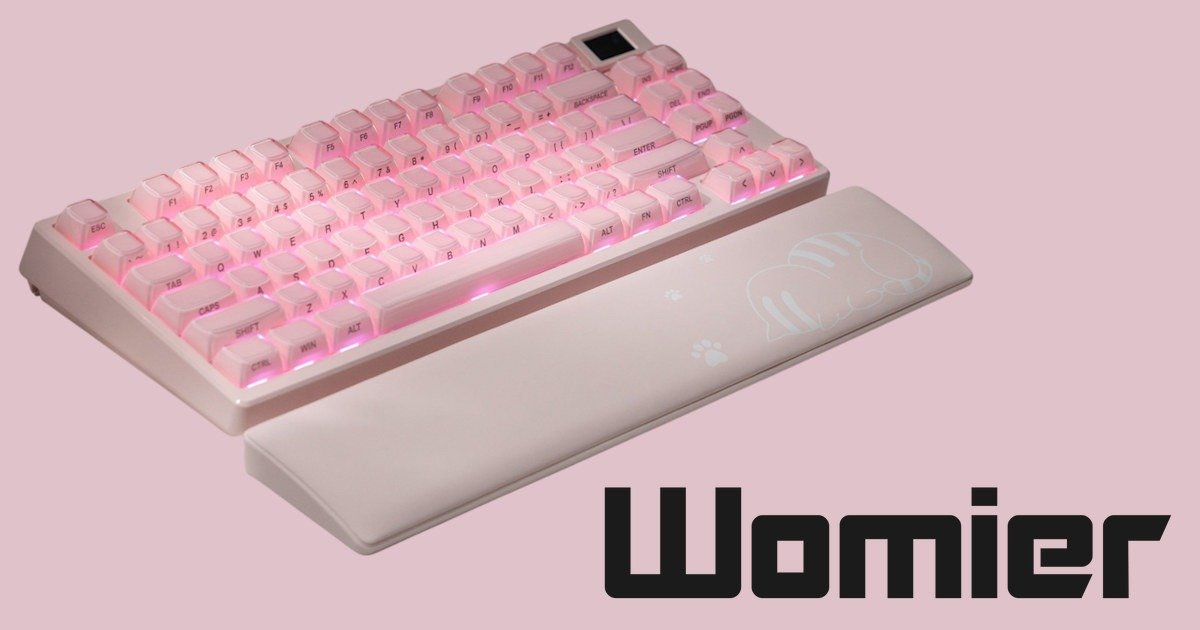
Opening the Box: From Meh to Wow
Then I opened it. And wow, just wow. The shift was instant. That first glimpse of Womier SK80 Pro Sakura Pink was breathtaking. It’s hard to explain, but the colour almost glows without being too loud. There’s this softness to it, but at the same time, it feels bold, confident, like it knows exactly what it’s doing. I went from disappointed to mind-blown in about three seconds flat. Honestly, I just sat there staring at it for a moment, like I needed time to process what I was seeing. I didn’t expect that. I think I even muttered something like, “okay, this is gorgeous,” probably out loud, without even realising.
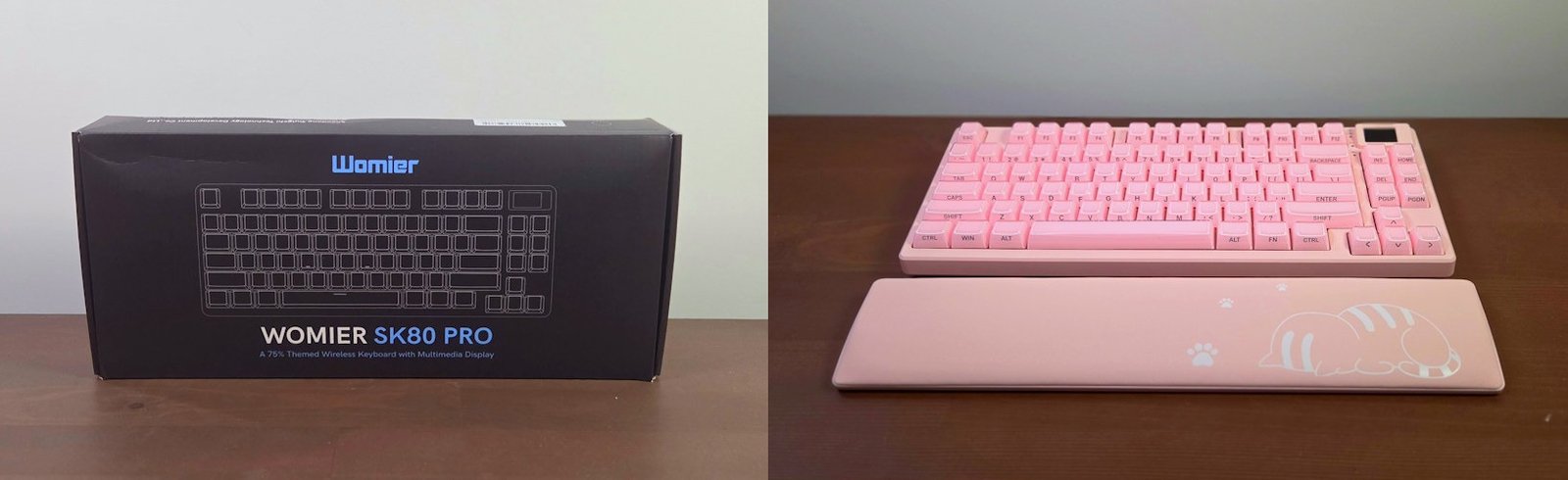
The first thing I did was call my housemate over. I couldn’t keep that reaction to myself. She walked in, took one look, and then we both just stood there, staring at it like it was some kind of art piece. No words for a good few seconds. Then she laughed and said, “Can I steal this?” Which was funny because she doesn’t even have a computer. She admitted she just wanted it on her desk to look at. That’s how striking it is; it’s not just a keyboard, it’s something you want to show off, even if you never press a single key.
I think that moment really hit me. It’s rare for tech to feel like decor, or even a statement piece, but this one does. The colour isn’t just pink, it’s layered, almost like it changes slightly depending on the light. Under daylight, it feels soft and airy, but at night, with the RGB lighting on? It’s something else entirely. Almost dreamy. I found myself turning the lights off just to see how it glowed against the desk. It’s ridiculous, but I even took a few photos because I wanted to capture that look. Spoiler: the photos didn’t do it justice or look good at compaired.
What’s in the Box?
Once I got past the initial shock of that gorgeous pink, I started pulling everything out to see what else was included. And honestly, it’s a pretty generous bundle. Here’s what you get:
- 1x SK80 Pro Keyboard – the star of the show, obviously.
- 1x USB-A to USB Type-C Cable – braided, feels solid and not cheap.
- 1x 2-in-1 Keycap & Switch Puller – handy if you ever want to swap caps or switches.
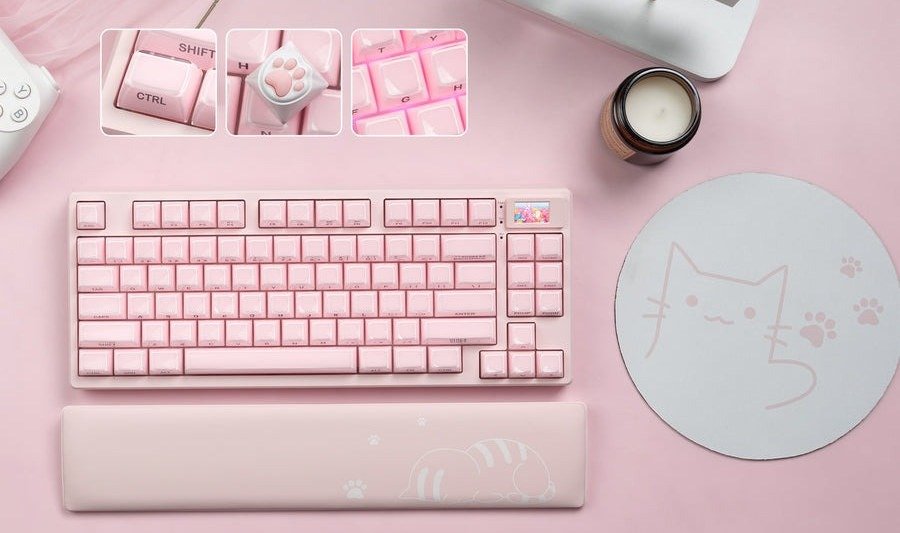
- 1x Wrist Rest – this was a nice surprise. It matches the keyboard and feels comfortable.
- 1x Mousepad – didn’t expect this at all, but it’s a great bonus.
- Extra Switches – always good to have spares, especially if you’re into customising.
- User Manual – simple, but covers the basics.
Everything was packed neatly (to the point, when I tried to rebox it up to take photos, It wasn’t as neat), and nothing felt like an afterthought. The wrist rest and mousepad really make it feel like a complete setup rather than just a keyboard. I even checked for scratches because I’m paranoid about that sort of thing, none, thankfully. And peeling off the protective film? Weirdly satisfying.
 and Build
The Womier SK80 Pro uses a 75% layout with 83 keys, which I’ve always liked because it saves space without feeling cramped. It’s compact enough to free up desk space but still gives you dedicated arrow keys and function rows, something I didn’t realise I missed until now. I’ve been using a 65% keyboard lately, and honestly, I didn’t think I relied on those keys that much. Turns out, I do. Having them back feels like a small luxury.
The keyboard weighs in at 793 grams, and you can feel its sturdiness the moment you pick it up, thanks to the ABS case. It’s not heavy, but it’s solid; no cheap flex, no hollow sound. There’s a smooth finish that really complements the overall aesthetic.
The keycaps? Dye-sublimation double-shot PBT in a Cherry profile, which means they’re durable and have that slightly textured feel that resists shine over time. They look and feel premium, and the legends are crisp and clear.
Now, the Sakura Pink theme of the Womier SK80 Pro, this deserves a mention. It runs across the entire board, and it’s consistent. No weird mismatched tones or faded spots. I know that sounds like a strange thing to point out, but here’s why: even with some of the premium keyboards and keycap sets I’ve bought for custom builds, there’s often a slight colour difference. So for a keyboard this vibrant, I was expecting at least a tiny inconsistency. But no, this one nailed it. Honestly, it’s one of the most cohesive colour themes I’ve ever seen on a keyboard.
And if pink isn’t your thing, Womier gives you options. There are four themes to choose from: Sakura Pink, Kanagawa, Kanagawa Outline, and Plum Blossom. Each one has its own personality. Sakura Pink is bold and playful, almost glowing under RGB lighting. Kanagawa takes inspiration from the famous wave artwork, giving the board a calm, artistic vibe. Kanagawa Outline is a more minimal take on the same theme, with clean lines and a monochrome aesthetic. And Plum Blossom? Elegant and subtle, perfect if you want something refined without being boring. These aren’t just colours slapped on a case; they feel intentional, like each Womier SK80 Pro board was designed to be a statement piece.
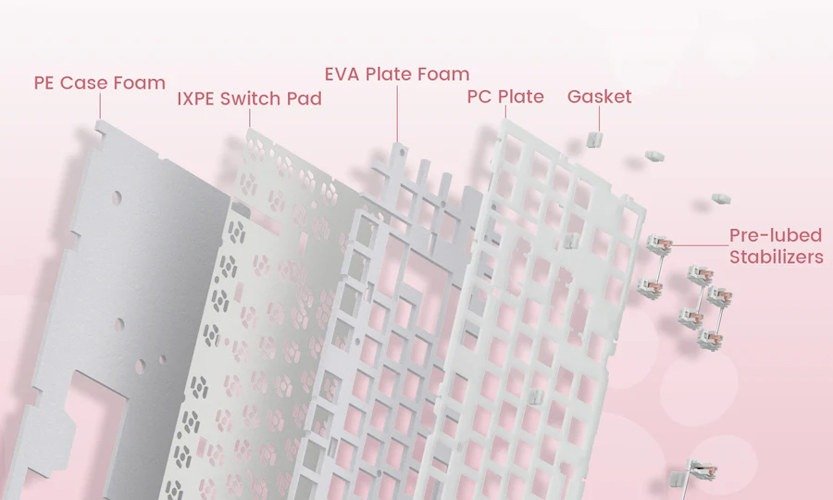
Now, here’s something that really impressed me: the gasket-mounted structure. The SK80 Pro uses a true gasket mount, which means the plate “floats” without hard contact with the case. This creates a softer, more elastic typing feel and helps minimise vibration. Inside, multiple layers of carefully selected dampening foams work together to absorb hollow sounds and enhance acoustics. The result? A deeper, cleaner, and more refined typing sound straight out of the box. No mods required. It’s the kind of detail that makes you realise this isn’t just a pretty keyboard, it’s engineered for a premium experience.
And then there’s the little screen. Ben, one of DezDoes’ writers, did a review on a keyboard with a screen a while back, and I was so jealous. I hadn’t seen or experienced one yet. So, finally having my own little screen to customise? Honestly, it feels great. It’s not just a gimmick either. You can tweak settings, check battery life, adjust RGB profiles, and even add animations. It’s fun, and it makes the keyboard feel alive in a way that most boards don’t. I’ve already spent way too much time playing with it, and I’m not even sorry.
Typing Experience
Typing on the Womier SK80 Pro? Honestly, it’s a joy. The Womier POM pre-lubed linear switches feel incredibly smooth and responsive right out of the box. There’s no scratchiness, no need to break them in, they just glide. Each keypress has a satisfying weight to it, and the sound profile is clean without being overly loud. It’s not silent, but it’s definitely not the kind of keyboard that will annoy someone in the next room. There’s this subtle but enjoyable “thock” that makes typing feel premium.
The gasket-mounted design really shines here. It adds a gentle bounce to each keystroke, which makes long typing sessions surprisingly comfortable. It’s not mushy, just soft enough to take the edge off that Cherry Red click-i-ness. Combined with the multi-layer dampening foams, the acoustics are impressive; deeper and more refined than you’d expect from a stock board. No hollow echo, no cheap rattle. Just a clean, satisfying sound that makes you want to keep typing. Even writing that on this keyboard makes me look down and enjoy what I hear.
And because I’m curious (and maybe a little obsessive…. nah, let’s go with thorough), I decided to check the factory lubing for myself. A lot of boards claim “pre-lubed,” but in reality, it’s often uneven or barely noticeable. The number claimed pre-lube switches I’ve opened, and it looks like they waved a piece of paper saying lube written on it. So I opened one of the extra switches included in the box, and honestly? I was impressed. The lube application was clean and consistent, on the rails, the stem, and even the spring. I would have added a little more to the spring. But, no clumps, no dry spots. It looked like something I would have done myself if I were hand-lubing switches for a custom build. That’s rare for a stock keyboard and honestly saves hours of work for anyone who usually mods their boards.
I’ve been using the Womier SK80 Pro for a few weeks now, and honestly, I keep finding excuses to type. Even boring tasks like emails feel less like a chore. I’ve caught myself opening random documents just to hear that sound and feel that bounce. Maybe that’s just me, but it’s the kind of keyboard that makes typing fun again. I even weirdly started writing a short story about my old Pathfinder character, as I was looking for an excuse to us it.
Wireless Performance and Bottom Design
The Womier SK80 Pro supports wired, 2.4GHz wireless, and Bluetooth, and so far, the wireless connection has been rock solid. No noticeable lag, even when gaming. I was sceptical because some boards promise great wireless and then… don’t deliver. But this one? It holds up. The 4000 mAh battery is reassuring, too. After a few long sessions, it barely dipped, which is a good sign.
To really test it, I took it into a 16-person Mythic raid in World of Warcraft. My PC struggled a bit, frames dropped, and my character stalled a few times. But the keyboard? It never skipped a beat. Every keypress registered exactly where I wanted it to, even when the game froze for a second. When the screen caught up, my character was standing exactly where I should have been if the computer hadn’t glitched. And yes, I know that wasn’t the keyboard’s fault because the same thing happened the last three times I ran the raid with a different keyboard. The Womier SK80 Pro didn’t let me down once (unlike the dam healer. Why can’t you just heal me!) That gave me a lot of confidence in its wireless reliability.
Flip the keyboard over, and you’ll find something I really appreciate: two physical switches. One lets you toggle between Windows and Mac, and the other controls your connection mode, USB, Bluetooth, or 2.4GHz wireless. There’s even a neat little slot for storing the USB dongle, which is such a small detail but makes a big difference. No more losing the receiver in a drawer somewhere or in my cupboard. As someone who makes and reviews keyboards quite a bit. I have a built-in robe with heaps of keyboards in it. And I have several that I can’t find or don’t remeber with where the USB dongle is. So this little slot is perfect!
RGB and Customisation
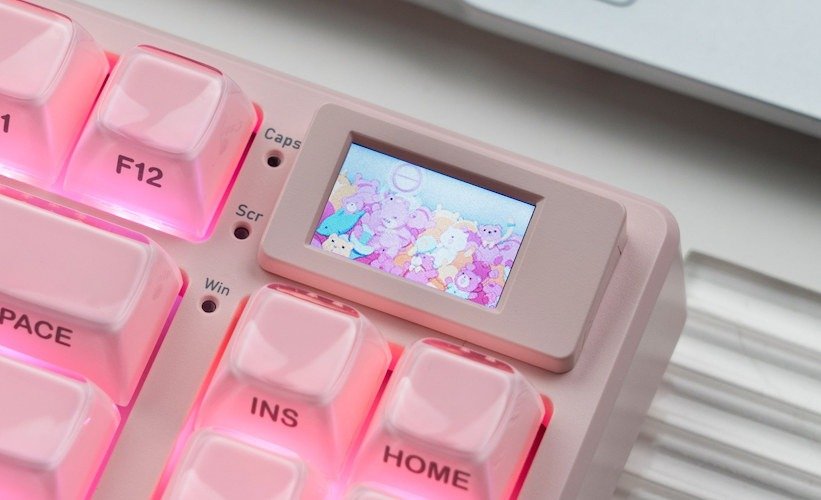
The south-facing RGB LEDs on the Womier SK80 Pro are bright, vibrant, and honestly, they steal the show when the lights go down. Every key glows evenly, and the colours pop without looking harsh. It’s not just a rainbow effect either; you’ve got full control through the driver, so you can really make it your own. Static colours, gradients, reactive effects, wave patterns, you name it, it’s there. Though, as always, I want with purple. And the transitions? Smooth, no flicker, no weird brightness dips.
Pair that with the little screen, and it’s a whole vibe. I’ve already spent way too much time tweaking colours and animations, and I’m not even sorry. You can set custom GIFs, battery indicators, or even quirky little icons that make the keyboard feel alive. It’s addictive. At one point, I had a soft pink gradient across the keys with a tiny animated cherry blossom loop playing on the screen, and honestly, it looked like something out of a desk setup dream.
What I love most is how easy it is to switch profiles. One click, and the entire mood of your desk changes, from calm blues for work to wild rainbow waves for gaming. It’s the kind of feature that makes you want to keep experimenting, even when you’ve already found a setup you like. If you’re into aesthetics, this keyboard doesn’t just give you options, it gives you personality.
Womier Software
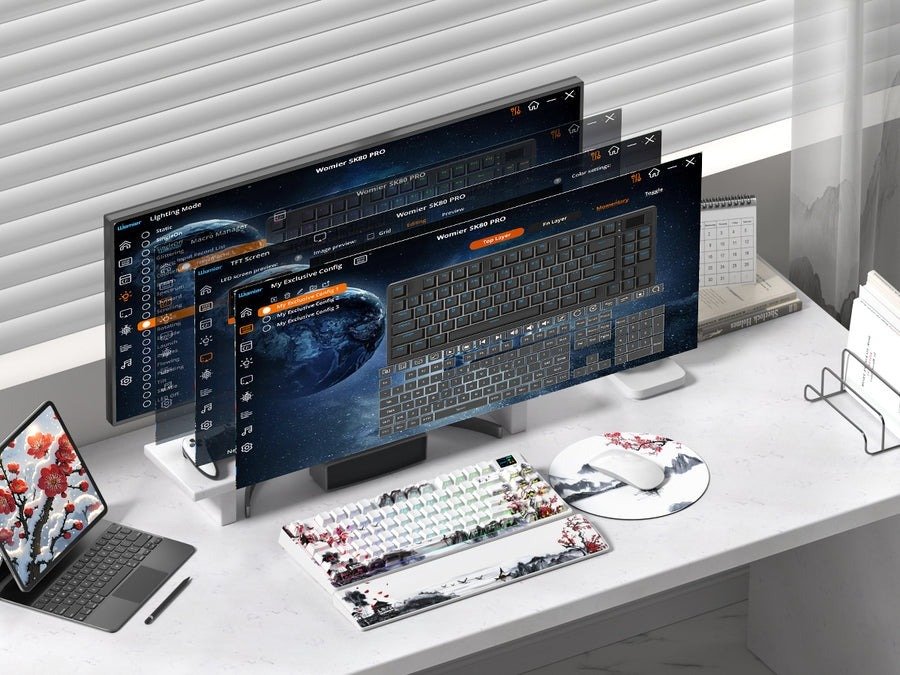
The Womier SK80 Pro comes with its own software, and honestly, it’s better than I expected. A lot of keyboard software feels clunky or overly complicated, but this one is pretty straightforward. The interface is clean, and everything is where you’d expect it to be. You can customise RGB lighting, set up macros, and even tweak the little screen with animations or status indicators. It’s not bloated with unnecessary features, which I appreciate.
Setting up profiles is easy, too. I created one for work with soft pastel lighting and another for gaming with a bold rainbow wave during my testing. It has since been switched back to purple, but switching between the profiles takes seconds. The software also lets you adjust polling rates, which is a big deal if you’re gaming. You can bump it up for ultra-responsive input during fast-paced sessions or dial it back to save battery when you’re just typing. It’s a small feature, but it shows Womier thought about both performance and practicality.
You can also manage Bluetooth connections, check battery status, and fine-tune the RGB effects with granular control. And then there’s the fun stuff like custom animations for the screen. At one point, I had a tiny pixel art dragon breathing fire every time I hit Caps Lock. Completely unnecessary, but ridiculously fun.
Final Thoughts
The Womier SK80 Pro completely exceeded my expectations. From the moment I opened that plain grey-blue box and saw the Sakura Pink shining back at me, I knew this keyboard was something special. The Womier SK80 Pro isn’t just about looks—though, let’s be honest, the aesthetics are stunning—it’s about the experience. The build quality feels solid, the gasket-mounted design and multi-layer dampening make typing smooth and satisfying, and the pre-lubed switches are genuinely impressive. I’ve opened enough “pre-lubed” switches to know most brands barely try, but the Womier SK80 Pro nailed it.
Wireless performance? Rock solid. Even during a chaotic 16-person Mythic raid in World of Warcraft, the Womier SK80 Pro never missed a beat, even when my PC did. That gave me confidence this board can handle anything you throw at it. Add in thoughtful touches like the physical mode switches and dongle storage, and you can tell Womier designed this keyboard for real-world usability.
Then there’s the RGB and that little screen. Honestly, they’re addictive. Between custom lighting profiles and animated GIFs, I’ve spent way too much time tweaking settings just because I can. The software makes it easy, and the ability to adjust polling rates shows the Womier SK80 Pro isn’t just about aesthetics—it’s built for performance too.
Is it perfect? No keyboard is. Flipping it over to change modes can be a minor hassle if you swap devices often. But for me, that’s a tiny trade-off for everything else this board offers. The Womier SK80 Pro isn’t just a keyboard—it’s a statement piece, a tool that feels premium without demanding endless mods, and something that genuinely makes typing fun again.
Would I recommend the Womier SK80 Pro? Absolutely. If you want a keyboard that looks incredible, feels amazing, and performs flawlessly, the Womier SK80 Pro deserves a spot on your desk.






One Comment
[…] Read the full review: Womier SK80 Pro: A Rollercoaster First Impression […]
Comments are closed.