

I didn’t expect to become someone who regularly uses a portable monitor. It always felt like one of those “nice-to-have” extras, convenient, sure, but hardly essential. But after a few weeks with the Dell Pro 14 Plus Portable Monitor P1425, paired with the recently reviewed Dell 14 2-in-1 DB04255, it’s quietly embedded itself into my daily routine.
Gone are the days of wrestling with a clunky, mismatched work-issued setup, one screen oversized, while the laptop screen feels barely usable. It is a huge bugbear of mine. Mismatching monitors it drives me nuts. While the Dell Pro 14 Plus, though? Sleek, appropriately sized, and surprisingly capable. It adds a clean, modern edge to my dining room workspace. While keeping it uniform and extremely portable
I’ll admit it, sitting here on my dining room table with dual uniform monitors, I feel a little fancy. Maybe even a little smug.
Setup Simplicity
There’s a certain thrill in things working right out of the box, and this monitor nails it. One USB-C cable, the perfect definition of plug and play. No drivers, no vague blinking lights, no “searching for device” nonsense. Plug it in, and it wakes up like it’s been part of your setup for years. It’s sad, as that is how tech should work out of the box. Yet, too often you find yourself wanting to return something just because it is annoying to get working. The Dell Pro 14 Plus Portable Monitor is pure simplicity!
And here comes the hardest part of the setup of this monitor, as it mirrors your screen immediately. Switching to extended display mode took maybe two or three clicks. It even remembered my settings the next time I plugged it in. The whole process was so effortless, I didn’t think about it again until writing this review. Which, frankly, might be the highest compliment you can give to a setup.
Design and Portability
The Dell Pro 14 Plus Portable Monitor hits all the right notes: brushed aluminium shell, slim bezels, and a lightweight frame that feels more executive accessory than tech gadget. Dell’s aesthetic here is quietly confident. It won’t turn heads in a coffee shop, but it will definitely get some looks when you set it up. As a clean-looking dual monitor set that is portable, sitting alongside a premium laptop is a head-turner.
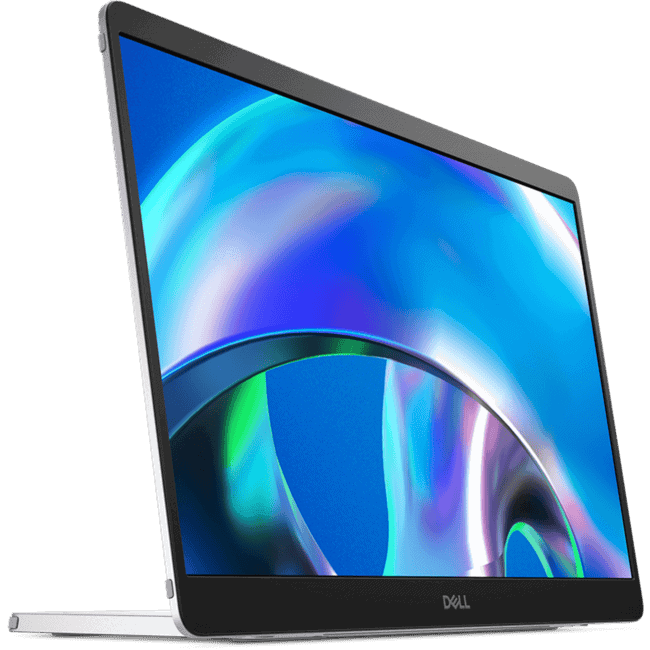 Now, because it looks refined, you start treating it like a fragile object. I slip it into a padded sleeve like I’m storing a vintage first edition run of a vinyl record. Probably overkill, but I’ve seen too many screens meet their end in overstuffed backpacks. Structurally, though, it feels sturdy and I think wouldn’t need the babying I gave it. The built-in stand is a minor triumph; it folds flat, pops up cleanly, and offers decent adjustability. At first, there was this lingering hesitation when I set it up on a shaky café table, like I’m babysitting a champagne flute. But that quickly fades, and I think it goes back to me being overly careful with it; it handled every bump and movement that table threw at it without skipping a beat.
It’s light, approximately 0.57 kg (1.25 lbs), enough that I barely notice carrying it with my laptop, but robust enough that I don’t feel like I’m travelling with a junky or cheap piece of tech.
Ports, Buttons, and Practical Design
Around the back of the Dell Pro 14 Plus Portable Monitor, things are kept simple and functional. You’ll find a Power On/Off button and a set of function buttons that let you adjust brightness, contrast, and other display settings. They’re tactile enough to use without fumbling, and spaced well so you’re not accidentally pressing two at once. As someone with fat fingers, I’m very thankful for that addition. As often with these kinds of products, compact means elements like buttons or plugs are an afterthought and just thrown in where they fit.
On the side, Dell includes two USB Type-C ports, both supporting Alt Mode with DisplayPort 1.2 and power pass-through. That means you can connect the monitor to a laptop or device and still charge through the same cable, depending on your laptop. Handy if you’re working with limited ports or just want a cleaner setup. It’s a thoughtful touch that makes the monitor feel more integrated into your workflow, rather than just an add-on.
And that is the thing about the Dell Pro 14 Plus Portable Monitor: everything feels so intuitive. Nothing feels out of place.
- Power On/Off button
- Function buttons
- USB Type C – (Alt mode with DP 1.2, with power pass through) (2)
Everyday Performance
Let’s be honest: this is an indoor monitor. I gave it one brave attempt outdoors under full Melbourne sunlight and instantly regretted everything. Glossy screen plus bright skies equals pure glare. Could a matte screen protector help? Maybe. But fresh out of the box, this isn’t built for beachside editing. Which is fine, as I’m not your beachside kind of girl!
Indoors, it’s flawless. The brightness holds up, the viewing angles are wide enough for collaborative work, and it never feels like a compromise. I’ve used it on various surfaces, wooden desks, café tables, and even propped it on some pillows while using my laptop in bed. Never buckled, never jittered… well, on the pillows it did a little. Mostly because I can’t sit still.
The only real issue I hit was a power hiccup, and that was more a ‘me’ issue, rather than an issue with the Dell Pro 14 Plus Portable Monitor. With an older laptop, the display would blink off randomly. Turns out, the USB-C port wasn’t delivering enough juice. Once I routed power through a wall adapter or changed laptops, it stabilised immediately. So, nothing shocking or a major issue, just something to keep in mind if you plug it into a 5- or 6-year-old laptop.
Who Should Buy It
This monitor knows its lane. It’s not for gamers, and it’s not aiming to be a colour-critical editing display. It’s for people working across various spaces, home, office, co-working zones, or even dining room tables, who need a clean second screen that doesn’t feel like an afterthought. It’s for multitaskers, remote workers, and digital nomads. And it’s for anyone who’s tired of dragging windows around a cramped laptop screen like they’re playing Tetris or having a mis-sized screen to work on that makes you feel like you are headbanging while consistently moving between them.
It doesn’t shout. It doesn’t light up with RGB nonsense. It’s just quietly dependable. The kind of tool you forget how good it is until you unplug it and suddenly feel cramped.
Final Thoughts
I didn’t expect a portable monitor to become part of my daily setup, but the Dell Pro 14 Plus Portable Monitor P1425 quietly proved its value. Paired with the Dell 14 2-in-1, it’s made my workspace feel more polished, more functional, and honestly, more enjoyable. It’s the kind of upgrade that doesn’t shout, but once it’s there, you wonder how you lived without it.
And if you’re working with a larger laptop or need more screen real estate, Dell has you covered. The P1425 comes in a range of sizes: 14-inch, 19-inch, 22-inch, 24-inch, 27-inch, 34-inch, and even a monstrous 55-inch. So there’s flexibility depending on your setup and workflow.
Setup is refreshingly simple. One USB-C cable, and it’s ready to go. No drivers, no troubleshooting. The design is sleek, the build feels premium, and it’s light enough to carry without thinking twice. Indoors, it performs beautifully. Outdoors? Not so much, but that’s not really its purpose.
This monitor is for people who work across spaces and want a second screen that feels like part of the setup, not an afterthought. It’s simple, reliable, and quietly impressive. I didn’t think I needed the Dell Pro 14 Plus Portable Monitor. Now I don’t want to work without it.





Recent Comments