

Choosing a gaming mouse isn’t exactly a life-altering decision, as there are so many great ones on the market. It seems you just pick the best one at the price you can afford or ask a friend and boom, its done. At least, that’s how it feels, until you find one that just clicks. Then suddenly, everything from your aim in a shooter to the way you navigate a dense spreadsheet feels… smoother, more intuitive. It’s not just about specs like DPI or fancy RGB lighting (though those can be nice). It’s about grip, weight, responsiveness—all the little things you don’t think about until they’re off.
So, after recently writing a review on the Razer Basilisk V3 35K, I was asked by a friend, ‘Is it better than my Logitech G502 X?,’ to which I replied, ‘Of course it is!’ But it got me thinking, is it actually better, or am I just biased, as that was the last mouse I used that just clicked for me.
I spent some time with two well-loved options: the Logitech G502 X Wired and the Razer Basilisk V3 35K. Both have strong reputations, feature-packed designs, and enough customisation to satisfy even the pickiest of players. But do they actually improve the experience, or is the difference just marketing hype

Comparison at a Glance:
| Feature | Logitech G502X Wired | Razer Basilisk V3 Pro 35K |
| Sensor | HERO 25K | Focus Pro 35K Optical Gen-2 |
| DPI | Up to 25,600 | Up to 35,000 |
| Connectivity | Wired (USB) | Wireless & Wired |
| Weight | 89g | 112g |
| Buttons | 13 Programmable | 11 Programmable |
| Scroll Wheel | Dual-mode HyperScroll | Razer HyperScroll Tilt Wheel |
| RGB Lighting | No | Yes (Razer Chroma RGB) |
| Switch Type | LIGHTFORCE Hybrid Optical-Mechanical | Razer Optical Gen-3 |
| Battery Life | N/A | Up to 150 hours (Wireless) |
| Price Range | Mid-range | Premium |
Now, I should mention, there’s also the Logitech G502 X Plus. I didn’t have that one on hand as the store I went to, only had the wired version & the wireless plus was on back order. Yet the differences are minor:
- It’s basically the wireless version of the G502 X.
- It adds RGB lighting, which the standard G502 X doesn’t have.
- It’s heavier—about 106 grams vs. 89 grams for the wired G502 X.
Otherwise? Same shape, same sensor, same button layout. Technically, I haven’t spent time with this particular mouse myself, but as you can see, it’s pretty much the same.
First Impressions: Shape, Feel, and That First Click
Razer Basilisk V3 35K
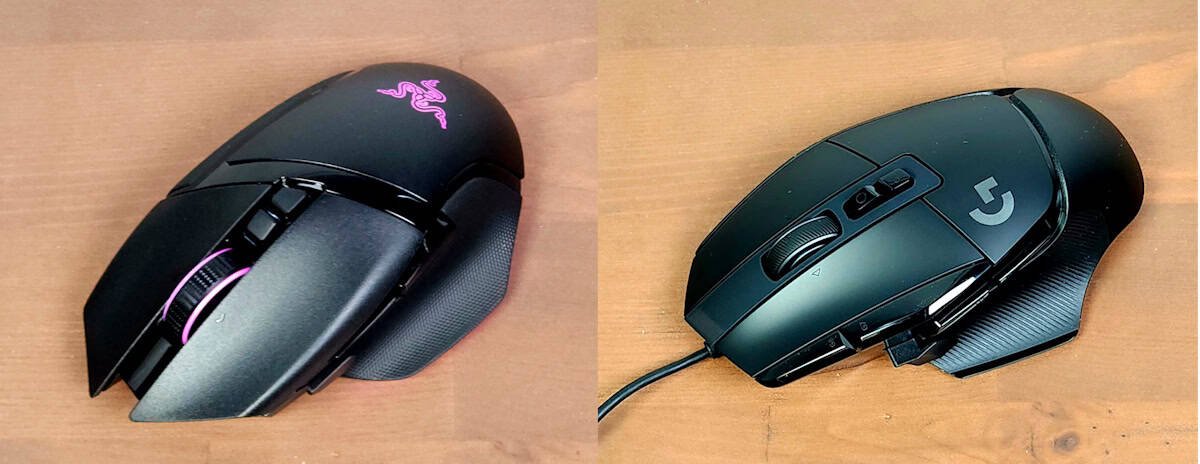
The Basilisk V3 35K made an immediate impression on me, with its chunkier, more sculpted design. It’s heavier at around 112 grams, which gives it a grounded, stable feel, rather than feeling clunky. The ergonomic curves and moulded grip make it particularly suited for palm grip users or those with larger hands; it feels like it naturally fits into place.
One of the standout features is the Razer HyperScroll Tilt Wheel, which offers three scrolling modes—tactile cycling, free-spin scrolling, and an adaptive Smart-Reel mode that adjusts based on your scrolling speed. The Focus Pro 35K Optical Sensor Gen-2 ensures flawless tracking, even on glass surfaces, making it one of the most accurate sensors on the market.
Logitech G502 X Wired
The G502 X has that familiar Logitech aesthetic of sharp angles, a hint of a futuristic sci-fi design, but nothing too aggressive. What stands out most is its weight or lack of it. At just 89 grams, it’s noticeably lighter than previous G502 models. This gives it an agile, effortless feel, like it’s always ready to respond instantly to your hand movements.
It retains Logitech’s signature dual-mode scroll wheel, which allows switching between precise ratcheted scrolling and free-spin scrolling. The buttons feel fast and tactile, thanks to the LIGHTFORCE hybrid optical-mechanical switches, designed for quicker actuation and extended durability.
Both mice shine in their own ways, but the difference in weight, grip, and scroll features makes it clear they’re designed for slightly different types of users. The Basilisk V3 35K feels stable and moulded, while the G502 X feels light and fast. This isn’t going to be easy. At first glance, it seems that each mouse has both pros and cons, which makes me feel. I may have jumped the gun on that bold call, ‘Of course it is!”
As this is a draw, and comes done to personal preference. I didn’t expect the Logitech G502 X Wired to be as good as it was, but I personally can’t pick on first impressions
Logitech G502 X vs Razer Basilisk V3 35K: Draw
Buttons & Scroll Wheels: Where Preferences Get Personal
Razer Basilisk V3 35K
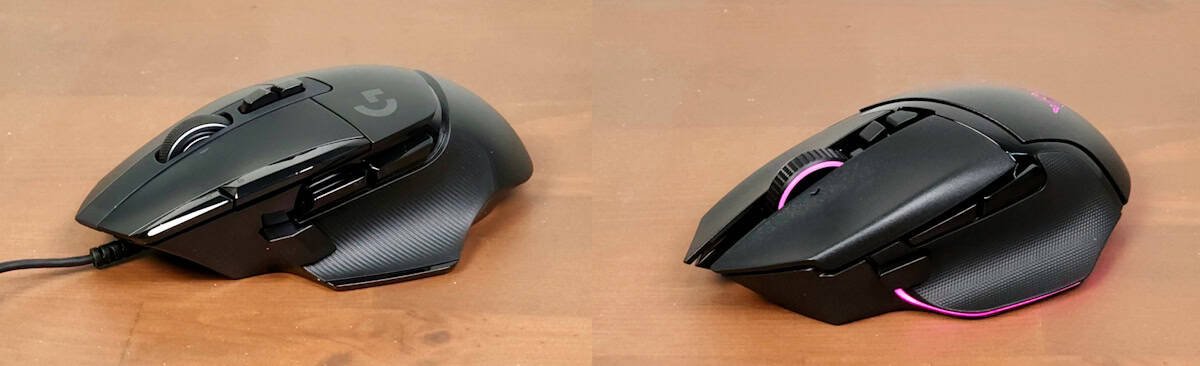
The Basilisk V3 35K comes with 11 programmable buttons, which might seem like a step down compared to the Logitech G502 X, 13, but in practice, it doesn’t feel like a limitation. The layout is intuitive and well-spaced, making it easy to access commands without accidental misclicks. For someone like me with chubby fingers, I will gladly sacrifice those two keys for more precision.
But the real star of the show? The scroll wheel. Razer’s HyperScroll Tilt Wheel is more than just a gimmick; it’s a game changer. It automatically switches between tactile and free-spin modes, adapting to how fast you scroll. At first, I didn’t think I’d care. A scroll wheel is a scroll wheel, right? But after using it, I found myself missing it whenever I switched to the Logitech G502 X Wired. It’s one of those features that sneaks up on you, as something you don’t realise you need until it’s gone.
Logitech G502 X Wired
The G502 X takes a different approach, offering 13 programmable buttons, which is, frankly, a lot. Maybe even too many? While having extra buttons is great for MMOs (which I love way too much), I found that when video editing and setting up shortcuts, I ran out of shortcuts to put on all of them. I found myself occasionally hitting the wrong one, especially the button near the thumb. It’s positioned for quick DPI adjustments, but in the heat of a match, it’s easy to press unintentionally. Which I did often and ended up turning off the button, as it really started to annoy me the longer I used it.
That said, if you love customisation and having commands at your fingertips, this mouse delivers. The dual-mode scroll wheel lets you switch between precise ratcheted scrolling and free-spin scrolling, giving you flexibility depending on the task. It’s not quite as seamless as the Basilisk’s auto-switching scroll wheel, but it’s still a solid feature that we’ve seen with many of Logitech latest offerings.
While both mice offer strong customisation, their approach differs. The Basilisk V3 35K keeps things streamlined and intuitive, while the G502 X leans into maximum control and flexibility. Which one works better depends on how much customisation you actually use, and personally, I found that the Basilisk V3 35K worked so much better. As the button placement was a lot more user-friendly & that scroll wheel that adapts to you is.
Logitech G502 X vs Razer Basilisk V3 35K: Razer
Performance: DPI Wars and Real-World Use
Razer Basilisk V3 35K
On paper, the Basilisk V3 35K is an absolute powerhouse. With a 35,000 DPI sensor, 750 IPS tracking speed, and 70G acceleration, it’s built for extreme precision. But let’s be honest, as I said in my previous review of the mouse, those numbers are completely overkill except for maybe 1% of the gaming population. Even competitive gamers rarely push their DPI settings anywhere near the max. That said, if you want uncompromising accuracy or if you’re the type to tweak every setting down to the finest detail, the Basilisk gives you room to experiment.
The Focus Pro 35K Optical Sensor Gen-2 (try saying that 5 times fast) ensures flawless tracking, even on my glass coffee table. It glided over it with ease. Whether you’re making micro-adjustments in an FPS or flicking across the screen in a fast-paced MOBA or trying out your new laptop on the TV so you can watch movies while resting it on your glass coffee table, the responsiveness is undeniable.
Logitech G502 X Wired
The G502 X takes a more balanced approach. It tops out at 25,600 DPI, with 400 IPS tracking speed and 40G acceleration. While those numbers might seem lower compared to the Basilisk V3 35K, and on paper, it is. In actual gameplay, the difference is hard to notice unless you’re working with ultra-high resolutions or extreme flick shots, which I can’t do, and when I try often has me launching my mouse across the room. But for the normal person and even most professionals, the Logitech G502 X performance is more than you’ll ever need.
The HERO 25K sensor delivers exceptional accuracy, with zero smoothing, filtering, or acceleration. It’s designed for consistent, reliable tracking, making it a great choice for players who want precision without unnecessary excess. Having used Logitech for years, the Hero 25k sensor is one of my favourites and pairing with their LIGHTSPEED Wireless is a match made in heaven. And yes, I know that I was using the wired version, but I have a lot of experience with their wireless settings, and the G502 X has a wireless version.
At the end of the day, both mice offer top-tier performance, but the Basilisk leans into raw power and extreme customisation, while the G502 X focuses on efficiency and refined control. Unless you’re pushing the absolute limits of DPI settings, you’re unlikely to feel held back by either.
Logitech G502 X vs Razer Basilisk V3 35K: Draw (In real-world usage)

Build Quality & Extras
Razer Basilisk V3 35K – Smooth, Flashy, and Surprisingly Refined
The Basilisk V3 35K build quality is solid. No creaks, no give. It feels like it’s built to last, but with a slightly softer, more sculpted feel than some of its competitors. It’s comfortable, especially for longer sessions, and the shape encourages a relaxed grip without sacrificing control.
And then there’s the RGB. It’s bold, bright, and highly customisable. If lighting is your thing, this mouse delivers. Even if you’re more like me and not an RGB fan, it’s hard not to appreciate how polished it looks when it lights up your desk. It feels like part of the setup, not just an accessory. There aren’t a ton of extras beyond the lighting and the smooth glide, but what’s here feels intentional. It’s a mouse that knows what it’s good at and leans into it.
Logitech G502 X – Solid, Subtle, and Sharply Tuned
The G502 X takes a different approach. It’s lighter, more angular, and feels like it was built with precision in mind. The LIGHTFORCE hybrid switches are a standout; they’re crisp, responsive, and just the right amount of tactile. Every click feels deliberate, like it was designed to matter. And personally, I love these switches. They are tactile, and the instant feedback is perfection for me.
It’s not flashy. There are no RCGs on the Logitech G502 X wired, but there are on the Logitech G502 X Plus. The RGB on the Plus is minimal, almost reserved. Some might call it elegant. But they are little plain, especially next to something like the Razer Basilisk V3 35K. As my friend Anthony has the Plus, and in a sun-filled room, it is barely noticeable. I found myself appreciating the simplicity as I said, I’m not an RGB fan, but seeing the Basilisk in a dark room you can’t help but be impressed. It depends on your preference or mood, I guess to whick you prefer.
In terms of build, the G502 X is rock solid. It doesn’t move or flex, and the weight distribution feels balanced, given light when using the wired version. It’s the kind of mouse that disappears in your hand, not because it’s forgettable, but because it just works. No distractions, no fuss.
There’s a quiet confidence to the G502 X. It doesn’t try to impress with extras but just focuses on performance. And for a lot of users, that’s exactly what they want.
Logitech G502 X vs Razer Basilisk V3 35K: Logitech G502 X Win
So… Which One Would I Pick?
Honestly? It depends. A handful of personal preferences that might shift more than you expect.
The Logitech G502 X feels lighter, quicker, and more utilitarian. It’s the kind of mouse that disappears in your hand during long sessions, especially if you care about weight or play competitively. It’s focused, no-nonsense, and sharp where it counts.
The Razer Basilisk V3 35K, on the other hand, feels more luxurious. That scroll wheel alone is worth a second look; it’s smooth, tactile, and just satisfying to use. And the RGB? It’s not really my thing, if I’m honest. I don’t usually care whether my mouse lights up or not. But I get it. For a lot of people,friends of mine included, RGB are life. And if that’s you, the Basilisk doesn’t just check the box. It owns it. The lighting is gorgeous.
If I had to choose right now? I think I’d still lean toward the Basilisk V3 35K.
But, and this surprised me, that confidence I once had isn’t as confident anymore. The G502 X performed far better than I expected. It’s not flashy, but it’s smart. The LIGHTFORCE hybrid switches are probably my favourite feature across both mice. If the Basilisk had something similar, more tactile, more deliberate switches, it might not be as close.
Yes, the Basilisk wins on DPI range and RGB customisation. Technically, it offers more. But for me? DPI beyond a certain point is just numbers. Both mice go well beyond what most people will ever need. If you’re someone who really dials in sensitivity settings, the Basilisk gives you more room to play. But if you’re not? It’s kind of a wash.
And that’s the thing, these are both excellent mice. It’s not really about which one is better. It’s about which one feels more like you.





Recent Comments