

I’ve been using the Logitech Brio 100 for about a month now, and honestly, I didn’t expect to like it as much as I do. I received the pink model, and having it perched on top of my monitor looking a bit too cute has been a whole experience of its own. Weirdly, I’ve found myself looking directly into the camera more, as I just love looking at it. And I’m not the only one. My housemate has been dropping increasingly obvious hints about “borrowing” it or “would this work for my ‘x’ meeting”, which, translated from housemate‑speak, probably means I’ll need to keep a closer eye on it before it mysteriously migrates to her desk…. for an extended time.
When I first unpacked the box, the weight was the first real surprise. It’s only about 75 grams, or a few grams heavier than a king-sized Snickers, but somehow it feels more solid than it looks. I thought it’d be one of those airy, hollow little webcams that rattles if you shake it, but there’s this nice bit of substance when you pick it up. It’s strange, really, you don’t expect something so small and colourful to have that slightly reassuring heft. It makes the whole thing feel just a touch more premium than the price would lead you to believe. And maybe this is me overthinking it a bit, but the lightweight actually makes it sit more securely on the monitor, too. It doesn’t wobble every time I nudge my desk, which is a major issue with cheaper, lighter webcams. Which is something I didn’t realise mattered until I originally upgraded to the Logitech Streamcam and got rid of my cheap one.
Over the last few weeks, I’ve found myself weirdly fond of it. Maybe it’s the colour. Maybe it’s the way it blends into my setup without demanding attention, except when it does, usually when the light hits it just right, and it looks like a piece of pastel stationery rather than a camera. Either way, it’s grown on me in that slow, comfortable way where you don’t notice at first, and then suddenly you’re recommending it to people and defending it from your housemate like it’s a pet.
Design and Build Quality
The design is simple and straightforward, almost modest in a way. It doesn’t try to compete with those over‑styled, futuristic‑looking webcams that seem like they’re about to transform into a tiny robot. Instead, the Logitech Brio 100 leans into a softer, friendlier look. The pink colour, especially, gives it this little spark of charm, almost like it was designed by someone who thought, ‘you know what, tech can be cute too.’ Logitech offers it in black and white, but the rose‑pink one really stands out if you enjoy your workspace having a bit of personality without going over the top.
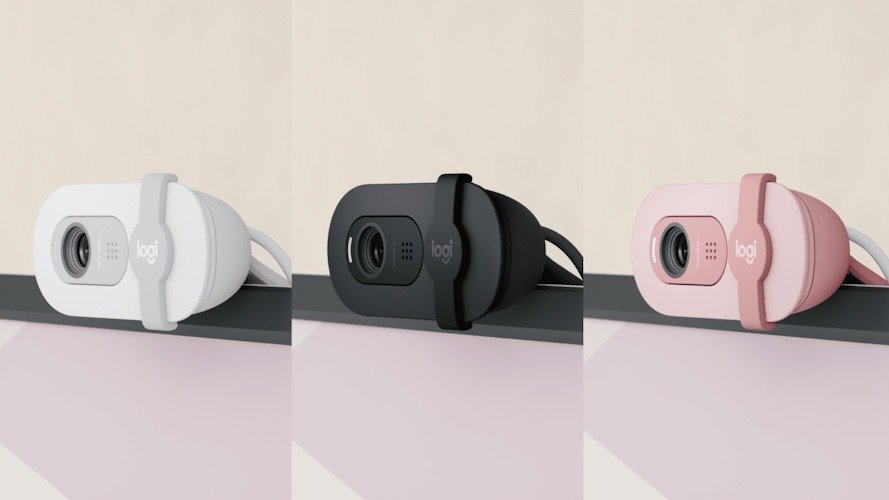
What surprised me the longer I used it is how balanced the materials feel. It’s all plastic, of course, but it doesn’t come across as cheap or creaky. When you pick it up, there’s no rattling or flimsy flex. It feels like the kind of device you could toss into a bag without worrying you’ll pull out a handful of loose parts later. The surface has a slight texture to it as well, nothing dramatic, but just enough to avoid that slippery, glossy finish that fingerprints love.
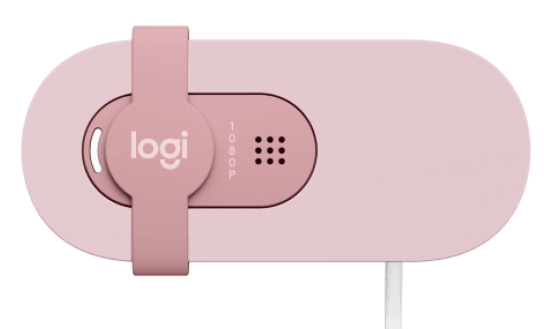
The built‑in privacy shutter is one of those small things you don’t appreciate until you’ve had it for a bit. It’s a simple slider, nothing fancy, but it snaps into place with a reassuring little click. The moment it covers the lens, you get that instant “okay, no one can see me or record me, let’s watch Wicked and sing at the top of my lungs” feeling. I used to rely on sticky notes, bits of paper, or even a Band-Aid at one point, which looked ridiculous and kept falling off every time the monitor wobbled. For my Logitech Streamcam, I eventually got frustrated and bought a cover from Etsy, which I still use today. Having the shutter built in means one less thing to fuss over, and honestly, it’s quite nice not having my webcam look like it’s been patched up with 3D printed. And yes, I know that the chance of someone hacking my webcam is slim. But it brings me peace of mind.
Mounting the Logitech Brio 100 is refreshingly uneventful… in a good way. It just sits there, calmly doing its job. The clip is firm enough that it doesn’t wobble every time I shift in my chair. It doesn’t bite into the monitor frame or leave marks either. There’s no tripod threading, which could be an issue for people who like more flexible positioning, but these people are less likely to purchase a webcam in this price point. And I’ve never felt the need for it in day‑to‑day use. For me, it stays exactly where I put it, and that’s pretty much all I ask from a webcam mount.
I’ve come to appreciate the little details I didn’t notice straight away, the way the weight keeps it from tipping forward, the slightly rounded edges that make it look friendlier, which is weird, I know, and even the overall footprint that doesn’t dominate the top of the screen. It’s one of those products where the design doesn’t shout for attention, but it settles in so naturally that you end up forgetting what life was like with that clumsy old webcam you used to wrestle with.
Video Quality
The Logitech Brio 100 records in Full HD 1080p at 30fps, which has become the standard for everyday webcams (unless you’re my work computer, then it’s built in grainy 720p!). While it doesn’t aim for cinematic flair, the clarity is more than enough for professional video calls, online classes, or casual chats. The image is sharp and consistent, so you won’t have to worry about looking blurry or pixelated. For a webcam positioned at the affordable end of Logitech’s lineup, this level of performance is exactly what most people need. It’s actually better than I thought you’d get.
The Logitech Brio 100’s 58‑degree field of view is noticeably tighter than many competing webcams, which often range between 70–90 degrees. This narrower framing keeps the focus squarely on you, minimising distractions from your surroundings. So I like it a lot. It can feel restrictive if you’re used to wider shots, but you get used to it pretty quickly, and it also means you don’t have to worry about clutter creeping into the background or in my case, a whole lot of nothing in the background. For small spaces or minimalist setups, this tighter angle can actually be an advantage.
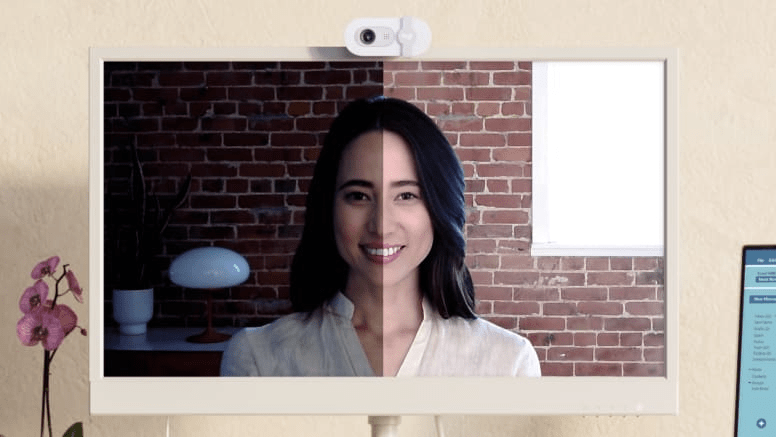
One of the most useful features is Logitech’s RightLight auto‑light balance technology. Try saying that 5 times fast. The Logitech Brio 100 automatically adjusts brightness and contrast to smooth out uneven lighting and reduce shadows. Even without external lighting, it helps you look brighter and more evenly lit, which makes a big difference in rooms with mixed or dim lighting. Skin tones remain natural, and the camera adapts quickly if you move between different lighting conditions, avoiding the washed‑out look that cheaper webcams often produce. And I put that to the test this weekend, with 40 plus degrees, I had everything closed and studio lights off, just the down lights. I was impressed by how well it actually worked. And though it may be hard to say quickly, RightLight auto‑light balance technology really is something I want to experience more.
The Logitech Brio 100 delivers exactly what it promises: clean, reliable video quality for everyday use. It’s not designed to replace a DSLR or high‑end streaming camera, but for meetings, online classes, or casual video chats, it’s a dependable little workhorse. Its combination of 1080p clarity, auto‑light balance, natural colour reproduction, and privacy shutter makes it a strong choice for users who want simplicity and consistency without breaking the bank.
Audio Quality
The built‑in microphone is… alright. Not great, not bad. Pretty typical for a webcam mic. My voice comes through clearly enough for meetings, though it leans a little thin, almost like the sound has been flattened. It’s fine for casual calls, but I wouldn’t rely on it if I were presenting something important or if you are streaming regularly. If you are, get yourself a cheap Amazon microphone.
I tried a few different setups, sitting closer, leaning back, even speaking a bit louder than usual, and the Logitech Brio 100 handled all of that without distortion. There’s no fancy noise cancellation here, so if someone’s clattering dishes in the kitchen or a dog barks in the background, you’ll probably hear it. But then again, most built‑in mics struggle with that.
What I did notice, and maybe this is just me being picky, is that the tone feels a little sterile. It captures the words, sure, but not much warmth. I think that’s why I still prefer using a headset or a dedicated USB mic when I want my voice to sound fuller. The Logitech Brio 100’s mic is serviceable, dependable even, but it doesn’t add anything extra.
That said, I’ve had a couple of calls where I didn’t bother plugging in my headset or mic, and nobody complained. In fact, one person said I sounded “fine,” which is probably the best word for it. Not impressive, not distracting. Just fine. And honestly, for a webcam in this price range, that’s enough.
Everyday Use & Software
Setup is about as simple as it gets: plug it in, and you’re ready to go. No fussing with drivers, no digging through menus. It just works. I didn’t have to download anything extra unless I wanted to fine‑tune things through Logitech’s software, which is optional, but I already have as I’m using their Streamcam. Honestly, I only opened the app once out of curiosity and mostly for the review, and then mostly left it alone. The defaults were good enough.
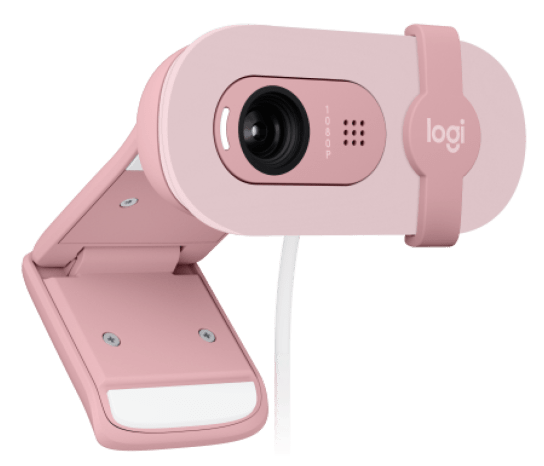
The Logitech Brio 100 is compact, which I’ve come to appreciate more than I expected. I’ve tossed it in a bag a few times when heading into the office, as the laptop inbuilt one is horrible and embarrassing for those big, important meetings. I never worried about it getting scuffed up or tangled. The cable isn’t detachable, a small detail that might bother some people, but in practice, it hasn’t caused me any hassle. It’s fixed, it’s sturdy, and I don’t find myself thinking about it.
Day‑to‑day, the webcam feels unobtrusive. It doesn’t demand attention, which I like. I clip it on, it stays put, and I forget it’s there until I need it. The hinge is firm enough that it doesn’t wobble when I adjust my monitor, though I did notice once that it took me a couple of tries to get the angle just right due to its field of view. Not a big deal, but worth mentioning.
As for the software, Logitech’s app gives you the usual tweaks, brightness, contrast, and colour balance. Nothing groundbreaking, but handy if you’re particular about how you look on camera. I played around with the settings, and while it was nice to have the control, I ended up going back to auto mode. It’s simpler, and I think the camera does a decent job on its own, so there is no real point in playing with it.
Every day use is smooth. The Logitech Brio 100 doesn’t try to reinvent anything, and maybe that’s the point. It’s reliable, easy to carry, and straightforward to set up. If you’re after a webcam that just gets out of the way and does its job, this one fits the bill
Sustainability Notes
A small but meaningful detail: Logitech uses recycled plastic in the Brio 100, which feels like a quiet step in the right direction. The pink version, in particular, includes a portion of post‑consumer recycled material. It’s not something that would make me buy it over the better brands in the lineup, and I doubt most people would, but there’s a bit of comfort in knowing it isn’t made entirely from fresh plastic and I, in turn with Logitech are helping Old Mother Nature.
I wouldn’t call it a game‑changing sustainability move, though it does make the webcam feel a little more considered. Maybe that’s the point, small improvements that add up over time. Even if it’s just a fraction of the material, it’s still better than nothing, and I appreciate that Logitech is at least nudging things in a more responsible direction.
 Final Thoughts
After a month with the Logitech Brio 100, I’ve ended up liking it far more than I expected, maybe more than a person should reasonably like a webcam. It’s one of those products that doesn’t try to impress you with big, flashy features, yet somehow wins you over anyway. A bit like a quiet coworker who turns out to be the most reliable person in the room, or that old Doc Martins that just feel like home
What surprised me most was how quickly it settled into my setup, almost like it had always been there. I stopped thinking about it, which is probably the best compliment you can give a webcam. It just works. It looks nice. It behaves. It doesn’t wobble or glare or demand attention. And every now and then, usually when the light hits that pink shell just right, I catch myself thinking, “oh, you’re actually kind of adorable.”
It’s not perfect; the microphone is fine but nothing special, and the tighter field of view won’t suit everyone. There’s no tripod mount, and the feature set is intentionally simple. But none of that really feels like a deal‑breaker, at least not for the kind of person this webcam is clearly made for. It’s meant to be easy, dependable, and a little bit charming. Kind of like me! And it is.
If anything, the Logitech Brio 100 reminds me that not every piece of tech needs to be a powerhouse or feature… well, everything new and fancy. Sometimes you just want something that does its job without drama, looks good doing it, and doesn’t cost a small fortune. And in that sense, it hits the mark beautifully.
So yes, I’ve grown oddly attached to it. Enough that I’m keeping an eye on my housemate, who is absolutely plotting a slow‑motion webcam heist. And enough that I’d happily recommend it to anyone who wants a simple, reliable upgrade from their grainy built‑in laptop camera or just an upgrade to their aging webcam. It’s affordable, it’s friendly, and it’s surprisingly capable.
A small, pastel‑coloured overachiever. That’s probably the best way to put it. And yes… my housemate is still plotting its disappearance, so I’m surprising her with one that should arrive tomorrow!






Recent Comments