

A balance board that turns workouts into play, GoBalance Play might just make fitness fun again… it did for me!
The GoBalance Play by Particula isn’t your typical fitness gadget. It’s a balance board with a twist…. or is it a shake? Bluetooth connectivity, interactive games, and real-time feedback. I spent some time with it, and here’s what stood out, and why it might just sneak into your daily routine and my continued weight loss journey.
First Impressions & Setup
When I first opened the box, the GoBalance Play looked simple enough, a round board with a Bluetooth sensor neatly tucked inside. It’s surprisingly lightweight at about 900 grams (or roughly 2 freedom units or pounds), making it easy to carry around. You could even toss it in your luggage for the holidays without a second thought, though I’m not sure why you’d want to, considering I plan to eat for exercise over that period! Still, the GoBalance Play is impressively portable, whether you’re taking it on the go or storing it away when not in use.
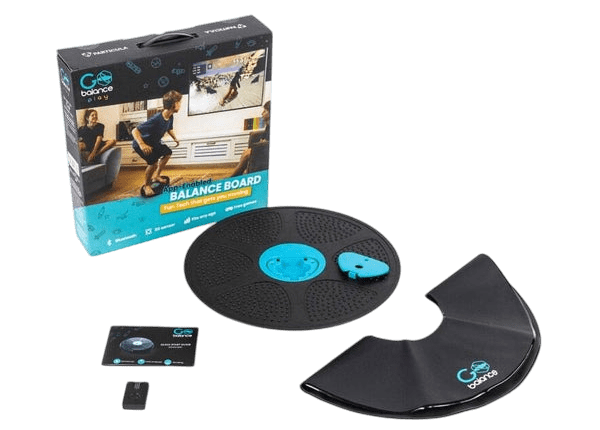
The design feels solid, supporting up to 150 kg or 330 lbs, so there’s no sense of fragility when you step on it. As someone who sits around 110 kg, I’ve often found these kinds of devices aren’t really made for me. That higher weight limit gives me confidence to actually use it properly, without being timid, and get the most out of the GoBalance Play. It’s a small detail, but for anyone who’s ever hesitated because of weight restrictions, it makes a big difference.
I also found the anti-slip surface reassuring straight away. That matters because balance gear can feel sketchy if it’s not well-made, especially when you’re in the triple digits. There’s nothing worse than stepping on something and wondering if it’s going to slide out from under you or you are going to fall off it and feature on an episode of Ridiculousness. Here, it grips well, and that sense of security makes the whole experience more enjoyable.
Setting it up was straightforward. Switch it on, open the app, and it pairs almost instantly. It works on both iOS and Android, and if you want to cast to a TV, you’ll need your phone or tablet to handle that. The instructions in the app could be clearer, though. I had to poke around a bit to figure out profiles and pairing, but it wasn’t a deal-breaker. Once you’re in, the interface is clean and easy enough to navigate.
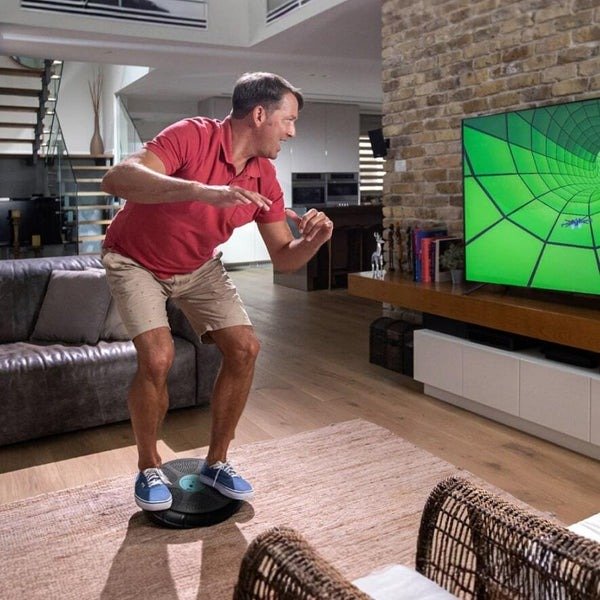
The board itself feels well thought out. It’s not bulky, and the finish is clean, no sharp edges or cheap plastic vibes. I did notice the sensor housing looks delicate, so I wouldn’t throw it around carelessly. It’s clearly designed for indoor use, though I could see myself taking it onto my Alfresco area for some fresh air… and to block out the laughter of my housemate. While she watches me wiggle and sway on my new favourite toy, snowboarding up a storm.
Games & Real-Time Feedback

The real fun starts with the games. There are 14 built-in options, all accessible through the free app.
They’re not just filler either; there’s a mix of balance challenges, reaction-based games, and even a Tetris-style mode. Which truly shocked me. As in any pack of games, there are always a few that feel phoned in or just there to make up numbers. Not so much with the GoBalanced Play offering.
The Bluetooth sensor tracks your movements in real time and gives feedback as you play. It’s subtle but motivating. You don’t feel like you’re slogging through a workout; it’s more like gaming with a side benefit.
In one session, I tried the snowboard game, and my quads were burning halfway through. Another time I played the shape-stacking game and realised my calves were doing most of the work. It’s nice that the focus shifts between the core and the lower body depending on the game. That variety keeps it interesting, and honestly, it makes me want to hop on for a quick session rather than dread it…. well, in theory. As there are days, normally after having too much and spending too long on the GoBalanced Play the day before, just the sight of it hurts my body!
The app itself is clean and functional. It tracks your progress, shows scores, and even lets you compete with friends if you’re into that. I didn’t dive too deep into the social features, but they’re there and could be a great touch if you are on a fitness goal with a friend & wanted to keep each other honest. What I liked most was the instant feedback; you can see how your balance improves over time, which is oddly satisfying, even if the improvement isn’t significant….. because it was so good… yeah, that is 100% why it hasn’t improved significantly. I swear!
A Few Quirks
There are a few quirks worth mentioning with the GoBalanced Play. The app instructions could also be clearer. They work, but they’re not exactly intuitive. I spent a few minutes figuring out profiles and pairing, and while it’s easy enough once you get the hang of it, the process feels a little clunky compared to other systems I’ve used. It’s not a major flaw, but it’s something that could be polished, and hopefully we see that in future app updates.
Another thing I noticed is that while the board itself feels sturdy, the sensor relies heavily on Bluetooth stability. If your phone is juggling multiple connections, say, headphones and a smartwatch, you might see a slight delay in feedback, especially if you’re using an older device. It didn’t happen to me, but I can see this being a possible factor if you have all the right (or wrong) conditions. So not a criticism, more of a heads-up. It’s worth noting because the whole appeal of GoBalanced Play is real-time tracking, and even a small lag takes away a bit of that instant gratification.
None of these quirks is are deal-breaker, but they’re still part of the picture. For me, they were minor inconveniences rather than major flaws, and they didn’t stop me from enjoying the experience.
Final Thoughts
The GoBalance Play by Particula isn’t just another fitness gadget; it’s a clever mix of tech and movement that feels approachable, even for someone like me who’s not exactly a gym regular. It’s light, portable, and surprisingly sturdy, which matters when you’re on the heavier side and want to feel safe using it. That confidence alone makes a big difference.
The games are where it really shines. They turn what could be a boring balance exercise into something fun and competitive, even if you’re only competing against yourself. I found myself sneaking in short sessions throughout the day, and honestly, that’s the kind of habit that sticks. It’s not about sweating buckets or bulking up; it’s about moving more without feeling like a chore.
Sure, there are quirks. The app could use a polish, and Bluetooth stability might be a factor if you’re running multiple devices. But none of these issues were deal-breakers for me. After a few weeks, the GoBalance Play has earned its spot in my routine, and maybe even in my weight loss journey. It’s not perfect, but it doesn’t need to be. It just needs to make you want to get on it again tomorrow, and for me, it does exactly that… well depending on how much I’m hurting from the previous day.
If you’re looking for something that blends gaming with fitness and doesn’t feel intimidating or even like fitness for that matter, the GoBalance Play is worth a serious look. It’s fun, practical, and just different enough to keep you engaged. And honestly, that’s half the battle.




Recent Comments