
Dell Pro 14 Plus: A quiet performer with a few quirks I didn’t expect…. and a few I did.
I didn’t expect to like the Dell Pro 14 Plus Laptop as much as I did. That’s probably the most honest way to start this review.
It doesn’t try to impress with flashy design or bold branding. It’s subdued. Maybe too subdued. The aluminium chassis feels solid, but visually? It’s… fine. Neutral. You’d walk past it on a desk without a second glance. I did.
But once I started using it, especially with the 32GB RAM, it felt quietly capable. Not showy, not thrilling, but dependable. And sometimes that’s exactly what you want.
No distractions. No gimmicks. Just a machine that boots fast, handles multitasking without complaint, and stays out of the way. I’ve had laptops that tried too hard, RGB lighting, aggressive angles, and fans like jet engines. This one doesn’t. It just works.
Performance and Responsiveness
With the AMD Ryzen AI 7 PRO 350 and 32GB of LPDDR5 memory, multitasking on the Dell Pro 14 Plus is smooth as silk. Not the kind of silk that’s flashy or dramatic, more like the kind you forget you’re wearing because it just fits. I’ve had dozens of tabs open, a video render chugging away in the background, Discord pinging, and it didn’t flinch.
There’s one moment that sticks with me: I was editing my housemate’s YouTube video, while streaming the new Jim Jefferies special on Netflix on one of my monitors screen. At the same time, I had a browser window open with half a dozen tabs comparing lapel mics for PAX Australia. It should’ve groaned. It didn’t. Not even a hiccup. No fan surge, no cursor lag, no weird delay when switching windows. Just steady, quiet competence. I actually forgot I was using the Dell Pro 14 Plus and thought I was on my desktop.
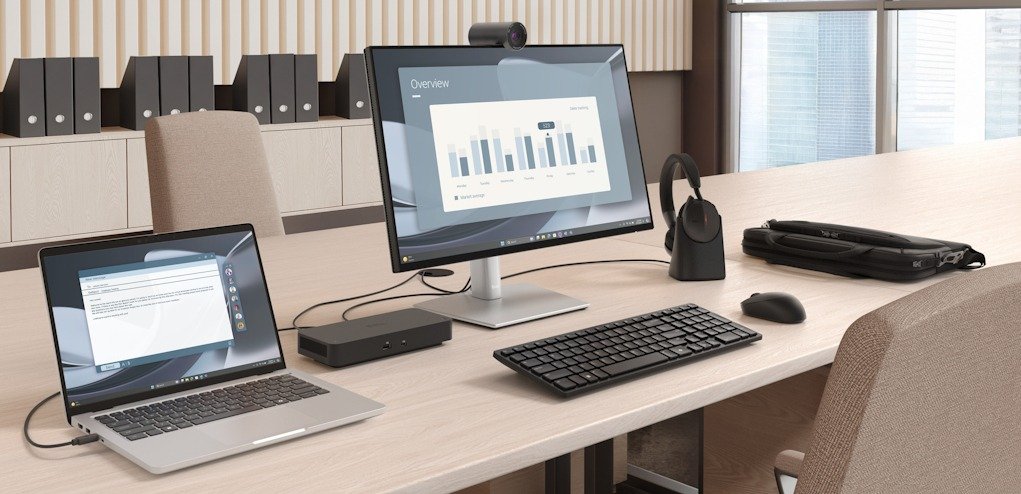
That said, I wouldn’t call it lightning-fast. It’s not the kind of machine that makes you say “whoa” when you launch an app. It’s more like… consistently fast. There’s a difference. It doesn’t leap forward, but it never stumbles either. It’s the kind of speed that doesn’t draw attention to itself, which I suspect is where the AI chip quietly earns its keep; optimising power, managing background tasks, smoothing out the edges without ever announcing its presence.
The 512GB SSD is snappy enough for most workflows. File transfers are quick, boot times are short, and I haven’t hit any storage limits yet. Still, I do find myself wondering if I should’ve gone for the 1TB version. There’s one available, apparently, along with a few other configurations, some with 16GB RAM, others with different Ryzen processors. It’s nice to know there’s flexibility, but if this is your flagship machine, why not future-proof it a little with a 1TB?
Display and Design
The 14-inch FHD+ display on the Dell Pro 14 Plus is decent. Not stunning, not disappointing, just somewhere in the middle. Indoors, it’s bright enough for most tasks, even in a well-lit room. But step outside or sit near a sunlit window, and you’ll start squinting. It’s not built for glare-heavy environments, and that’s fine. This isn’t a field laptop, it’s a desk companion.
Colour accuracy is… close enough. I wouldn’t trust it for colour grading or anything where precision matters, but for writing, browsing, editing documents, and the occasional Netflix binge? It holds up. Whites are clean, blacks are deep-ish, and saturation doesn’t feel overly boosted. It’s the kind of display that doesn’t distract you, which, depending on your workflow, might be exactly what you want.
The bezels are slim, which helps the overall footprint feel modern and compact. And the 16:10 aspect ratio, a feature I came to love on the Dell 14 2-in-1, it was something I didn’t think I’d care about when I first experienced but it actually makes a noticeable difference. And one I will look for now on any future laptop purchases I make. That extra vertical space means fewer scrolls when reading or editing, and it’s one of those subtle design choices that quietly improve the experience without calling attention to itself. Until you’ve experienced it, you don’t know what you’re missing.
Build-wise, the laptop feels solid, weighing in at 1.56kg or approximately 3.4 freedom units. The aluminium chassis has a muted, professional vibe, no glossy finishes or sharp edges, just clean lines and a matte texture that resists fingerprints better than I expected. It’s not a head-turner, but it’s not trying to be. It’s the kind of design that blends in, which I’ve come to appreciate more than I thought I would.
Now, the touchpad… It’s okay. Functional, but a little temperamental. Some days it feels hyper-sensitive, registering the lightest brush as a click, while other times I find myself dropping the People’s Elbow just to get a response. Gestures work, mostly, but I’ve had a few moments where I wondered if it was ignoring me, only to realise I wasn’t pressing firmly enough. It’s not bad, just inconsistent. The kind of thing you adapt to over time, but it never quite disappears from your awareness. After a few days, I just got annoyed and plugged in my mouse.
If you are a touchpad user, you’ve been warned.
Battery Life and Thermals
Battery life is solid. I’ve consistently gotten around 12 hours on mixed use, which is a bit shy of the advertised 16.1 hours, but honestly, I wasn’t expecting miracles. I had YouTube or Netflix running for most of that time, plus a few background apps ticking away. With brightness set at 70% and Wi-Fi on, it comfortably lasts through a full workday without needing a charge. Even late into the evening and it held up without complaint.
It’s the kind of battery performance that feels reliable, not inflated. You don’t have to baby it or constantly check the percentage. I’ve gone entire days without reaching for the charger, which is more than I can say for some of the other machines I’ve used recently.
Thermals are impressively quiet. Even under load rendering video, juggling multiple apps, the fans rarely kick in audibly. I’ve used it in a quiet room, late at night, and barely noticed any noise. No sudden whirring, no distracting hum. Just a soft, steady silence that makes you forget it’s even working hard. That’s something I appreciated. It’s subtle, but it adds to the sense that this laptop is built to stay out of your way.
Ports and Connectivity
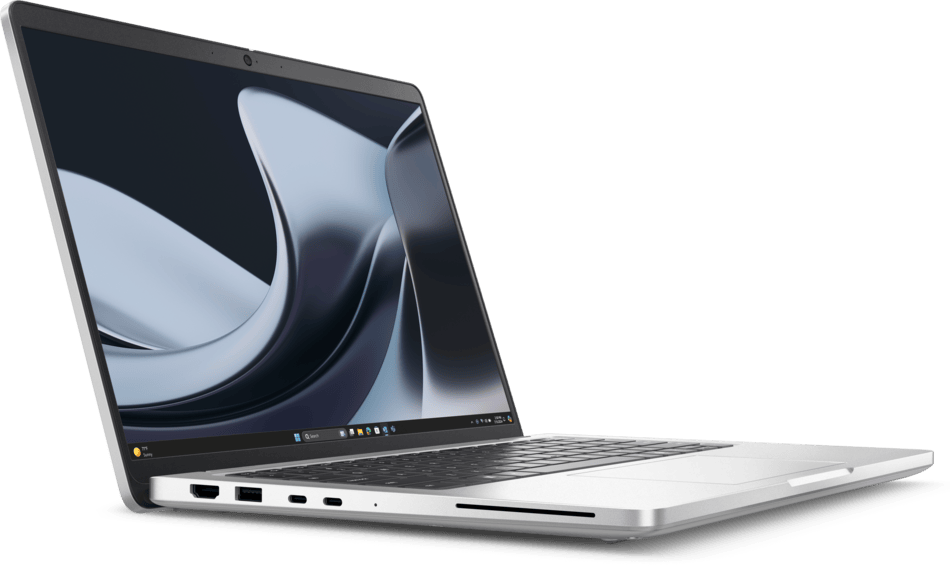
There’s a good mix of ports:

2. Global Headset Jack
3. USB 3.2 Gen 1 Type-A with PowerShare
4. Optional RJ45 (1 Gbps)
5. Wedge-shaped lock slot
7. USB 3.2 Gen 1 Type-A
8. AMD Ryzen™ 200 Series – 2 x USB Type-C Thunderbolt™ 4.0 with Power Delivery 3.1 & DisplayPort™ 1.4a or AMD Ryzen™ AI 300 Series – 2 x USB Type-C Thunderbolt™ 4.0 with Power Delivery 3.1 & DisplayPort™ 2.1
9. Optional Smartcard reader
A Few Things That Bother Me
The keyboard is backlit and comfortable, but the layout feels slightly cramped. Maybe it’s just me. I’ve mistyped a few times, especially when reaching for the arrow keys. And while the build is sturdy, there’s a bit of flex near the centre of the keyboard deck. Not enough to worry about, but enough to notice.
Additionally, the design, I don’t know why, I just can’t quite put my finger on it, and I keep coming back to that. It’s minimal, yes, but almost to a fault. There’s no personality. No visual hook. I know that’s subjective, but I do miss a bit of flair.
Final Thoughts
The Dell Pro 14 Plus isn’t trying to be exciting. And maybe that’s what makes it quietly impressive. It’s not a laptop that demands attention; it earns it slowly, through consistency and restraint. No flashy branding, no over-the-top features, just a solid performer that gets out of your way and lets you work.
Sure, there are quirks. The touchpad’s mood swings, the slightly cramped keyboard, the design that feels like it’s missing a personality chip. But none of those are deal-breakers. They’re just… things you notice. Things you adapt to.
What stuck with me most was how often I forgot I was using it. That sounds like a strange compliment, but it’s not. It means it didn’t interrupt me. It didn’t frustrate me. It just did its job, quietly, reliably, and without fuss.
If you’re after a laptop that blends in, performs well, and doesn’t try to be something it’s not, the Dell Pro 14 Plus might surprise you. It surprised me.





Recent Comments