

When I first set eyes on the Alienware 34 Ultra-Wide QD-OLED Monitor (AW3425DW), I was struck by its sleek design. It’s not just a monitor; it’s a statement piece. A piece that marvelously takes over my desk & elevators my setup to one of grandeur, even if my PC is a potato!
The 34-inch curved display with its 21:9 aspect ratio pulls you in, promising immersion like never before with premium build quality, a solid stand, and the futuristic flair that Alienware is known for, this monitor is an undeniable showpiece.
But is it a gateway to an out-of-this-world experience, or the beginning of an alien invasion that could shake up everything we thought we knew?
Display Quality
One of the standout features here is the QD-OLED technology. For anyone unfamiliar with QD-OLED, it’s a combination of OLED and quantum dot technology, resulting in perfect black levels and colors that pop brighter than standard OLEDs. Think of it as having a miniature cinema right on your desk. It’s something I wished the Alienware 27 4K Dual-Resolution Gaming Monitor had—because when I got my hands on that little beauty, that was the one thing missing. QD-OLED is next level, and Alienware knows exactly how to harness it in their stunning designs.
And wow—the colors. The contrast. The depth. Watching movies or playing games on the Alienware 34 Ultra-Wide QD-OLED Monitor in a dark room is nothing short of mesmerizing because those blacks are so deep, so inky. While playing Helldivers 2, a bug came out of nowhere and actually made me scream. A manly scream, of course. I could just barely see something lurking in the shadows—until I wasn’t sure if I had seen anything at all. And then suddenly, there it was, in all its terrifying, beautifully detailed glory.
The 3440 x 1440 resolution ensures everything looks razor-sharp while pulling you right into the world you’re playing. That’s precisely why I refuse to play horror games on it. I already jump at every little scare, but with black levels this deep, anything emerging from the darkness would send me straight to the hospital. No exaggeration. I’m the biggest scaredy-cat at the best of times, but this monitor would absolutely take that fear to the next level.

Surprisingly, even spreadsheets looked better. That ultra-wide screen gives you so much room to work with—honestly, it made me feel more focused, more immersed in the task at hand. Something about taking up my full field of view helped me concentrate. So whether you’re diving into expansive game worlds or just slogging through work, the display of Alienware 34 Ultra-Wide QD-OLED Monitor is, in a few words, breathtakingly immersive.
But it’s not perfect. In bright rooms, black levels can sometimes look a little raised, which impacts contrast slightly. It’s not a huge issue, but if you’re in a sunlit space, you’ll notice it. The anti-reflective coating helps, but it’s not a miracle fix. If you prefer gaming or working in a brightly lit room, it’s something to keep in mind.
Gaming Performance
Gaming on the Alienware 34 Ultra-Wide QD-OLED Monitor is an absolute joy—the kind of experience that makes hours disappear without you even realizing. With a 175Hz refresh rate and native G-SYNC support, it handles fast-paced action effortlessly, smoothing out every motion and making precision feel second nature. Whether you’re tearing through corners in a high-speed racer or frantically dodging attacks in Marvel Rivals, the responsiveness is unreal.
The motion clarity? Sharp. The input lag? Practically nonexistent. Every action feels immediate, like your brain and the screen are operating in sync. And yet—none of that seems to help me actually win. I don’t know what it is. I love Marvel Rivals, Overwatch, Paladins—fast, competitive shooters are my thing. Or at least, I thought they were. But despite having one of the most responsive displays on the market, my skills remain… underwhelming.
Maybe it’s me. Maybe it’s the matchmaking. Or maybe I was just never meant to be good at these games. Either way, this monitor makes losing look absolutely stunning.

I found myself so absorbed in the gameplay that I completely forgot I was supposed to be testing the monitor—I was just playing, fully immersed, lost in the action. That low input lag makes a huge difference, especially for competitive gaming, yes, I use the word competitive loosely to describe my gaming. Every click, every flick of the mouse, giving you that crucial edge where split-second reactions can make or break a match. It’s the kind of responsiveness that makes everything feel second nature, allowing you to focus on strategy rather than worrying about screen latency.
Then there’s the ultra-wide aspect ratio, which takes immersion to a whole other level. Games that support 21:9 fill the screen beautifully, offering a broader field of view that genuinely makes you feel like you’re in the thick of the action. It’s especially noticeable in racing games and flight simulators, where the extra screen space gives you a more natural, panoramic perspective. Seeing more of the road ahead, catching glimpses of rival racers in your peripheral vision—it just adds to the realism in a way that standard displays can’t match.
Even in slower, more cinematic games, the wide format enhances everything. Expansive landscapes stretch out before you, making environments feel grander, richer, more detailed. Cutscenes take on a more theatrical feel, almost like you’re watching a blockbuster movie rather than just playing a game. And once you experience this level of immersion, it’s hard to go back to anything else.
Simply put, the Alienware 34 Ultra-Wide QD-OLED Monitor isn’t just a display—it’s an experience. Whether you’re locked in a competitive match, cruising through an open-world adventure, or just soaking in the atmosphere of a beautifully designed game, it pulls you in and refuses to let go. If you’ve never gamed on an ultra-wide screen before, this monitor will absolutely make you wonder why you waited so long to try it
Design and Build
Alienware doesn’t just make monitors—they craft showpieces. And this one? It’s a stunner. From the moment you set it up, its impossible to ignore on my desk. Everything feels sturdy, well-made, designed with purpose. The aesthetic leans heavily into that sleek, futuristic vibe, fitting and effortlessly elevating any setup.
The 1800R curvature is another subtle but effective touch. It’s not aggressively curved like some ultra-wide displays and and my pick if you want a curved monitor. As it is soft, and gentle with the perfect amount of immersion. As something like an 1000R are too aggressive and on an ultrawide would hinder your vision rather than suck you into it. The Alienware 34 Ultra-Wide QD-OLED Monitor is perfect, offering just enough to gently wrap the visuals around you, pulling you into whatever you’re watching or playing. Whether you’re deep into an open-world RPG or just scrolling through spreadsheets, the immersion factor is there.
Then there’s the stand, which is rock-solid and packed with practical adjustments. Height, tilt, swivel; however you want to spin it, you’ve got options. And trust me, getting the perfect viewing angle matters more than you think, especially on a display this wide. Adjustability ensures you don’t have to awkwardly crane your neck or shift your entire desk setup just to get things just right. A I’ve reviewed monitors in the past, where I wouldn’t use it without being on a mount. As they were rigid & lock at one level; nothing a few reams of A4 reams of paper couldn’t fix.
And here is the bit my OCD friends have been screaming that their computers about; What about the cable management? Surprisingly well thought out. There’s nothing worse than a tangle of wires ruining the aesthetic of a clean desk, don’t look at my cable management, it isn’t pretty. And Alienware’s design keeps things organized without much effort and actually made my spaghetti factory neat, well neater. I know for most, this won’t make a huge difference & thought it’s a small detail, it’s one that makes a difference.
Connectivity and Features
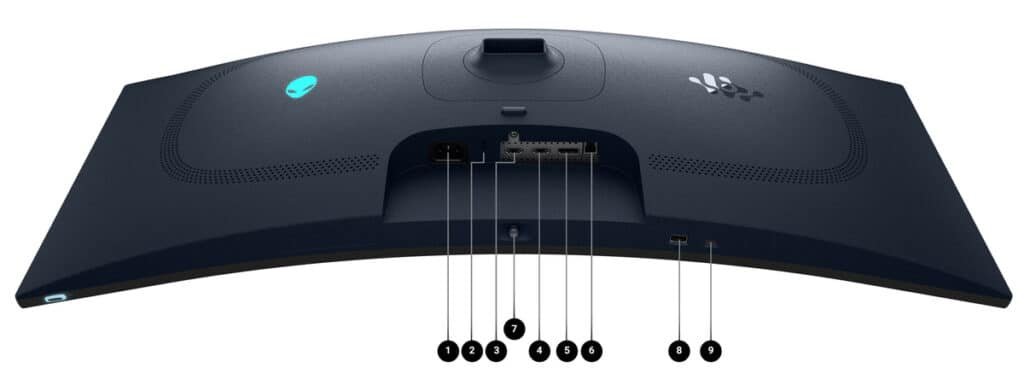
1. Power connector
2. Security lock slot
3. HDMI 2.1
4. HDMI 2.1
5. Display port
7. Joystick
8 USB 5Gbps Type A downstream port
9. USB-C 5Gbps downstream port with 15 W charging
The monitor comes with a decent array of ports as you can see. This makes it easy to connect all your peripherals and devices. The on-screen display (OSD) is intuitive and easy to navigate, with plenty of customization options to tweak the settings to your liking. There’s also a built-in KVM switch, which is a nice touch if you use multiple computers. This allowed me to go from work mode to party mode in a press of a button. This is one of those hidden features that I love & wished more monitors did. As I currently use a KVM switch & have found it invaluable since working from home with my job.
Conclusion
In the end, the Alienware 34 Ultra-Wide QD-OLED Monitor isn’t just impressive, it’s kind of unforgettable. I didn’t expect to be this taken with it, even though the specs excited me. Honestly. I figured it would be great, but this? This felt like stepping into a different category altogether and this will finish in my top 2 list of tech for 2025.
The visuals are stunning, yes. The performance is top-tier. And the design? It’s the kind of thing that makes you glance back at your desk just to admire it. But more than that, it’s how it all comes together. The way it pulls you into a game and have old favourites you’ve played many times feel a little more cinematic. It’s hard to explain without sounding like I’m overselling it, but once you’ve used it, you’ll get it.
That said, it’s not flawless. The blacks in bright rooms are noticable, and sure, it’s not exactly your budget-friendly monitor. But those feel like small trade-offs in the bigger picture. And maybe that’s the point, it’s not trying to be perfect for everyone. It’s just trying to be exceptional at what it does best.
If you’ve been thinking about going ultra-wide, or you’re curious about QD-OLED, I’d say… go for it. The Alienware 34 Ultra-Wide QD-OLED Monitor is alive in a way that’s hard to unsee.






Recent Comments